How Much Faster is Ssd Than Hdd: Unlock Blazing Speed Today
Are you tired of waiting forever for your computer to start up or load files? You might have heard that SSDs are faster than HDDs, but how much faster are they really?
Understanding this difference can change the way you use your computer and boost your productivity. You’ll discover exactly how much speed you gain by switching to an SSD and why it matters for your daily tasks. Keep reading to find out how upgrading your storage could make your digital life smoother and quicker.
Speed Differences Between Ssd And Hdd
Speed is one of the main differences between SSDs and HDDs. SSDs work much faster because they use flash memory. HDDs use spinning disks and moving parts, which slow them down. This difference changes how fast your computer runs and how quickly it responds.
Understanding these speed differences helps you choose the right storage for your needs. Let’s look at three key areas: read and write speeds, boot times, and file transfer rates.
Read And Write Speeds
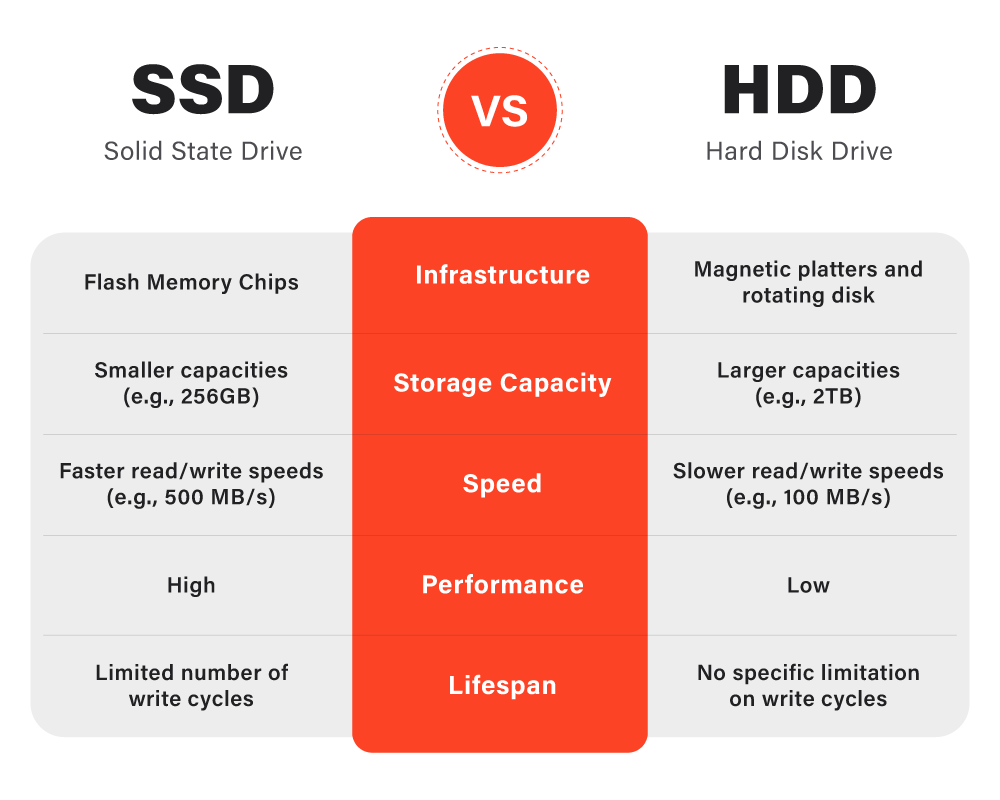
SSDs read and write data much faster than HDDs. Typical SSDs reach speeds of 500 MB/s or more. HDDs often stay below 150 MB/s due to their mechanical parts. Faster read speeds mean quicker access to files. Faster write speeds help when saving large files or installing software.
Impact On Boot Times
SSDs can start your computer in 10 to 20 seconds. HDDs usually take 30 to 60 seconds or longer. The difference is because SSDs have no moving parts. They access system files instantly, making boot times shorter. This means less waiting and a smoother start.
File Transfer Rates
SSDs move files between devices much faster than HDDs. Copying a large video or game takes minutes on an SSD. On an HDD, it could take twice as long or more. Quick file transfers save time and reduce frustration. This speed is helpful for work, gaming, or media editing.
Technology Behind Ssd And Hdd
Understanding the technology behind SSD and HDD helps explain their speed differences. Both store data but use different methods. This affects how fast they read and write information. The design and parts inside each drive play a big role.
Learning how each drive works shows why SSDs are faster than HDDs. The next sections break down their technology and key components.
How Hdds Work
HDD stands for Hard Disk Drive. It uses spinning disks called platters. A small arm moves over the disk to read or write data. The disks spin at high speeds, usually 5400 or 7200 RPM. The arm has to find the right spot on the disk to access data. This takes time and slows down the process.
Data is stored magnetically on the disk surface. The moving parts inside create noise and wear out over time. This mechanical nature limits the speed of HDDs.
How Ssds Work
SSD stands for Solid State Drive. It has no moving parts. Data is stored on flash memory chips. These chips can access data instantly. There is no arm or disk spinning. This means SSDs can read and write data much faster.
The lack of moving parts makes SSDs more durable. They also use less power and produce less heat. This technology allows quick access to files and programs.
Key Components Influencing Speed
For HDDs, the speed depends on disk rotation and arm movement. Faster spinning disks improve speed but still lag behind SSDs. The time to find data, called seek time, also affects performance.
For SSDs, speed depends on the type of flash memory and controller chip. Newer SSDs use NVMe technology, which offers higher data transfer rates. The controller manages data flow and error correction, impacting speed and reliability.
Overall, SSDs use electronic components, while HDDs rely on mechanical parts. This difference makes SSDs much faster in everyday use.
Real-world Performance Comparison
Comparing SSDs and HDDs in real life shows clear differences in speed. These differences affect daily tasks like gaming, opening programs, and working with many apps. SSDs use flash memory, which reads and writes data much faster than the spinning disks inside HDDs. This speed helps tasks run smoother and saves time.
Gaming Load Times
Games load faster on SSDs. Levels and textures appear quickly. Waiting screens are shorter. HDDs take longer to read game data. This delay can interrupt the gaming experience. SSDs reduce waiting and keep players in the action.
Application Launch Speeds
Opening software is much quicker with SSDs. Programs start almost instantly. HDDs need more time to find and load files. This difference helps users work faster. It feels smoother and less frustrating to use SSDs for apps.
Multitasking Efficiency
SSDs handle many tasks at once better than HDDs. Switching between apps is smooth and fast. HDDs slow down with many open programs. SSDs keep the system responsive during heavy use. This boost helps users stay productive.
Credit: www.esseg.eu
Factors Affecting Ssd Speed
Several factors influence how fast an SSD works. Knowing these helps you understand the speed differences between SSDs and HDDs. Speed affects how quickly your computer starts, loads files, and runs apps. Each factor plays a key role in overall performance.
Type Of Ssd (sata Vs Nvme)
SATA SSDs are common and cheaper but slower. They connect through older interfaces designed for hard drives. NVMe SSDs use a newer technology with faster data paths. NVMe drives can read and write much faster than SATA SSDs. This makes NVMe better for heavy tasks and fast data access.
Interface And Protocols
The interface is how the SSD connects to the computer. SATA uses a slower connection than PCIe, which NVMe SSDs use. Protocols control how data moves between the drive and system. NVMe protocol is built for speed, reducing delays and boosting performance. A good interface and protocol combination improves SSD speed greatly.
Storage Capacity And Health
Larger SSDs often perform better because they have more memory chips working together. As SSDs fill up, their speed can drop due to less free space. Over time, SSD health can decline from heavy use. Worn-out cells slow down data writing and reading. Regular maintenance and enough free space help keep SSD speeds high.
Benefits Beyond Speed
SSDs are well known for being faster than HDDs. Yet, their benefits go beyond speed. They offer several advantages that improve your computer’s overall experience. These benefits make SSDs a smart choice for many users.
Durability And Reliability
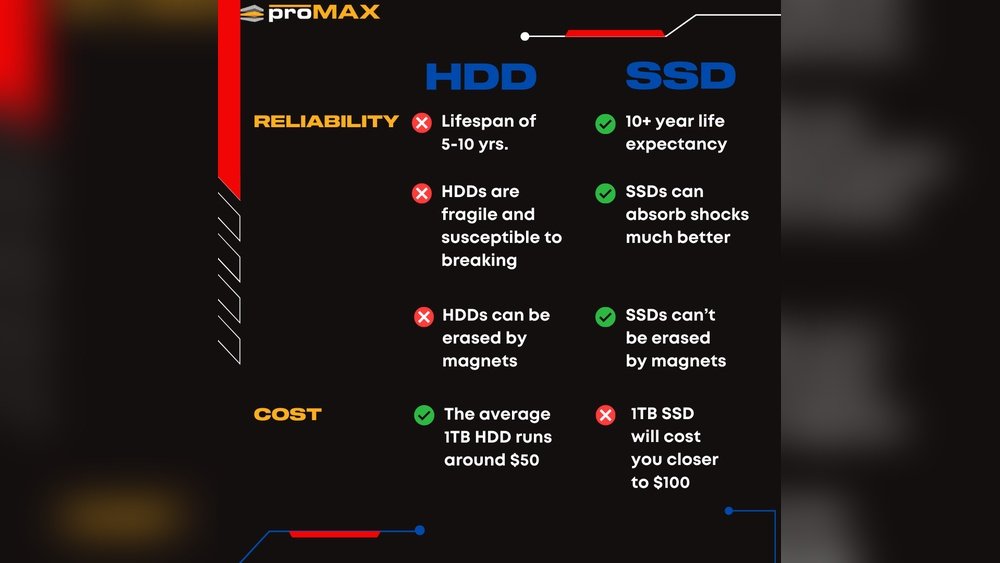
SSDs have no moving parts. This makes them less likely to break from drops or bumps. HDDs have spinning disks that can get damaged easily. SSDs also handle shock and vibration better. This means your data stays safer on an SSD. They last longer and fail less often than HDDs.
Power Consumption
SSDs use less power than HDDs. They require less energy because they have no spinning parts. This helps laptops run longer on battery. Lower power use also means less heat inside your device. Cooler systems work better and last longer.
Noise Levels
SSDs operate silently. No spinning disks or moving heads create noise. HDDs can produce noticeable sounds during use. This noise can be distracting in quiet places. SSDs keep your environment peaceful and quiet. They are perfect for offices and bedrooms.
Credit: www.ameelectrical.co.uk
Choosing Between Ssd And Hdd
Choosing between an SSD and an HDD depends on what you need from your computer. Both storage types have strengths and weaknesses. Understanding these helps in picking the right drive for your needs.
Speed, durability, and price matter. Each drive suits different tasks and budgets. Knowing these differences can save time and money.
Use Cases For Ssd
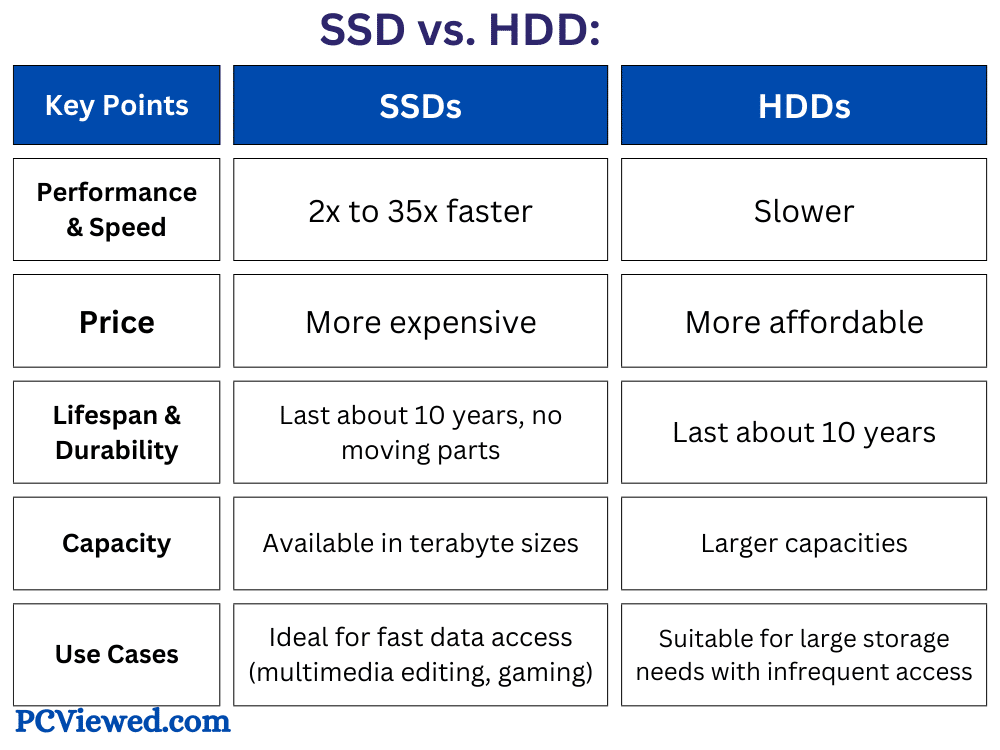
SSDs are much faster than HDDs. They start computers quickly and load programs in seconds. This speed benefits gamers, video editors, and anyone needing fast access to files. SSDs also handle multitasking well, keeping systems smooth. They have no moving parts, so they are quieter and less likely to break from bumps. Great for laptops and mobile devices.
Use Cases For Hdd
HDDs offer more space for less money. They work well for storing large files like photos, videos, and backups. Slower speed makes them less ideal for running software or games. They have moving parts, which makes them louder and more fragile. Best for desktop computers where storage size is a priority over speed.
Cost Considerations
SSDs cost more per gigabyte than HDDs. Prices have dropped but still higher for large capacities. HDDs are cheaper and provide more storage for less money. Budget constraints often lead to choosing HDDs for storage needs. Some use both: SSD for speed and HDD for extra space. This mix balances cost and performance.
Upgrading Tips For Maximum Speed
Upgrading from an HDD to an SSD can make your computer much faster. To get the best speed, follow some simple tips. These tips help your new SSD work at its full potential. Proper checks, careful installation, and regular maintenance keep your drive running smoothly.
Compatibility Checks
Check if your computer supports SSDs. Look for SATA or NVMe connections. Not all older computers work with modern SSDs. Find out the right type before buying. Verify the SSD size fits in your laptop or desktop. Make sure your system BIOS supports SSD booting.
Installation Best Practices
Turn off your computer before installing the SSD. Handle the drive carefully to avoid damage. Use the correct screws and cables for secure fitting. Connect the SSD to the fastest port available. After installation, update your system settings for the SSD.
Maintenance For Optimal Performance
Keep your SSD firmware updated for better speed and reliability. Avoid filling the drive to full capacity. Leave some free space to help the SSD work well. Use built-in tools to check the health of the SSD. Regularly clean up unused files and programs.
Credit: www.esseg.eu
Frequently Asked Questions
How Much Faster Is An Ssd Compared To An Hdd?
SSDs are typically 4 to 10 times faster than HDDs in data transfer speeds. This speed boost improves boot times, file transfers, and overall system responsiveness.
Why Are Ssds Faster Than Traditional Hdds?
SSDs use flash memory with no moving parts, enabling quicker data access. HDDs rely on spinning disks and mechanical arms, which slow down read/write speeds.
Does Ssd Speed Improve Gaming Performance?
Yes, SSDs reduce game load times and improve texture streaming. This leads to smoother gameplay and faster level loading compared to HDDs.
Can Ssd Speed Affect Software Installation Time?
Absolutely, SSDs drastically cut down installation times. Software installs and updates complete much quicker on SSDs due to faster data writing speeds.
Conclusion
SSD drives load data much faster than HDDs. This speed helps your computer start and run quickly. SSDs have no moving parts, so they work silently and last longer. HDDs still hold more storage for less money, but they are slower.
Choosing between SSD and HDD depends on your needs and budget. For faster performance, SSD is the clear choice. It makes everyday tasks smoother and saves time. Speed matters, especially for work and gaming. SSDs deliver that speed simply and reliably.