How Much Ram Do I Need for Pc Build: Ultimate Guide 2026
When building your PC, one question probably pops up right away: how much RAM do you really need? Choosing the right amount can feel confusing, but it’s a crucial step that affects how fast and smoothly your computer runs.
Too little RAM can slow everything down, while too much might mean you’re spending money on something you don’t fully use. You’ll discover exactly how to find the perfect balance for your needs—whether you’re gaming, working, or just browsing. Keep reading, and you’ll get clear, simple advice that helps your PC run at its best without wasting a dime.
Choosing Ram For Your Needs
Choosing the right amount of RAM is key for building a PC that fits your needs. RAM helps your computer run programs smoothly and quickly. Different tasks need different amounts of RAM. Picking the right size saves money and avoids slowdowns. This section explains how much RAM suits various uses.
Basic Tasks And Minimum Ram
For simple activities like browsing, email, and office work, 4 to 8 GB of RAM is enough. This amount handles everyday apps and light multitasking without lag. It suits users who do not run heavy software or many programs at once.
Gaming Requirements
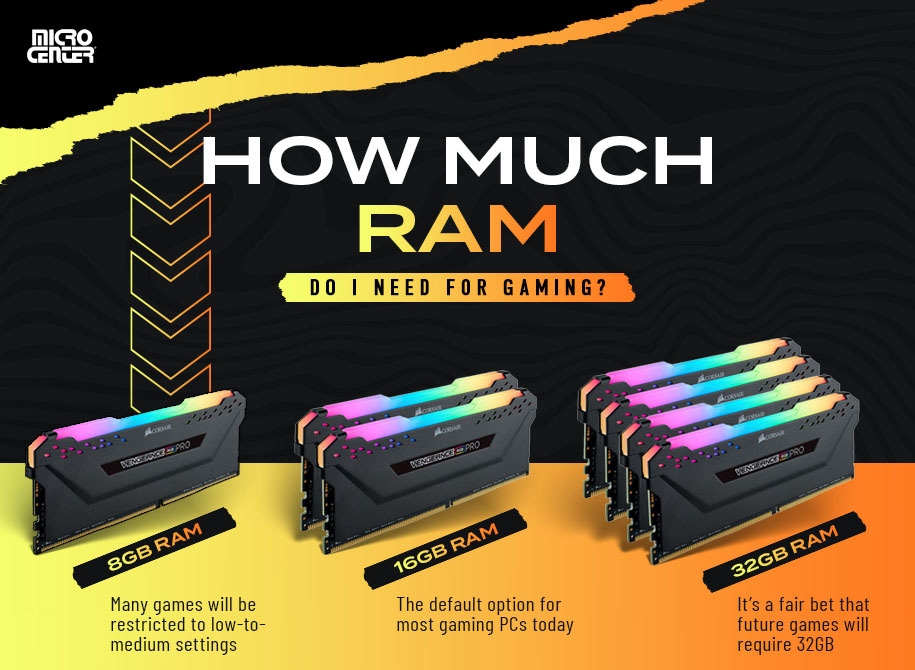
Most games need at least 8 GB of RAM to run well. For better performance and newer titles, 16 GB is ideal. This amount supports smooth gameplay and faster loading times. It also helps when streaming or running background apps during gaming.
Content Creation Demands
Photo editing, video editing, and graphic design need more memory. 16 to 32 GB of RAM is best for these tasks. More RAM allows working with large files and multiple programs without slowing down. It improves editing speed and overall workflow.
Professional Workloads
Heavy workloads like 3D rendering, software development, and data analysis require 32 GB or more. High RAM helps run complex software and large projects smoothly. It reduces waiting time and boosts productivity for professionals.
Credit: www.aydin.nl
Ram Types And Speeds
RAM plays a key role in a PC’s speed and multitasking ability. Different types and speeds of RAM affect how fast your computer runs. Understanding these differences helps you pick the best RAM for your build. Below, learn about RAM types and speeds to make a smart choice.
Ddr4 Vs Ddr5
DDR4 and DDR5 are the most common RAM types today. DDR4 is older but still very popular and affordable. DDR5 is newer and faster but costs more. DDR5 offers better power efficiency and higher data rates. Most PCs now use DDR4, but DDR5 is growing in use. Both types are not compatible with each other, so choose based on your motherboard.
Impact Of Ram Speed
RAM speed is measured in MHz and shows how fast data moves. Higher speed means faster data transfer and better performance. Faster RAM helps with gaming, video editing, and heavy software. For basic tasks, speed matters less. Choose RAM speed that fits your CPU and motherboard limits for best results.
Latency And Timings
Latency is the delay before RAM starts working after a command. Lower latency means quicker response. Timings show latency details as numbers like 16-18-18-36. Smaller numbers mean faster RAM response. Balancing speed and latency gives better overall performance. Look for RAM with good speed and low latency for smoother operation.
Capacity Vs Performance
Choosing the right amount of RAM for a PC build means balancing capacity with performance. RAM capacity affects how many tasks your computer can handle at once. Performance depends on how fast your system accesses and uses that memory. More RAM does not always equal better speed. Understanding this balance helps you build a PC that runs smoothly for your needs.
How Much Ram Is Enough?
For basic tasks like web browsing and office work, 8GB of RAM usually works well. It lets you open several programs without slowdowns. For gaming or photo editing, 16GB is a safer choice. It provides extra space for bigger files and more apps. Heavy tasks like video editing or 3D design might need 32GB or more. This prevents your system from slowing down under pressure.
Benefits Of More Ram
More RAM allows your computer to handle many programs at once. It reduces delays when switching between applications. It also helps with large files and complex software. Systems with more RAM can keep working without freezing or crashing. This can make your PC feel faster and more responsive.
When More Ram Won’t Help
Adding RAM does not fix slow computers caused by other parts. A slow processor or hard drive can limit performance. Running simple tasks does not need extra RAM. Too much RAM can be wasted if your programs don’t use it. Check your current RAM use before buying more.
Credit: www.avadirect.com
Dual Channel And Beyond
Choosing the right RAM setup goes beyond just the amount of memory. The way RAM is arranged in channels affects your PC’s speed and performance. Dual channel and other multi-channel configurations help improve data flow between the RAM and the CPU. This section explains the differences between single, dual, and quad channel setups and what happens when you mix RAM modules.
Single Vs Dual Channel
Single channel means the RAM works using one data channel. It limits the speed at which data moves to the processor. Dual channel uses two channels at the same time. This doubles the data path and increases memory speed. Dual channel can improve tasks like gaming, video editing, and multitasking. Most modern motherboards support dual channel for better performance.
Quad Channel And Higher
Quad channel uses four channels to transfer data simultaneously. It offers even higher bandwidth than dual channel. This setup is common in high-end desktops and workstations. Some motherboards and CPUs support six or eight channels for extreme performance. Quad and higher channels benefit heavy workloads like 3D rendering and professional video work. For everyday use, dual channel is usually enough.
Mixing Ram Modules
Using different RAM sticks can cause problems. Different sizes, speeds, or brands may not work well together. The system often runs all RAM at the speed of the slowest stick. Mixing can disable multi-channel modes, reducing performance. To keep dual or quad channel active, use matching modules. It ensures stable operation and full speed.
Future-proofing Your Build
Building a PC is more than just choosing parts for today. It means thinking about the future too. Future-proofing your build means picking the right amount of RAM now. This helps your PC stay fast and useful for years. This section explains how to plan RAM for your PC build. It covers trends, upgrades, and cost choices.
Trends In Ram Usage
Software and games use more RAM every year. New programs need more memory to run well. Operating systems also require more RAM to work smoothly. Streaming and multitasking demand extra memory too. Buying enough RAM today prevents slowdowns later. The trend is clear: more RAM keeps your PC ready.
Planning For Upgrades
Think about adding more RAM later. Choose a motherboard with free RAM slots. This allows easy upgrades without big changes. Start with enough RAM for now, but leave room to grow. Upgrading RAM is cheaper than buying a new PC. Planning ahead saves money and effort in the future.
Balancing Cost And Longevity
More RAM costs more money upfront. But it extends your PC’s lifespan. Less RAM saves money now but may cause slowdowns soon. Find a balance that fits your budget and needs. Invest a bit more in RAM to avoid early upgrades. This choice protects your PC’s performance long-term.

Credit: www.pcmag.com
Tips For Buying Ram
Choosing the right RAM is key to a smooth PC build. It affects speed and multitasking. Follow these tips to pick the best RAM for your needs. This helps avoid issues and saves money.
Choosing Reliable Brands
Pick RAM from well-known brands with good reviews. Trusted brands offer better quality and support. This reduces the chance of defects or failures. Popular brands often provide warranties for peace of mind.
Checking Compatibility
Check your motherboard’s manual for RAM compatibility. Match the RAM type (DDR3, DDR4, DDR5) exactly. Look at the supported speed and maximum capacity. Using compatible RAM prevents system errors and crashes.
Budget-friendly Options
Set a clear budget before buying RAM. Look for deals that meet your speed and size needs. Avoid very cheap RAM as it may lack quality. Balance cost and performance for best value.
Frequently Asked Questions
How Much Ram Is Enough For Gaming Pc?
For gaming, 16GB of RAM is ideal. It supports most modern games smoothly and allows multitasking without lag.
Does More Ram Improve Pc Performance?
More RAM helps multitasking and running memory-heavy apps. However, after a point, extra RAM won’t boost speed significantly.
How Much Ram Do I Need For Video Editing?
For video editing, 32GB RAM is recommended. It handles large files and complex software efficiently, reducing render times.
Can I Build A Pc With 8gb Ram Today?
Yes, 8GB RAM suits basic tasks and light gaming. It’s affordable but may limit performance in demanding applications.
Conclusion
Choosing the right amount of RAM depends on what you want to do. Basic tasks need less memory, while gaming and editing require more. Think about your budget and future needs too. Remember, having enough RAM helps your PC run smoothly.
Too little can slow things down. Take your time to pick the best option for your build. This way, your computer works well today and tomorrow.