Can Any Motherboard Fit Any Case: Ultimate Compatibility Guide
Have you ever wondered if any motherboard can fit into any case? If you’re building or upgrading your PC, this question might be on your mind.
Choosing the right combination is crucial because a mismatch can lead to frustration, wasted money, or even hardware damage. But don’t worry—understanding how motherboards and cases work together is simpler than it seems. Keep reading, and you’ll learn exactly what you need to know to make the perfect match for your setup.
Your next build will be smooth, efficient, and hassle-free.

Credit: www.reddit.com
Motherboard Sizes
Motherboard sizes play a key role in choosing the right computer case. Not all motherboards fit every case. Understanding the common sizes helps you pick the perfect match. Each size has a standard shape and hole layout for screws. This keeps the motherboard secure and aligned inside the case.
Atx
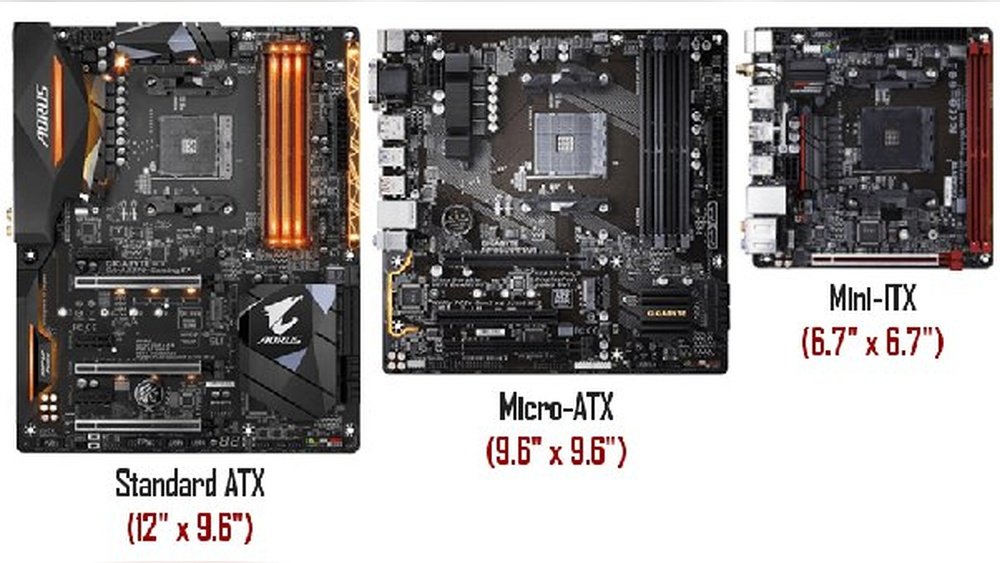
ATX is the most common motherboard size. It measures about 12 by 9.6 inches. It offers many slots for graphics cards and memory. Most mid-tower and full-tower cases support ATX boards. This size is great for powerful computers with many components.
Micro-atx
Micro-ATX boards are smaller than ATX. They usually measure 9.6 by 9.6 inches. These motherboards have fewer slots but still support good performance. Micro-ATX fits in smaller cases that support ATX as well. It suits users wanting a balance between size and power.
Mini-itx
Mini-ITX is the smallest popular size. It measures 6.7 by 6.7 inches. It has very limited slots but saves a lot of space. Mini-ITX boards fit in compact cases made for small builds. Ideal for simple PCs or portable systems with fewer components.
Extended Atx
Extended ATX, or E-ATX, is larger than standard ATX. It can be up to 12 by 13 inches. This size offers more slots and space for advanced setups. Only larger full-tower cases can fit E-ATX motherboards. E-ATX suits high-end workstations and gaming rigs.

Credit: www.reddit.com
Case Types
Cases come in different types and sizes. Each type fits certain motherboard sizes. Choosing the right case type matters for your build. It affects space, cooling, and future upgrades.
Understanding case types helps match your motherboard well. This section explains the four common case types.
Full Tower
Full tower cases are the largest. They hold big motherboards like E-ATX and XL-ATX. Plenty of space for many drives and cooling parts. Perfect for advanced builds and heavy hardware.
Mid Tower
Mid tower cases are the most popular size. They fit ATX and smaller motherboards. Enough room for good cooling and several drives. Great balance of size and features for most users.
Mini Tower
Mini tower cases are smaller than mid towers. Designed for micro-ATX and mini-ITX motherboards. Limited space for extra parts but easier to carry. Suitable for basic or compact desktop builds.
Small Form Factor
Small form factor cases are very compact. Built for mini-ITX motherboards only. Minimal space for drives and cooling. Ideal for tiny PCs or space-saving setups.
Matching Motherboards And Cases
Choosing the right motherboard and case is essential for building a PC that fits well and works properly. Not all motherboards fit in every case. Matching these parts ensures your computer parts align and connect without issues. Understanding how motherboards and cases match helps avoid buying incompatible parts.
Several key points decide if a motherboard fits inside a case. These include the size, screw locations, and the back panel layout. Knowing these details saves time and money during your build.
Form Factor Compatibility
Motherboards come in different sizes called form factors. Common types include ATX, Micro-ATX, and Mini-ITX. Cases are made to fit one or more of these sizes. A Micro-ATX motherboard fits in a Micro-ATX or ATX case, but not in a Mini-ITX case. Checking form factor compatibility is the first step to ensure a proper fit.
Mounting Points
Mounting points are small holes inside the case where screws hold the motherboard. These points must match the holes on the motherboard. If mounting points do not align, you cannot secure the motherboard properly. Most cases support standard mounting points for popular form factors.
Rear I/o Alignment
The rear I/O shield on the motherboard must line up with the case’s back panel. This panel allows ports like USB, audio, and Ethernet to be accessible. If the alignment is off, ports may be blocked or hard to reach. Always check the rear I/O fit before buying.
Other Compatibility Factors
Choosing the right motherboard and case is more than just size. Other factors impact how well they fit and work together. These factors affect performance, cooling, and ease of building your PC. Understanding them helps you pick parts that match and work smoothly.
Power Supply Considerations
The power supply must fit inside the case. Some cases only support specific sizes like ATX or SFX. The power supply must have enough wattage for your motherboard and components. Make sure cables can reach all parts without stretching or bending too much.
Cooling Solutions
Good airflow is key to keeping your PC cool. Cases come with space for different fan sizes and radiator types. Your motherboard’s layout can affect where fans and coolers fit. Check that your case supports the cooling system you want to use.
Expansion Slots
Expansion slots let you add cards like graphics or sound cards. Cases vary in the number of slots they offer. Your motherboard’s slot count should match the case slots. This ensures you can install all your cards without trouble.
Cable Management
Cable management keeps your build neat and tidy. Cases with good cable routing options make building easier. Motherboards with well-placed connectors help reduce cable clutter. Proper cable management improves airflow and makes upgrades simpler.
Common Compatibility Issues
Choosing a motherboard and case is not always simple. Many common compatibility issues can cause problems. These issues affect how well parts fit and work together. Knowing these problems helps avoid frustration and wasted money.
Size Mismatches
Motherboards come in different sizes like ATX, Micro-ATX, and Mini-ITX. Cases also support certain sizes only. A large motherboard will not fit inside a small case. Check the motherboard size and case support before buying. This saves time and effort during assembly.
Port Accessibility
Ports on the motherboard must match the case’s openings. If ports do not line up, connecting devices becomes difficult. USB, audio, and video ports need clear access. Some cases have limited or fixed port layouts. Always compare the motherboard’s port layout with the case design.
Obstructed Components
Some parts on the motherboard can block case features. Large CPU coolers or tall RAM sticks may not fit under case panels. Power connectors or expansion slots may be hard to reach. Check the clearance space inside the case. This avoids problems with installing or upgrading parts later.
Tips For Choosing The Right Case
Choosing the right case for your motherboard is important. A good case fits well and keeps your parts safe. It also helps your computer stay cool and run smoothly. Here are some tips to pick the best case for your needs.
Check Manufacturer Specifications
Always check the size and type of your motherboard first. Cases support different motherboard sizes like ATX, Micro-ATX, or Mini-ITX. Make sure the case matches your motherboard size. Look at the case’s product details to confirm compatibility.
Plan For Future Upgrades
Think about adding new parts later. A bigger case gives more space for extra drives or graphics cards. It also allows better airflow and cooling options. Choose a case that can grow with your computer needs.
Consider Airflow And Cooling
Good airflow keeps your PC cool and stable. Cases with multiple fan mounts or mesh panels improve air movement. Check if the case supports liquid cooling if you want that option. Proper cooling helps your computer last longer.

Credit: www.reddit.com
Frequently Asked Questions
What Motherboard Sizes Fit Most Pc Cases?
ATX, Micro-ATX, and Mini-ITX are common sizes. Cases support specific sizes based on mounting points and dimensions. Always check case specifications for compatible motherboard sizes before buying.
Can A Larger Motherboard Fit A Smaller Case?
No, larger motherboards won’t fit smaller cases due to limited space and mounting holes. Choose a case that supports your motherboard’s size to ensure proper installation.
Do All Pc Cases Support Standard Atx Motherboards?
Most mid-tower and full-tower cases support ATX motherboards. However, compact cases may only support smaller sizes. Always verify case specifications to confirm ATX compatibility.
How To Check If Motherboard Fits Pc Case?
Check the motherboard form factor and case specifications. Match the form factor (ATX, Micro-ATX, Mini-ITX) with case compatibility. Also, ensure the case has correct standoff locations.
Conclusion
Not every motherboard fits every case. Cases and motherboards have specific sizes. Checking size compatibility is important before buying. Screw holes and ports must line up well. Choosing the right case ensures easy building and good airflow. A wrong fit can cause problems inside the computer.
Take time to compare sizes and types carefully. This helps avoid headaches and extra costs later. A good fit means a strong, well-functioning PC. Simple steps keep your build smooth and successful.