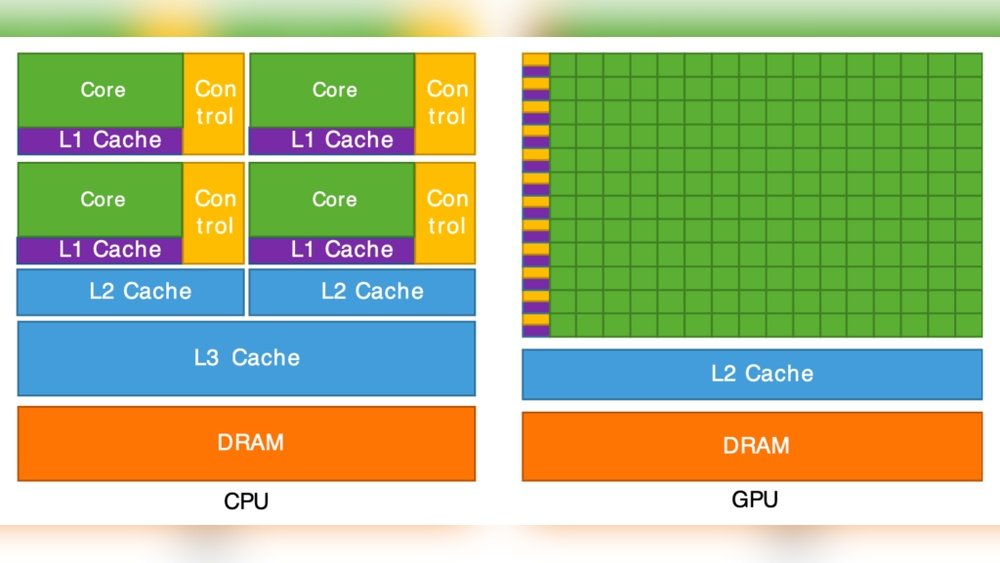
How Much Gpu Memory is Enough: Ultimate Guide for Gamers & Creators
Choosing the right amount of GPU memory can feel confusing. You might wonder, “How much GPU memory is enough for my needs?” Whether you’re gaming, designing, or editing videos, your GPU memory impacts your experience more than you realize.
Picking too little can slow you down, while too much might be a waste of money. This guide will help you understand exactly what you need, so you get the best performance without overspending. Keep reading to find out how to match your GPU memory to your goals perfectly.
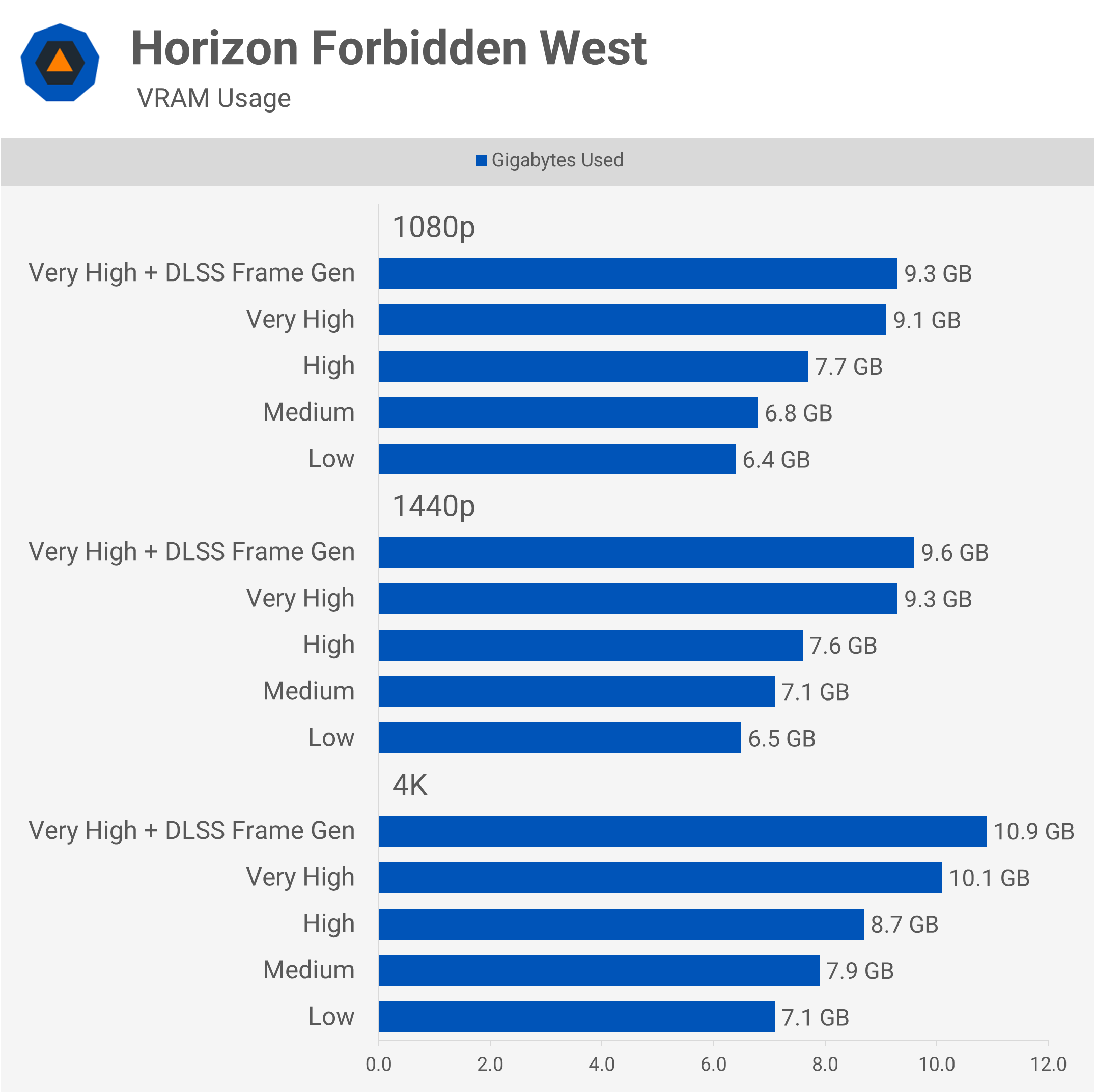
Credit: www.techspot.com
Gpu Memory Basics
Understanding GPU memory is key to choosing the right graphics card. It affects how well your computer handles images, videos, and games. Knowing the basics helps you pick a GPU that fits your needs without overspending.
What Gpu Memory Does
GPU memory stores data that the graphics card uses to create images. It holds textures, models, and frame buffers. This memory helps the GPU work fast and smooth. More memory means the card can handle bigger files and higher resolutions. Without enough memory, the GPU slows down or struggles with complex visuals.
Types Of Gpu Memory
There are different kinds of GPU memory. The most common is GDDR, which is fast and good for gaming and video tasks. Newer GPUs use GDDR6 or GDDR6X, which are even faster. Some high-end cards use HBM (High Bandwidth Memory). HBM offers better speed and efficiency but costs more. Each type affects performance and price in different ways.
Gpu Memory Needs For Gamers
Gamers need enough GPU memory to run games smoothly. GPU memory stores textures, game data, and graphics information. Without enough memory, games may lag or show lower quality images. Different games need different amounts of memory. Understanding these needs helps gamers pick the right graphics card.
Memory Requirements By Game Genre
Action games often need less GPU memory than open-world games. Open-world games load large maps and many objects. This requires more memory to avoid slowdowns. Strategy games may need moderate memory for many units on screen. Racing games need medium memory for detailed tracks and cars. Knowing your favorite genre helps choose the right GPU memory size.
Resolution And Frame Rate Impact
Higher screen resolution means more GPU memory is needed. Playing at 4K requires more memory than 1080p. Higher frame rates also use more memory and processing power. Gamers playing at 144Hz or 240Hz benefit from more GPU memory. Lower resolutions and frame rates need less memory, but quality may drop.
Future-proofing Your Setup
Games get more demanding each year. Buying a GPU with extra memory helps keep up with new releases. More memory lets you play future games without upgrades. It also improves performance in mods and updates. Planning ahead saves money and hassle later.
Gpu Memory For Creators
Creators need enough GPU memory to handle complex tasks smoothly. GPU memory affects how well software runs, especially with large files and detailed projects. Choosing the right amount of memory helps avoid slowdowns and crashes. This section covers GPU memory needs for different creative fields.
Video Editing And Rendering
Video editing uses a lot of GPU memory. High-resolution videos need more memory to load and edit quickly. Rendering effects and transitions also require extra memory. For 1080p editing, 4GB can work, but 8GB or more is better for 4K videos. More memory helps in faster previews and smoother playback.
3d Modeling And Animation
3D tasks demand large GPU memory. Models with many details need more space in memory. Animation software uses GPU memory to show smooth movements. Complex scenes and textures increase memory use. Creators working with 3D should aim for at least 8GB, with 12GB or 16GB preferred for heavy projects.
Graphic Design And Photo Editing
Graphic design and photo editing use less GPU memory than video or 3D work. Still, enough memory helps with large files and multiple layers. Programs run faster with 4GB or 6GB of GPU memory. For very large images or batch processing, 8GB can improve performance. Smooth workflow depends on having enough memory for all tools.

Credit: www.youtube.com
Comparing Memory Sizes
Choosing the right GPU memory size is key for smooth performance. Different tasks need different amounts of memory. Comparing memory sizes helps you pick the best fit for your needs.
Understanding the difference between 4GB, 6GB, 8GB, and beyond can guide your decision. Each size suits certain uses better than others.
4gb Vs 6gb Vs 8gb And Beyond
4GB of GPU memory works well for basic tasks. This includes light gaming and everyday use. It handles older or less demanding games easily.
6GB offers more room for modern games and creative work. It supports higher settings and better textures. Users often find it a good middle ground.
8GB and beyond suits heavy gaming and professional work. This memory size supports 4K gaming and large video editing files. It reduces slowdowns and lag in demanding tasks.
When More Memory Matters
More memory matters for high-resolution gaming and large projects. Games with big open worlds need extra space. Video editors and 3D modelers benefit from extra memory too.
Running many programs at once also uses more GPU memory. Creative professionals often require 8GB or more. This avoids crashes and keeps work smooth.
Balancing Memory With Other Gpu Specs
Memory size is just one part of GPU power. Core speed, number of cores, and memory type also matter. A balanced GPU performs better than one with only large memory.
Choose a GPU that fits your tasks overall. High memory with slow cores will bottleneck performance. Match memory size with other specs for the best results.
Optimizing Gpu Memory Usage
Optimizing GPU memory usage helps your computer run smoothly. It stops slowdowns and crashes in games or apps. Managing memory well means better performance without extra cost. Simple steps can lower memory use and keep your GPU healthy.
Settings To Reduce Memory Load
Lower graphics quality in games or apps to save memory. Turn off shadows or reduce texture details. Close background programs using GPU power. Adjust resolution to a smaller size. These settings cut down memory use fast.
Tools For Monitoring Memory Use
Use software like MSI Afterburner or GPU-Z to watch memory. These tools show real-time memory use and temperature. You can spot issues before they cause problems. Regular checks help keep your system stable.
Upgrading Your Gpu Memory
Some GPUs allow memory upgrades for better performance. Check if your card supports extra memory modules. More memory lets you run bigger apps and games smoothly. Choose upgrades that match your GPU model and power supply.

Credit: www.corsair.com
Frequently Asked Questions
How Much Gpu Memory Do I Need For Gaming?
For most modern games, 6-8GB of GPU memory is ideal. It ensures smooth gameplay and high-quality textures without lag. Older games may require less, around 4GB. Always check game requirements to match GPU memory for the best experience.
Does More Gpu Memory Improve Video Editing?
Yes, more GPU memory helps with high-resolution video editing. It allows faster rendering and smoother previews. For 4K editing, at least 8GB is recommended. Larger memory supports complex effects and multitasking efficiently, enhancing overall workflow performance.
How Does Gpu Memory Affect 3d Rendering?
GPU memory impacts 3D rendering by storing textures and models. Larger memory handles complex scenes and higher resolutions better. For professional 3D work, 8GB or more is beneficial. Insufficient memory may cause slow rendering or crashes during heavy tasks.
Can I Game With 4gb Gpu Memory?
Yes, 4GB GPU memory can handle many games at medium settings. It suits older or less demanding titles well. However, new AAA games might require more memory for high settings and smooth performance. Adjust settings based on your GPU capacity.
Conclusion
Choosing the right GPU memory depends on your needs and budget. More memory helps with big games and heavy tasks. Less memory can still work for simple uses. Think about what programs you use the most. Avoid buying too much memory you won’t use.
Balance performance with cost for the best value. Your GPU memory should match your daily tasks. This makes sure your computer runs smooth and fast. Keep these tips in mind when picking your GPU memory. It helps you get the best experience without overspending.