What Pc Parts Affect Multitasking: Boost Performance Fast
Have you ever noticed your computer slowing down when you have many programs open at once? If you want your PC to handle multitasking smoothly, it’s important to understand which parts inside your computer make the biggest difference.
Knowing this can help you choose the right upgrades or new build to keep your work and play running without frustrating delays. You’ll discover exactly which PC parts affect multitasking and how they impact your computer’s speed and efficiency. Ready to unlock your PC’s full potential?
Let’s dive in.
Key Components For Multitasking
Multitasking depends on several PC parts working well together. These parts help your computer handle many tasks at once. Knowing which parts affect multitasking helps you make better choices.
Some components manage how fast your PC runs programs. Others handle storing data or showing visuals. Each part plays a role in smooth multitasking.
Cpu (central Processing Unit)
The CPU is the brain of your computer. It processes instructions and runs programs. A stronger CPU can handle more tasks at the same time. More cores and higher speeds improve multitasking performance.
Ram (random Access Memory)
RAM stores data for active programs. More RAM means your PC can keep more programs open without slowing down. Faster RAM also helps your computer switch between tasks quickly.
Storage Drive
The storage drive holds your files and programs. An SSD (Solid State Drive) works faster than an HDD. Faster storage helps load apps and files faster, making multitasking smoother.
Gpu (graphics Processing Unit)
The GPU handles images and videos. It helps when multitasking with graphic-heavy apps. A good GPU frees the CPU to focus on other tasks.
Credit: www.alamy.com
Role Of The Cpu
The CPU acts as the brain of your computer. It processes all instructions and tasks. When multitasking, it handles many jobs at once. The CPU’s power directly affects how smoothly your computer runs several programs.
A strong CPU can manage multiple tasks without slowing down. It divides its work among its parts to keep everything moving. Understanding the CPU’s features helps choose the right one for multitasking.
Core Count And Threads
Cores are separate processing units inside the CPU. More cores mean the CPU can handle more tasks at the same time. Threads are virtual parts that help each core work on more tasks. A CPU with many cores and threads handles multitasking better.
For example, a CPU with 8 cores and 16 threads can run many apps smoothly. Lower core and thread counts limit the CPU’s ability to multitask. This makes the computer slower when many programs run together.
Clock Speed Impact
Clock speed shows how fast the CPU processes data. Measured in gigahertz (GHz), higher speeds mean quicker task completion. Fast clock speeds help the CPU switch between tasks rapidly.
This speed improves performance in tasks that need quick responses. However, high clock speed alone does not guarantee great multitasking. It works best combined with enough cores and threads.
Cpu Cache Importance
Cache is fast memory inside the CPU. It stores important data and instructions close to the processor. Larger cache sizes reduce the time the CPU spends fetching data.
More cache helps the CPU handle multitasking more efficiently. It keeps frequently used information ready. This lowers delays and improves overall speed during multitasking.
Ram And Its Effect
RAM plays a big role in how well your PC handles multitasking. It stores the data your computer uses right now. More RAM means your PC can keep more apps open at once without slowing down. The speed and type of RAM also change how fast your PC reacts.
Understanding RAM helps you pick the right parts for smooth multitasking. Below are key points about RAM size, speed, and how it works inside your PC.
Memory Size And Speed
Memory size is how much RAM your PC has. More RAM means better multitasking. Your computer can hold more apps and files in active memory. Speed shows how fast RAM can move data. Faster RAM makes programs open quicker and run smoother. Both size and speed matter for a better multitasking experience.
Dual Vs. Single Channel
RAM can work in single or dual channel mode. Dual channel uses two memory sticks together. This doubles the data flow between RAM and CPU. It helps your PC run faster and smoother. Single channel uses one stick, which limits speed. Dual channel is better for multitasking and overall performance.
Ram Latency Explained
Latency means the delay before RAM starts to send data. Lower latency means less waiting time. This helps your PC respond faster. Even with fast RAM speed, high latency can slow things down. Choosing RAM with low latency improves multitasking and system responsiveness.

Credit: www.amazon.com
Storage Drives And Performance
Storage drives play a key role in how your PC handles multitasking. They affect how fast programs open and files load. A good storage drive keeps your system running smoothly when many tasks run at once.
Choosing the right storage drive can make a big difference in your PC’s multitasking ability. Some drives work better with multiple apps and heavy workloads.
Ssd Vs Hdd For Multitasking
Solid State Drives (SSDs) are faster than Hard Disk Drives (HDDs). SSDs have no moving parts, so they read and write data quickly. This speed helps open programs faster and switch between tasks smoothly.
HDDs are slower because they use spinning disks. They take more time to access files, which can slow multitasking. SSDs reduce waiting times and improve overall performance.
Nvme Drives Advantages
NVMe drives are a type of SSD with even faster speeds. They connect directly to the motherboard through a special slot. This connection allows quicker data transfer than regular SSDs.
NVMe drives help load large files and apps faster. They also reduce delays when running many programs. This makes them ideal for heavy multitasking and demanding tasks.
Storage Speed And Access Time
Storage speed means how fast data moves between the drive and PC. Access time is how quickly the drive finds the data. Both affect multitasking performance.
Faster speeds and lower access times mean less waiting. Your PC can switch tasks and open files more quickly. This leads to a smoother multitasking experience.
Graphics Card Influence
The graphics card plays a key role in multitasking. It helps the computer handle visual tasks smoothly. This is important when running many programs at once. A strong graphics card reduces lag and improves overall speed. It supports tasks like video editing, gaming, and design work. Knowing how your graphics card works can help you choose the right PC parts.
Gpu Role In Multitasking
The GPU processes images and videos. It takes work off the main processor, the CPU. This frees the CPU to handle other tasks. A powerful GPU can run many apps that need graphics at the same time. It also helps with rendering and displaying content quickly. This makes switching between programs faster and smoother. Without a good GPU, multitasking with heavy apps can slow down your PC.
Integrated Vs Dedicated Graphics
Integrated graphics are built into the CPU. They share memory with the system. This makes them less powerful for multitasking with many graphic-heavy apps. Dedicated graphics cards have their own memory. They provide better speed and performance for multitasking. Dedicated GPUs handle multiple displays and demanding software better. For simple tasks, integrated graphics may be enough. For heavy multitasking, a dedicated graphics card is best.
Credit: us.norton.com
Motherboard And Connectivity
The motherboard is the heart of your PC. It connects all parts and controls data flow. Good connectivity means better multitasking. It helps your computer handle many tasks smoothly. The motherboard’s design affects speed and upgrade options. This section explains how motherboard features impact multitasking performance.
Bus Speeds And Data Transfer
Bus speed measures how fast data moves inside your PC. Faster bus speeds let information travel quickly between parts. This reduces waiting times during multitasking. A slow bus can cause delays and slow your computer down. Modern motherboards support high-speed buses like PCIe and DDR memory buses. These improve data transfer rates. Better data transfer means your PC handles multiple tasks easily.
Expansion Slots And Upgrades
Expansion slots let you add new parts to your PC. More slots mean more upgrades, such as extra RAM or faster graphics cards. Upgrades improve your PC’s ability to multitask. A motherboard with many slots offers flexibility for future improvements. Using these slots, you can increase memory or add faster storage drives. This helps your computer work well with many applications open at once.
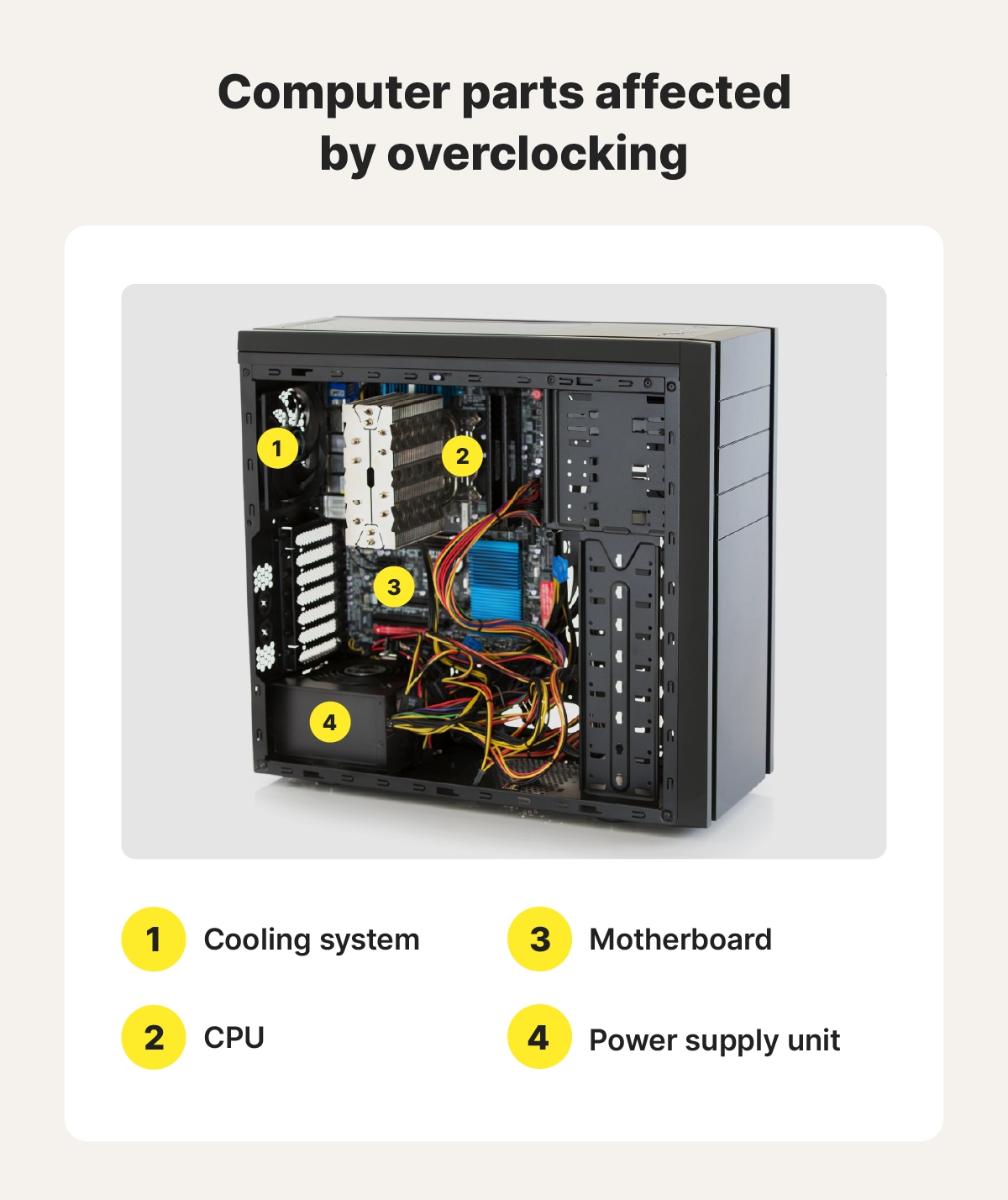
Cooling And Power Supply
Cooling and power supply are key parts of a PC that affect multitasking. They keep the system running smoothly. Without good cooling, parts can get too hot and slow down. Power supply gives stable energy to all components. Poor power delivery can cause crashes or freezes. Both work together to support heavy multitasking loads.
Impact Of Cooling On Performance
Heat reduces the speed of your PC’s processor and memory. Good cooling stops overheating. Fans, heat sinks, and liquid cooling help move heat away. Cooler parts run faster and more stable. This means your PC can handle many tasks at once without slowing. Overheating can cause the CPU to lower its speed. This lowers multitasking efficiency and causes delays.
Stable Power Delivery
A steady power supply ensures all parts get enough energy. If power fluctuates, components may fail or restart. A quality power supply unit (PSU) keeps voltage stable. It supports your CPU, GPU, and drives during heavy multitasking. Without stable power, the system may freeze or crash. Reliable power helps maintain smooth and continuous performance.
Optimizing For Better Multitasking
Optimizing your PC for better multitasking improves your work speed and efficiency. It means making smart choices about hardware and software. Small changes can make a big difference. This section explains easy steps to get the best performance.
Upgrading Components Wisely
Focus on the parts that handle many tasks at once. The CPU is crucial; choose one with multiple cores and threads. More cores help run several apps smoothly. RAM size matters too. More RAM lets your PC hold more programs open. A fast SSD improves loading times and data access. Pick parts that fit your budget and needs.
System Configuration Tips
Adjust your system settings for better multitasking. Close unused programs to free memory. Set your PC to prioritize active apps. Manage startup programs to speed boot time. Use virtual desktops to organize tasks. These simple tweaks help your computer run tasks without lag.
Software And Driver Updates
Keep your software and drivers current. Updates fix bugs and improve performance. New drivers can enhance hardware efficiency. Check for updates regularly to avoid slowdowns. Updated software often supports better multitasking features. Staying up-to-date keeps your PC running smoothly.
Frequently Asked Questions
Which Pc Part Improves Multitasking Performance Most?
The CPU is the key component for multitasking. A faster processor with multiple cores handles tasks simultaneously. It manages instructions quickly, reducing lag. More cores allow better parallel processing, boosting multitasking efficiency.
How Does Ram Affect Multitasking On A Pc?
RAM stores active data for running apps. More RAM lets you open more programs without slowdowns. It prevents swapping to disk, which causes delays. Sufficient RAM ensures smooth switching between tasks and improves overall multitasking speed.
Does The Storage Type Impact Multitasking Speed?
Yes, SSDs significantly improve multitasking responsiveness. They load files and apps faster than HDDs. This reduces wait times when switching tasks or opening programs. Faster storage helps maintain fluid multitasking without bottlenecks.
Can Gpu Influence Multitasking Capabilities?
While the GPU mainly handles graphics, it aids multitasking in graphics-heavy tasks. A dedicated GPU boosts performance in video editing and gaming while multitasking. It offloads work from the CPU, allowing smoother parallel operations.
Conclusion
Choosing the right PC parts makes multitasking easier and faster. A strong processor helps run many programs smoothly. More RAM lets your computer handle tasks at once without slowing down. A fast storage drive also improves how quickly apps open.
Don’t forget a good motherboard connects all parts well. Paying attention to these components helps your PC work better for multitasking. Simple upgrades can make a big difference. Keep these parts in mind to improve your computer’s multitasking ability.