

Choosing the right PC case size can feel confusing, especially with so many options out there. But picking the perfect case isn’t just about looks—it affects how your computer runs, cools, and even how easy it is to upgrade later.
You want a case that fits your needs without wasting space or money. You’ll discover exactly what to consider when deciding on a PC case size, so you can build a system that works perfectly for you. Keep reading to find the simple steps that will make your choice clear and stress-free.
Credit: www.buildcomputers.net
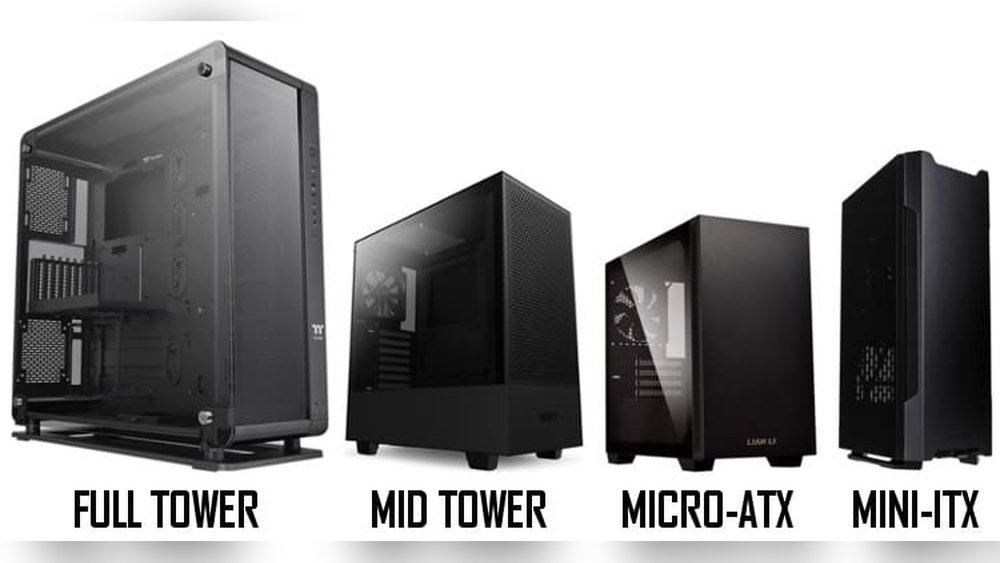
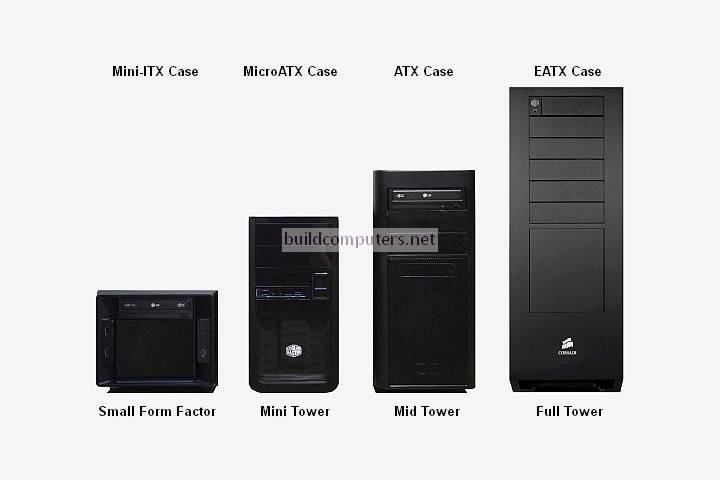
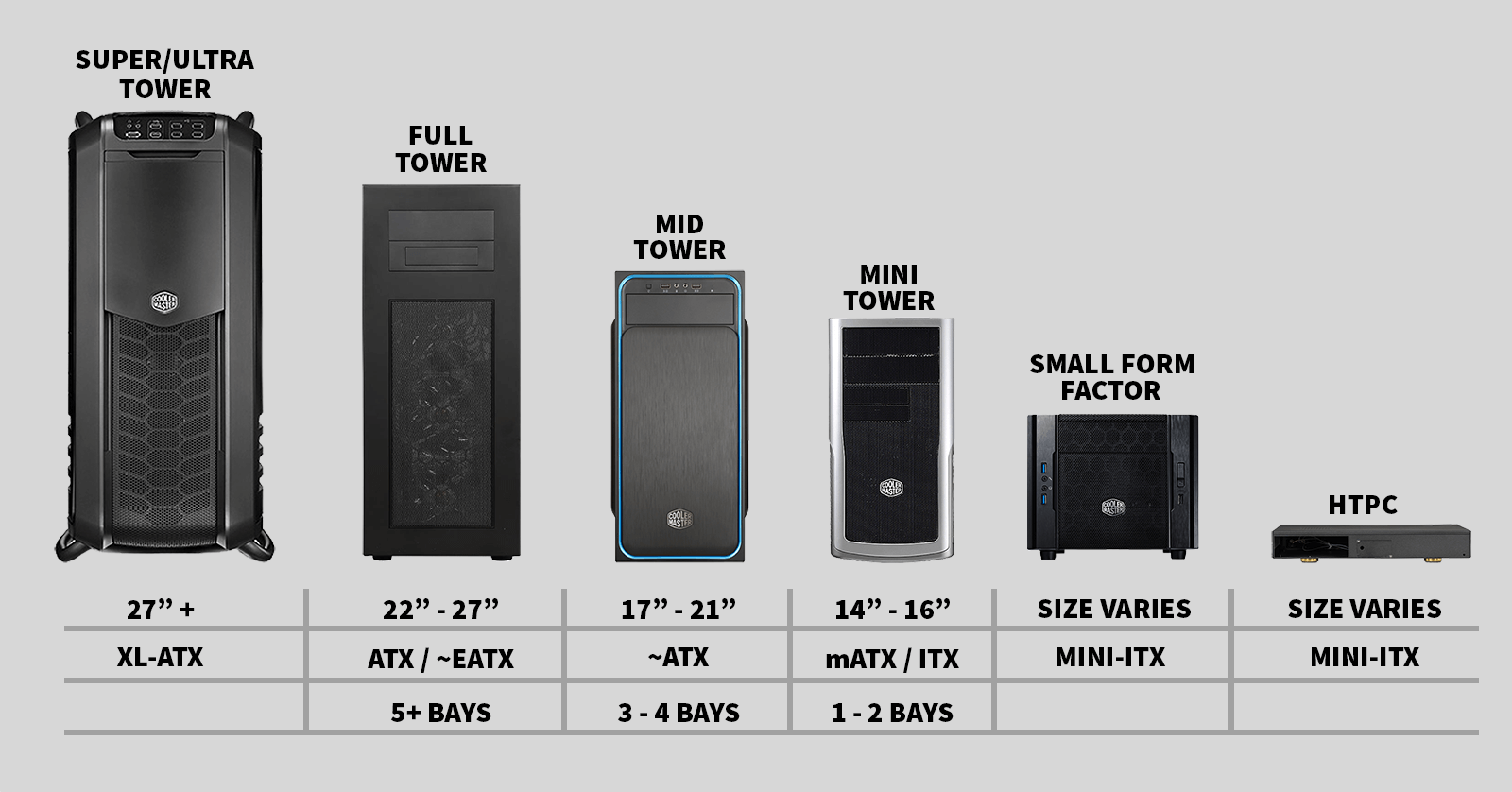
Common Pc Case Sizes
Choosing the right PC case size is important for your build. Cases come in several common sizes. Each size fits different needs and spaces. Understanding these sizes helps pick the best case for your setup.
Case size affects what parts fit inside. It also impacts airflow and cooling. Smaller cases are compact but may limit upgrades. Larger cases offer more space but take up more room.
Mini Itx Cases
Mini ITX cases are the smallest common cases. They fit small motherboards and limited parts. These cases are great for tight spaces or portable PCs. Cooling options may be limited due to size.
Micro Atx Cases
Micro ATX cases are slightly larger than Mini ITX. They support medium-sized motherboards and more components. These cases balance compact size with decent expandability. Ideal for budget builds with some upgrades.
Mid Tower Cases
Mid tower cases are the most popular size. They fit standard ATX motherboards and many parts. These cases offer good airflow and space for cooling. Suitable for most gamers and general users.
Full Tower Cases
Full tower cases are the largest common cases. They support large motherboards and many components. These cases allow extensive upgrades and advanced cooling. Best for high-end gaming or workstation builds.
Credit: rogbuild.com
Factors Influencing Case Size Choice
Choosing the right PC case size depends on many important factors. These factors affect how well your computer parts fit and work together. Picking the correct case size helps avoid problems like poor cooling or space issues.
Understanding these factors makes your build easier and more efficient. Consider each point carefully before buying a case.
Motherboard Compatibility
The motherboard size is key to case choice. Common sizes include ATX, Micro-ATX, and Mini-ITX. Your case must support your motherboard size. Larger motherboards need bigger cases. Small cases only fit compact motherboards.
Graphics Card Dimensions
Graphics cards vary in length and thickness. Some high-performance cards are very long. Check your card’s size before choosing a case. The case must have enough space for the graphics card. A tight fit can cause overheating or damage.
Cooling Requirements
Good airflow keeps your PC cool and safe. Bigger cases usually allow more fans or liquid cooling. Small cases may limit cooling options. Think about how many fans or coolers you want. Cooling affects performance and component life.
Storage Needs
Storage drives take space inside the case. Decide how many hard drives or SSDs you need. Some cases have many drive bays, others have few. More storage means a larger case is better. Plan your storage before buying a case.
Future Upgrades
Think about future parts you might add. Upgrading to a bigger graphics card or more drives needs extra space. A bigger case gives room to grow. Small cases may force you to replace the case later. Plan for upgrades to save time and money.
Space And Desk Considerations
Choosing the right PC case size means thinking about your space and desk. Your desk area limits the size of the case you can place. A big case might not fit well on a small desk. Also, space around the case matters for air flow and cable management.
Consider how much room you have for your PC case before buying. This helps avoid clutter and keeps your workspace neat. The case size should fit comfortably without crowding other items.
Available Space Measurement
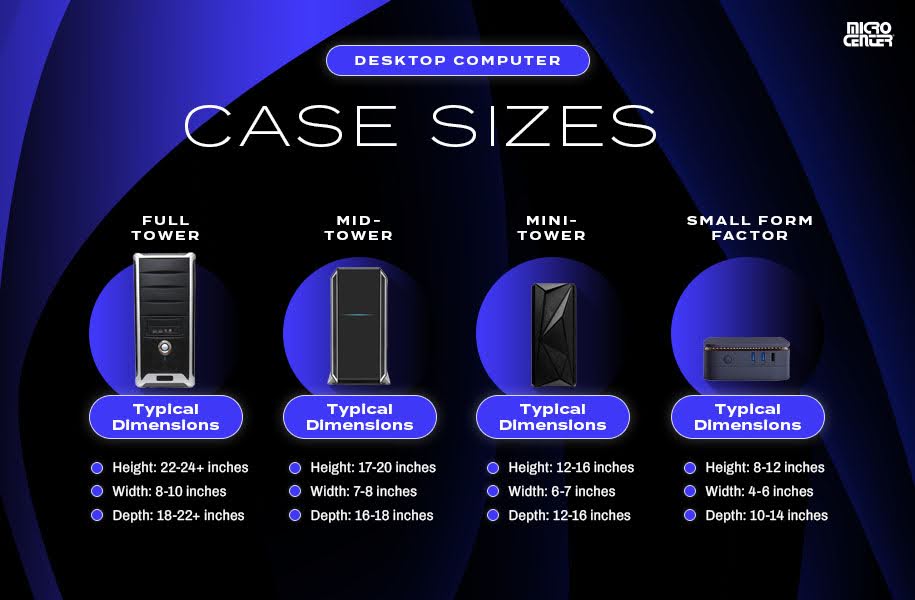
Measure your desk space carefully. Check width, depth, and height where the case will sit. Write down these numbers to compare with case dimensions. Leave extra space for cables and airflow. Small desks often need compact or mini cases. Larger desks can hold mid-tower or full-tower cases.
Ergonomics And Accessibility
Think about how easy it is to reach your PC ports and buttons. A case too large might block your view or access. Make sure you can plug in USB devices or headphones easily. A case with front or top ports helps. Also, consider how you open the case for upgrades or cleaning. Choose a size that fits your daily use habits.
Credit: www.microcenter.com
Airflow And Cooling Options
Choosing the right PC case size is important for good airflow and cooling. Proper airflow keeps your computer parts cool. This helps the PC work well and last longer. Different cases offer different cooling options. Knowing what to expect helps you pick the best case.
Case Ventilation Features
Good cases have vents in smart places. These vents let fresh air in and push hot air out. Mesh panels improve airflow by allowing more air to pass. Dust filters stop dirt from entering your PC. These keep your parts clean and cool. Some cases have side or top vents. These add extra airflow paths. Proper ventilation lowers the chance of overheating.
Fan And Radiator Support
Cases vary in how many fans they hold. More fans mean better airflow inside the case. Check how many fan slots the case has. Also, look at the size of fans it supports. Larger fans move more air quietly. Some cases support liquid cooling radiators. Radiators help cool your CPU or GPU faster. Make sure the case fits the radiator size you want. Good fan and radiator support improves cooling a lot.
Aesthetic And Build Style
The look of your PC case affects the whole setup. It shows your style and makes your space unique. Choosing the right size matters for the design you want. A bigger case can offer more room to show off parts.
Cases come in many styles, from simple to flashy. The style should match what you like and how you build your PC. A good case fits your parts and your taste.
Rgb And Window Panels
Many cases have window panels to display inside parts. These panels are usually made of glass or clear plastic. They let you see the colorful lights inside. RGB lighting adds life and color to your setup. Larger cases often support more lights and bigger windows. This makes your PC look bright and attractive. Small cases may have fewer lighting options.
Cable Management Space
Inside a PC, cables can get messy and block airflow. A good case offers space to hide cables neatly. Larger cases usually have more room behind the motherboard tray. This space helps keep cables out of sight. Clean cable management improves cooling and looks better. Small cases may have tight spaces, making cable work harder.
Budget Impact On Case Size
Choosing the right PC case size depends a lot on your budget. The size you pick can affect how much you spend. Bigger cases often cost more but offer extra space and features. Smaller cases may save money but limit upgrades and cooling options. Understanding these trade-offs helps you decide what fits your needs and wallet.
Cost Differences By Size
Small cases usually cost less. They use less material and are easier to make. Mid-tower cases fall in the middle price range. They balance size and features well. Full-tower cases tend to be the most expensive. They need more metal and design work. Remember, bigger does not always mean better for your budget.
Value For Features
Larger cases often include more fans and better airflow. They also support more drives and bigger graphics cards. Some come with extra dust filters and cable management options. Smaller cases might lack these features. But they save space and are easier to carry. Choose the case that offers features you really need.
Popular Cases By Size
Choosing the right PC case size is important for your build. Cases come in many sizes. Each size fits different needs and spaces. Knowing popular models helps pick the best case.
Popular cases are grouped by size. Mini ITX, Micro ATX, Mid Tower, and Full Tower are common categories. Each has unique features and fits certain components. Here are some popular cases by size.
Top Mini Itx Models
Mini ITX cases are small and compact. They save space on desks or in tight rooms. They fit smaller motherboards and fewer parts. Popular Mini ITX cases often have good airflow and easy cable management. They suit simple builds or portable PCs.
Best Micro Atx Cases
Micro ATX cases offer more room than Mini ITX. They support mid-sized motherboards and more hardware. These cases balance size and expandability. Many offer multiple drive bays and cooling options. Micro ATX cases work well for budget and mid-range builds.
Recommended Mid Towers
Mid Tower cases are the most common size. They support full-sized motherboards and many components. These cases allow good airflow and cooling setups. They often have space for several graphics cards and drives. Mid Towers fit most users’ needs.
Notable Full Towers
Full Tower cases are large and spacious. They fit extended motherboards and many components. These cases provide excellent cooling and expansion options. They are perfect for high-end gaming or workstation builds. Full Towers offer room for custom water cooling.
Tips For Measuring And Choosing
Choosing the right PC case size needs careful measuring and planning. A good fit means better airflow, easier building, and less hassle later. Take your time to measure parts and check case details. Think about space for cables too. These tips help you pick a case that fits your needs perfectly.
Checking Component Dimensions
Start by measuring your main parts. This includes the motherboard, graphics card, and CPU cooler. Write down each part’s length, width, and height. Compare these sizes with case specs to avoid buying a case that is too small. Remember to leave some extra space for future upgrades or bigger parts.
Reviewing Case Specs
Look at the official case specifications carefully. Check the maximum supported motherboard size and GPU length. Also, see the number of drive bays and cooling fan slots. Choose a case that fits your current parts and allows room to grow. Pay attention to the case’s internal layout for easy installation.
Planning For Cable Routing
Good cable management keeps your build tidy and cool. Look for cases with plenty of cable routing holes and tie points. Measure the space behind the motherboard tray to ensure cables fit without bulging. Proper planning makes building easier and improves airflow inside the case.
Frequently Asked Questions
What Are The Main Pc Case Sizes Available?
PC cases mainly come in Full Tower, Mid Tower, and Mini Tower sizes. Each size supports different motherboard types and hardware. Choose based on your component needs and space availability for optimal airflow and expansion.
How To Choose The Right Pc Case Size?
Select a PC case size based on your motherboard type, GPU length, and cooling options. Consider future upgrades and desk space. A properly sized case ensures good airflow, easy installation, and component compatibility.
Does Case Size Affect Pc Cooling Performance?
Yes, larger cases generally offer better airflow and cooling options. They accommodate more fans and bigger radiators. Smaller cases may restrict airflow, causing higher temperatures. Choose a case size that supports your cooling needs for optimal performance.
Can A Small Pc Case Fit High-end Components?
Some small PC cases support high-end components but require careful selection. Check GPU length, CPU cooler height, and power supply size. Compact builds need efficient airflow and cable management to avoid overheating and ensure performance.
Conclusion
Choosing the right PC case size depends on your needs and space. Small cases save desk room but limit parts. Larger cases fit more hardware and help cooling. Think about your future upgrades and budget too. A good case keeps your PC safe and cool.
Take your time to pick what fits best. This choice affects your computer’s performance and look. Make sure it matches your plans and setup. Simple and smart decisions lead to happy builds.
