What Pc Case Features Matter Most: Essential Tips for Buyers
Choosing the right PC case can feel overwhelming. You want something that looks good, keeps your parts cool, and fits all your components without hassle.
But with so many options, how do you know which features really matter? This guide will help you focus on what counts most for your build. By the end, you’ll feel confident picking a case that matches your needs perfectly—and avoids costly mistakes.
Keep reading to discover the key features that make a real difference for your PC.
Case Size And Compatibility
The size and compatibility of a PC case play a big role in building a smooth and efficient computer. The right case size makes sure all parts fit well and work properly. It also affects airflow and cooling. Choosing a case that matches your needs helps avoid problems later. Understanding case size and compatibility helps pick the best case for your build.
Choosing The Right Form Factor
Form factor means the size and shape of the PC case. Common sizes include full tower, mid tower, and mini tower. Full towers are big and hold many parts. Mid towers are popular and fit most builds. Mini towers are small and good for simple setups. Pick the form factor that fits your space and parts.
Motherboard Compatibility
Motherboards come in different sizes: ATX, Micro-ATX, and Mini-ITX. The PC case must support your motherboard size. Check the case specs to see which motherboards fit inside. Using the wrong case can block ports or make installation hard. Match the motherboard size with the case for a smooth build.
Space For Components
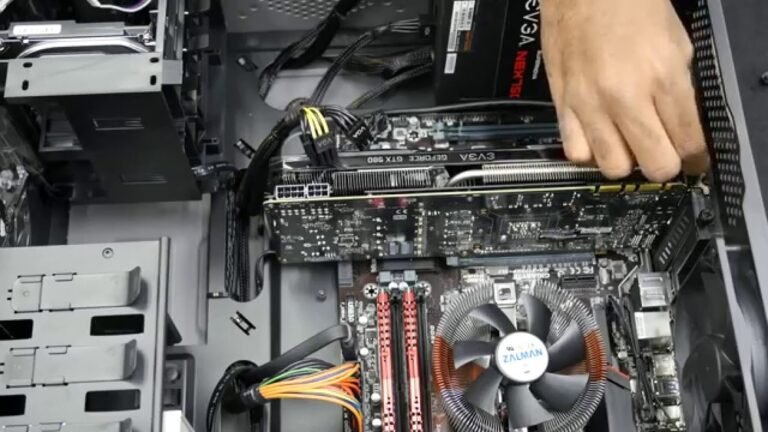
Space inside the case matters for more than just the motherboard. You need room for the graphics card, power supply, and cooling system. Some cases have extra space for big GPUs or liquid cooling. Look at the maximum length and height for components. Good space means better airflow and easier upgrades later.

Credit: www.techpowerup.com
Cooling Options
Cooling is a key part of a good PC case. It keeps your computer running cool and stops parts from overheating. Good cooling helps your PC work faster and last longer. Choosing the right cooling options matters a lot for building a strong system.
Airflow Design
Airflow design means how air moves inside the case. A case with good airflow brings cool air in and pushes hot air out. Look for cases with vents at the front and exhausts at the back or top. Open mesh panels improve airflow by letting air flow freely. A closed case can trap heat and slow down your PC.
Fan And Radiator Support
Fans help move air inside your PC case. Some cases support many fans in different sizes. Check how many fans the case can hold and where they fit. Radiator support is important for liquid cooling systems. Cases that fit big radiators offer better cooling options. Choose a case that matches your cooling needs and system size.
Dust Filters
Dust filters stop dust from entering your PC. Dust can build up and block airflow. Many cases have removable filters on vents and intakes. Filters are easy to clean and help keep your PC clean inside. A clean PC runs cooler and lasts longer. Make sure your case has good dust filters for better maintenance.
Build Quality And Materials
Build quality and materials shape the overall experience of a PC case. They affect how strong the case is and how well it protects internal parts. Choosing the right materials helps ensure your PC lasts longer and looks good.
Metal Vs Plastic
Metal cases offer better strength and heat resistance. They keep components safe from damage. Steel and aluminum are common metals used. Aluminum is light and cools well. Steel is heavier but very sturdy. Plastic cases tend to be lighter and cheaper. They may not last as long or protect well. Metal cases often feel more solid and premium.
Durability Factors
Durability depends on the material quality and design. Strong joints and thick panels resist bending. Good paint or coating stops rust on metal cases. Plastic cases can crack or warp with heat. Look for cases that use quality screws and reinforcements. A durable case keeps all parts safe and stable during moves. It also helps reduce noise and vibration inside the PC.
Cable Management Features
Cable management is a key feature in any PC case. It keeps your build neat and improves airflow. Good cable management makes your PC easier to build and maintain. It also helps keep cables safe from damage. Let’s explore the main cable management features to consider.
Routing Options
Routing options guide cables through the case. They help hide wires behind the motherboard tray. Look for cases with wide gaps and rubber grommets. These features protect cables and make routing simple. Proper routing reduces clutter and improves airflow.
Tie-down Points
Tie-down points secure cables inside the case. They keep wires tight and prevent them from moving. Many cases include built-in loops or hooks. These points work with zip ties or Velcro straps. Organized cables reduce the risk of damage and boost airflow.
Hidden Compartments
Hidden compartments let you store extra cables out of sight. These spaces keep cables from blocking fans or vents. Some cases have dedicated areas behind the motherboard tray. Storing cables in these compartments creates a clean interior look. It also makes your PC easier to clean and upgrade.
Expansion And Drive Bays
Expansion and drive bays play a key role in a PC case. They determine how many devices you can add inside your computer. Choosing the right case means checking these features carefully. They affect your PC’s storage and upgrade options.
Support For Storage Devices
Drive bays hold storage devices like SSDs and HDDs. More bays mean more space for files, games, and programs. Some cases offer dedicated slots for different drive sizes. This helps organize your storage neatly. Cases with tool-less drive bays make installation easy. You can add or swap drives without tools. Consider how many drives you need now and later.
Pcie Slot Availability
PCIe slots let you add expansion cards. These include graphics cards, sound cards, and network cards. A case with enough slots supports multiple cards at once. This boosts your PC’s power and features. Some cases offer vertical slots for better GPU display. Check slot size and spacing to fit large cards. Proper slots help keep airflow smooth inside the case.

Credit: x.com
Aesthetic And Design Elements
The look of a PC case plays a big role in the overall build. A good design can make your setup feel personal and stylish. Choosing the right aesthetic and design elements helps your PC stand out. It also reflects your taste and style.
Many people want their PC to look as good as it performs. Designers create cases that are both functional and attractive. These design details can add personality to your workspace.
Window Panels
Window panels show off the inside of your PC. They are usually made of glass or clear plastic. This lets you display your components and lighting. A clean inside looks great through a window panel. It motivates you to keep your build tidy and neat.
Window panels also help you spot dust or cable clutter fast. Many users find this feature adds a cool, modern vibe. It makes the PC feel more open and alive.
Rgb Lighting
RGB lighting adds color and life to your PC case. You can choose from millions of colors and effects. Lights can pulse, wave, or change with your music. This creates a fun, dynamic look.
RGB helps customize the PC to your mood or theme. It can match your other gear or room style. Some cases have built-in RGB strips or fans. These lights bring energy and excitement to your setup.
Color And Finish
The case’s color and finish affect its style and feel. Popular colors include black, white, and silver. Matte and glossy finishes offer different looks. Matte gives a smooth, subtle touch. Glossy shines and stands out more.
Some cases have bold or unique colors for flair. Pick a finish that fits your room and personality. The right color makes your PC a key part of the decor. It can blend in or become the main focus.
Front Panel Connectivity
Front panel connectivity is a key part of any PC case. It gives you easy access to important ports and jacks. This makes using your computer more comfortable and efficient. You can quickly connect devices like USB drives, headphones, and charging cables without reaching behind the case. A good front panel can save time and effort every day.
Usb Ports And Types
USB ports on the front panel are essential for connecting many devices. Most cases have USB 3.0 ports, which offer fast data transfer speeds. Some newer cases include USB-C ports, which are reversible and support even faster speeds. More ports mean more devices can connect at once. Check the type and number of USB ports before buying a case.
Audio Jacks
Audio jacks on the front panel allow quick connection of headphones and microphones. A headphone jack is useful for private listening. A microphone jack is helpful for calls and recordings. Some cases also offer combined audio jacks that support both headphones and microphones. Clear, easy-to-reach audio jacks improve your user experience.
Other Features
Some front panels include extra features for convenience. Power and reset buttons help control the PC. LED indicators show power and drive activity. Card readers can read SD and other memory cards. Fan controllers let you adjust cooling without opening the case. These features add value and ease to your PC setup.
Ease Of Assembly
Ease of assembly is a key feature of a good PC case. A case that is easy to build in saves time and reduces frustration. Clear design choices help beginners and experts alike. Understanding which features help simplify building is important.
Tool-less Design
Tool-less designs let you install parts without screws or tools. This speeds up the build process. It also makes upgrades easier. Clips, latches, and sliders hold components securely. These features reduce the need for small tools and lower the chance of mistakes.
Removable Panels
Panels that come off easily give quick access to the inside. Side and top panels that slide or pop off are best. This helps during installation and cleaning. It also allows better airflow adjustments. Removable panels make maintenance simple and less stressful.
Clear Internal Layout
A clear internal layout shows where each part goes. Cables and components should have dedicated spaces. This keeps wires neat and prevents blockages. Good layouts also improve airflow inside the case. A well-organized inside makes building faster and easier.
Price And Warranty
Price and warranty play key roles in choosing a PC case. They affect your budget and peace of mind. A good case should balance cost with quality and support. Understanding these factors helps make a smart purchase.
Budget Considerations
Price affects what features a PC case offers. Budget cases often have fewer extras like sound dampening or extra fans. Mid-range cases tend to offer better build quality and more space. High-end cases include advanced cooling options and premium materials.
Set a clear budget before shopping. It narrows your choices and saves time. Remember, a lower price might mean less durability or fewer features. Spend wisely for the best value and longevity.
Manufacturer Support
Warranty shows how much a company trusts its product. A longer warranty means better protection against defects. Check what the warranty covers and how long it lasts. Some brands offer free repairs or replacements.
Good customer service matters too. Quick responses and helpful support ease problems. Choose brands known for reliable support to avoid future headaches. Warranty and support add real value beyond the initial price.

Credit: www.expressvpn.com
Frequently Asked Questions
What Are The Essential Pc Case Features To Consider?
Essential PC case features include airflow, size compatibility, build quality, and cable management. Good airflow prevents overheating. Size compatibility ensures your components fit well. Sturdy build quality offers durability. Effective cable management improves aesthetics and airflow inside the case.
How Important Is Airflow In A Pc Case?
Airflow is crucial to keep components cool and prevent overheating. A case with good ventilation improves system stability and longevity. Look for multiple fan mounts and mesh panels for optimal airflow. Efficient cooling enhances overall PC performance.
Does Pc Case Size Affect Component Compatibility?
Yes, PC case size directly affects which components you can install. Ensure the case supports your motherboard size (ATX, Micro-ATX, Mini-ITX). Also, check GPU length, CPU cooler height, and PSU size compatibility before purchasing.
Why Is Cable Management Important In A Pc Case?
Cable management improves airflow and makes building easier. Properly routed cables reduce clutter inside the case. This not only enhances cooling but also gives a neat, professional look to your PC build.
Conclusion
Choosing the right PC case improves your build’s performance and look. Good airflow keeps parts cool and lasts longer. Space inside lets you add more hardware easily. Cable management helps your setup stay neat and tidy. Noise reduction features make your PC quieter.
Think about what matters most for your needs. A well-chosen case makes building and upgrading easier. Your PC will work better and look great too. Take time to pick a case that fits your style and budget.