Can Undervolting Damage GPU: Risks, Myths & Safe Practices
Are you thinking about undervolting your GPU to boost performance and reduce heat? It’s a popular tweak among gamers and tech enthusiasts, but you might be wondering—can undervolting actually damage your GPU?
The idea of lowering voltage sounds simple, but it raises important questions about safety and hardware longevity. You’ll discover what undervolting really does to your GPU, the risks involved, and how to do it the right way without harming your hardware.
Keep reading to protect your investment and get the most out of your graphics card.
Credit: dfarq.homeip.net
What Is Undervolting
Undervolting is the process of lowering the power supplied to a GPU. It reduces the voltage while keeping the GPU running smoothly. This helps to decrease heat and power use. Many use undervolting to improve efficiency and keep the GPU cooler.
Understanding how undervolting works is important before trying it. It is a careful balance of power and performance. Done right, it can make a GPU run quieter and last longer.
Basics Of Gpu Voltage
Every GPU needs voltage to work. Voltage is the electrical power that feeds the chip. Higher voltage means more power but also more heat. Too much voltage can harm the GPU.
Manufacturers set a default voltage that is safe but not always efficient. This default voltage keeps the GPU stable under heavy load. But sometimes, it uses more power than needed for regular tasks.
How Undervolting Works
Undervolting lowers the voltage to just enough for the GPU to work well. The goal is to reduce power without causing errors or crashes. This can lead to less heat and quieter fans.
Testing is key. Users lower voltage step by step and check if the GPU stays stable. If the GPU crashes, the voltage is raised a bit. This process finds the lowest safe voltage.
Undervolting does not change the GPU’s clock speed. It only cuts down on the power used. This keeps performance close to normal but uses less electricity.
Common Myths About Undervolting
Undervolting a GPU often sparks many questions and doubts. Several myths about its effects can confuse users. Clearing these misunderstandings helps you make better decisions. Here are some common myths about undervolting and the truth behind them.
Myth: Undervolting Causes Hardware Damage
Many believe undervolting harms the GPU hardware. This is not true. Undervolting reduces the voltage supplied to the GPU. It lowers heat and power consumption. Less heat means less stress on components. This can actually extend the lifespan of your GPU. Proper undervolting is safe and does not damage hardware.
Myth: Performance Always Drops
People often think undervolting lowers GPU performance. This is a misconception. Undervolting aims to keep performance stable while reducing power use. If done correctly, the GPU runs efficiently at lower voltages. Some users notice little to no change in speed. Performance loss only happens if undervolting is too aggressive.
Myth: Undervolting Voids Warranty
There is a fear that undervolting voids the GPU warranty. This is mostly false. Undervolting is a software-level adjustment, not hardware modification. Most manufacturers do not consider it a reason to void warranty. Always check your GPU’s warranty terms. Undervolting rarely affects warranty status.
Potential Risks Of Undervolting
Undervolting a GPU can help reduce heat and power use. It sounds safe, but it has some risks. Knowing these risks helps you make a smart choice. Undervolting might cause problems with your system and your GPU’s performance. It may also affect your GPU over time.
System Instability Issues
Undervolting can cause your system to crash or freeze. The GPU needs a certain voltage to work well. Too low voltage can make the GPU unstable. You might see random shutdowns or blue screens. This can happen during heavy tasks or gaming. Stability problems make your computer unreliable and frustrating.
Possible Reduced Performance
Lower voltage may cause your GPU to run slower. Your graphics card might lower its speed to save power. This means lower frame rates in games and slower rendering. Performance drops can hurt your experience. Undervolting too much limits your GPU’s full power. Balance is key to avoid losing speed.
Long-term Effects On Gpu
There is little proof that undervolting damages the GPU hardware. Running at low voltage might cause stress on some components. This stress could shorten the GPU’s lifespan over years. Some GPUs handle undervolting better than others. Careful monitoring is important to protect your investment.

Credit: www.youtube.com
Signs Of Unsafe Undervolting
Undervolting a GPU can improve efficiency and lower temperatures. But unsafe undervolting may cause problems. Knowing the signs helps protect your hardware and avoid damage.
Watch for changes in how your system behaves. These signs usually point to unstable undervolting settings. Catching issues early keeps your GPU safe and running well.
Frequent Crashes And Freezes
One common sign is frequent crashes during use. Your computer might freeze without warning. Games and programs may close suddenly. These crashes happen because the GPU gets too little power.
Artifacts And Visual Glitches
Visual glitches or strange lines on the screen also signal problems. You might see flickering textures or odd colors. These artifacts occur when the GPU cannot maintain stable performance. It struggles to render images correctly.
Unexpected Shutdowns
The system might shut down without notice. This happens if the GPU cannot handle undervolted power levels. Sudden shutdowns protect your hardware from damage. But they disrupt your work or gaming sessions.
Safe Undervolting Practices
Undervolting a GPU can reduce heat and power use. It can extend the lifespan of your graphics card if done right. Safe undervolting means making small changes and testing often. This way, you avoid damage and keep your system stable.
Step-by-step Undervolting Process
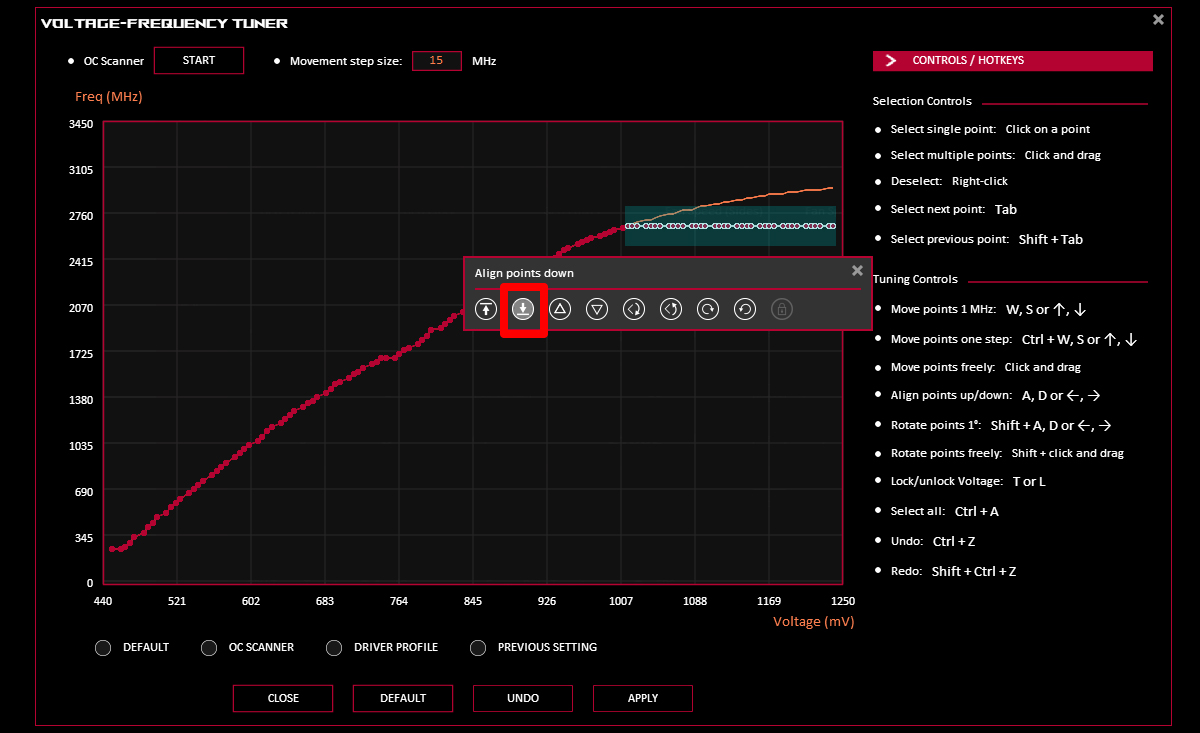
Start by opening your GPU control software. Find the voltage or power settings. Lower the voltage in small steps, about 10 to 20 millivolts. After each change, save the settings. Test your GPU with a simple task. Look for any crashes or glitches. Stop if you see problems. Otherwise, try lowering the voltage a bit more.
Tools And Software Recommendations
Use trusted software like MSI Afterburner or ASUS GPU Tweak. These tools let you change voltage safely. They also show real-time GPU stats. Some GPU brands have their own apps. Check the GPU manufacturer’s website. Always download software from official sources. Avoid unknown or risky programs.
Testing And Monitoring Stability
Test stability after every voltage change. Run GPU benchmarks or stress tests for at least 15 minutes. Watch for crashes, artifacts, or slowdowns. Monitor temperatures and clock speeds too. Use programs like FurMark or Heaven Benchmark. If the system is stable, try lowering voltage more. If not, return to the last stable setting. Regular checks keep your GPU safe.
Benefits Of Proper Undervolting
Proper undervolting a GPU offers many benefits that improve its performance and lifespan. It reduces the power the GPU uses without lowering its speed. This helps keep the GPU cool and stable during use. Many users undervolt to save energy and protect their hardware.
Undervolting must be done carefully to avoid problems. When done right, it can make your GPU run more efficiently and last longer.
Lower Power Consumption
Undervolting cuts down the amount of electricity the GPU needs. This lowers your electricity bill and uses less energy overall. Less power means the GPU works more efficiently, saving resources and money.
Reduced Heat Output
With less power used, the GPU produces less heat. Cooler GPUs run more smoothly and avoid overheating. This keeps your computer quieter because fans do not run at high speeds often.
Extended Gpu Lifespan
Heat and high power stress can damage GPU parts over time. Undervolting lowers these risks by reducing heat and stress. This helps your GPU last longer and keeps it stable for years.
When To Avoid Undervolting
Undervolting a GPU can save power and reduce heat. Yet, it is not always safe to try. Certain situations call for caution. Knowing when to avoid undervolting helps protect your hardware.
Here are key cases where undervolting might cause problems or damage.
Older Or Overclocked Gpus
Older GPUs may not handle undervolting well. Their power delivery and stability are less reliable. Overclocked GPUs already run at higher power. Lowering voltage can cause crashes or permanent damage. Avoid undervolting if your GPU is old or overclocked.
Lack Of Monitoring Tools
Good monitoring tools track voltage and temperature changes. Without them, you cannot see if undervolting hurts your GPU. Blind changes may cause instability and damage. Skip undervolting if you lack proper monitoring software.
Unsure About Technical Steps
Undervolting requires precise steps. Incorrect settings can harm your GPU. If you do not understand the process, avoid experimenting. Learning first or asking experts is safer. Do not undervolt if you feel unsure or confused.
Credit: rog.asus.com
Frequently Asked Questions
Can Undervolting Harm My Gpu’s Lifespan?
No, undervolting generally does not harm your GPU’s lifespan. It reduces power consumption and heat, which can improve longevity. However, improper settings may cause instability or crashes but won’t physically damage the GPU.
Is Undervolting Safe For All Gpu Models?
Undervolting is safe for most modern GPUs but varies by model. Always research your specific GPU and test settings carefully to avoid instability or performance drops.
Will Undervolting Reduce My Gpu Performance?
Proper undervolting maintains stable performance while lowering voltage. If set too low, it may cause crashes or reduce performance. Balanced undervolting optimizes efficiency without sacrificing speed.
How Do I Know If Undervolting Is Successful?
Success is indicated by stable GPU operation, lower temperatures, and reduced power use. Monitor for crashes or artifacts; if none occur, undervolting is effective and safe.
Conclusion
Undervolting a GPU can help reduce heat and save power. It rarely causes damage if done carefully. Small voltage drops usually keep your GPU stable and safe. Testing your settings step-by-step is very important. Watch for crashes or errors during use.
This way, you protect your hardware and keep performance steady. Many users find undervolting useful for quieter and cooler PCs. Still, always proceed with caution and patience. Undervolting is a simple tweak but needs careful attention.