

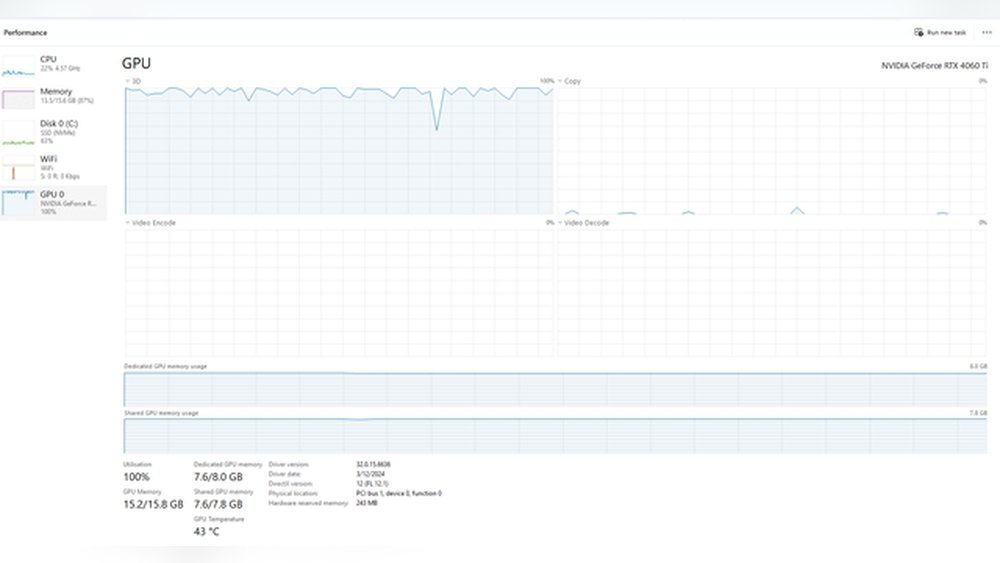
Is 43°C good for a GPU? If you’re wondering whether your graphics card is running too hot or just right, you’re not alone.
Keeping your GPU at the right temperature is key to getting the best performance and avoiding damage. You’ll discover what 43°C means for your GPU’s health, why temperature matters, and simple tips to keep your system cool. By the end, you’ll know exactly how to protect your GPU and boost your gaming or work experience.
Keep reading to find out if 43°C is a safe zone or a warning sign.
Credit: www.ebay.com
Ideal Gpu Temperature Range
Keeping your GPU at the right temperature helps it work well and last longer. GPUs generate heat when running games or heavy software. Too much heat can damage the GPU or slow it down. Knowing the ideal temperature range helps you keep your system safe.
Most modern GPUs work best between 30°C and 85°C. Temperatures under 60°C are great for normal use. High temperatures near 85°C are okay during heavy tasks but should not stay that way for long. Proper cooling and airflow keep the GPU inside this safe range.
Typical Operating Temperatures
GPUs usually run between 30°C and 85°C during use. Light tasks keep the temperature near 30°C to 45°C. Gaming or 3D work can push the temperature to 70°C or higher. Some models may run hotter but try to stay below 90°C. Above 90°C, the GPU may throttle or shut down to avoid damage.
Factors Influencing Gpu Heat
Several things affect GPU temperature. The type of game or software matters. More demanding programs cause the GPU to work harder and heat up. The cooling system also plays a big role. Fans and heatsinks help lower temperatures. Good airflow inside the case helps a lot too. Room temperature can change GPU heat. Hot rooms make it harder for the GPU to cool down.

Credit: www.tomshardware.com
43°c As A Gpu Temperature
43°C as a GPU temperature is often seen as a good sign. It shows the graphics card runs cool and stable. This temperature is common when the GPU is idle or under light use. Keeping the GPU at this level helps its life last longer. It also means the cooling system works well.
Comparison With Average Gpu Temps
Most GPUs run between 60°C and 85°C during heavy use. A temperature of 43°C is much lower than this range. It indicates the GPU is not under stress. Many gamers see temps above 70°C while playing games. 43°C is closer to the temperature when the GPU is resting. This temperature helps prevent overheating problems.
Situations Leading To 43°c
Several situations cause a GPU to stay at 43°C. The PC might be idle or doing light work like browsing. Good airflow inside the case helps keep the GPU cool. The ambient room temperature also affects the GPU temperature. Using efficient cooling solutions like fans or liquid cooling helps. Proper thermal paste application can lower temperatures too.
Risks Of High Gpu Temperatures
High GPU temperatures pose real risks to your computer’s performance and lifespan. Keeping your GPU cool is vital for smooth operation and stability. Excess heat can cause several problems that affect your gaming or work experience.
Understanding these risks helps you avoid damage and maintain your system’s health. Let’s explore what happens when a GPU runs too hot.
Thermal Throttling Effects
Thermal throttling happens when the GPU lowers its speed to cool down. This reduces the power it uses and the heat it creates. The result is slower performance during games or tasks. You may notice lag or stuttering. This slowdown protects the GPU from overheating but hurts your experience.
Long-term Damage Concerns
Continuous high temperatures can shorten your GPU’s life. Heat wears down electronic parts over time. This can cause permanent damage to the chip or other components. Your GPU may become unstable or stop working. Repair or replacement costs can be high. Keeping temperatures low helps your GPU last longer.
Maintaining Optimal Gpu Temperature
Maintaining the right temperature for your GPU is crucial. It helps keep your graphics card working well and lasting longer. High temperatures can cause slowdowns and damage. A good temperature means better performance and stability. Many factors affect GPU heat, like room temperature and workload. Knowing how to control and check your GPU’s heat is important for all users.
Cooling Solutions
Cooling helps lower the GPU temperature. Most GPUs come with built-in fans to cool down. You can add more fans inside your PC case. Liquid cooling is another option for better heat control. It uses water to move heat away from the GPU. Keeping your PC clean also helps cool the GPU. Dust can block air and raise temperatures. Proper airflow inside the case is key to good cooling.
Monitoring Tools And Software
Monitoring tools show the GPU temperature in real-time. These programs are easy to use and often free. They send alerts if the GPU gets too hot. Popular tools include MSI Afterburner and HWMonitor. Checking temperature helps avoid overheating problems. Regular monitoring lets you act before damage occurs. Use these tools during gaming or heavy tasks to stay safe.
Signs Of Gpu Overheating
Signs of GPU overheating can help you protect your computer. Overheating harms your graphics card and lowers its life. It is important to watch for early signs. These signs tell you when your GPU is too hot.
Not all signs are easy to spot. Some happen inside the system, while others you can see or hear. Knowing these signs helps you act fast and avoid damage.
Performance Drops
Your GPU slows down when it gets too hot. Games or apps may lag or freeze suddenly. Frame rates drop, making the display choppy. This happens because the GPU tries to cool itself by lowering speed. It protects itself but hurts your experience.
Unusual Noises And Visual Artifacts
Strange sounds can come from your computer fans working hard. Fans spin faster to cool the hot GPU. You might hear buzzing or whirring noises. Visual problems appear on your screen too. Lines, flickers, or strange colors show up. These are signs that the GPU is stressed and overheating.

Credit: www.reddit.com
Tips To Lower Gpu Temperature
Keeping your GPU cool is important for its performance and lifespan. High temperatures can cause slowdowns or damage. Here are simple tips to keep your GPU temperature low and safe.
Improving Case Airflow
Good airflow helps move hot air out and bring cool air in. Make sure your PC case has enough fans. Place one fan at the front to bring cool air in. Use another fan at the back to push hot air out. Avoid blocking vents with cables or other parts. Clean dust regularly to keep airflow smooth.
Adjusting Fan Speeds
Fans control how much air moves inside your PC. You can change fan speed using software tools. Increasing fan speed cools the GPU faster. Keep fan noise in mind. Find a balance between cooling and noise. Check your GPU manual or software for fan control options.
Applying Thermal Paste
Thermal paste helps transfer heat from the GPU chip to its cooler. Over time, thermal paste can dry out and lose effectiveness. Reapplying fresh thermal paste improves heat transfer. Use a small, pea-sized amount on the chip. Clean off old paste carefully before applying new paste. This simple step can lower GPU temperature by several degrees.
Frequently Asked Questions
Is 43°c A Safe Temperature For A Gpu?
Yes, 43°C is a safe and normal temperature for a GPU. Most GPUs operate safely between 30°C and 70°C. Maintaining this range ensures optimal performance and longevity of your graphics card.
Will 43°c Affect Gpu Performance Negatively?
No, 43°C will not negatively affect GPU performance. This temperature is well within the ideal operating range. GPUs can handle much higher temperatures without throttling or damage.
How To Keep My Gpu Temperature Around 43°c?
To maintain 43°C, ensure good airflow inside your PC case. Clean dust regularly and use quality thermal paste. Also, keep your fan speeds optimized using GPU management software.
Is 43°c Temperature Common When Idling Or Gaming?
Yes, 43°C is common when a GPU is idling or under light load. During gaming or heavy use, temperatures can rise higher but 43°C indicates efficient cooling and low usage.
Conclusion
A GPU temperature of 43°C is generally safe and normal. It shows your graphics card runs cool and stable. Lower temperatures help keep the GPU healthy and last longer. Make sure your PC has good airflow to maintain this level.
Avoid high temperatures, as they can cause damage over time. Watching your GPU temperature helps prevent problems early. Keep an eye on it during heavy use or gaming. Staying around 43°C means your GPU works well without stress. Simple care keeps your computer running smoothly every day.
