Is Video Card the Same As Gpu: Unveiling the Key Differences
Are you confused about the difference between a video card and a GPU? You’re not alone.
Many people use these terms as if they mean the same thing, but understanding how they differ can help you make smarter choices when buying or upgrading your computer. By the time you finish reading, you’ll know exactly what each one does and why it matters to your gaming, work, or everyday use.
Let’s clear up the mystery so you can get the most out of your tech.

Credit: www.youtube.com
Video Card Vs Gpu
Understanding the difference between a video card and a GPU is important for anyone interested in computers. Many people use these terms as if they mean the same thing. They do not. Knowing what each does helps you choose the right hardware for your needs.
Core Functions
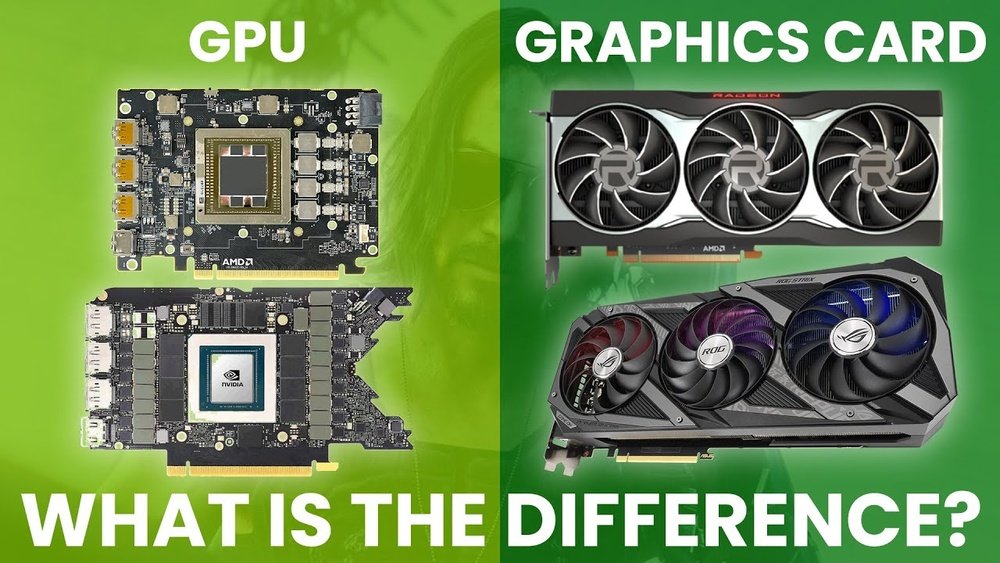
The GPU is the chip that processes graphics data. It handles tasks like rendering images and videos. The video card includes the GPU and other parts that help it work. It sends the final images to your monitor. So, the GPU does the work, and the video card makes it possible to use that work on your screen.
Physical Components
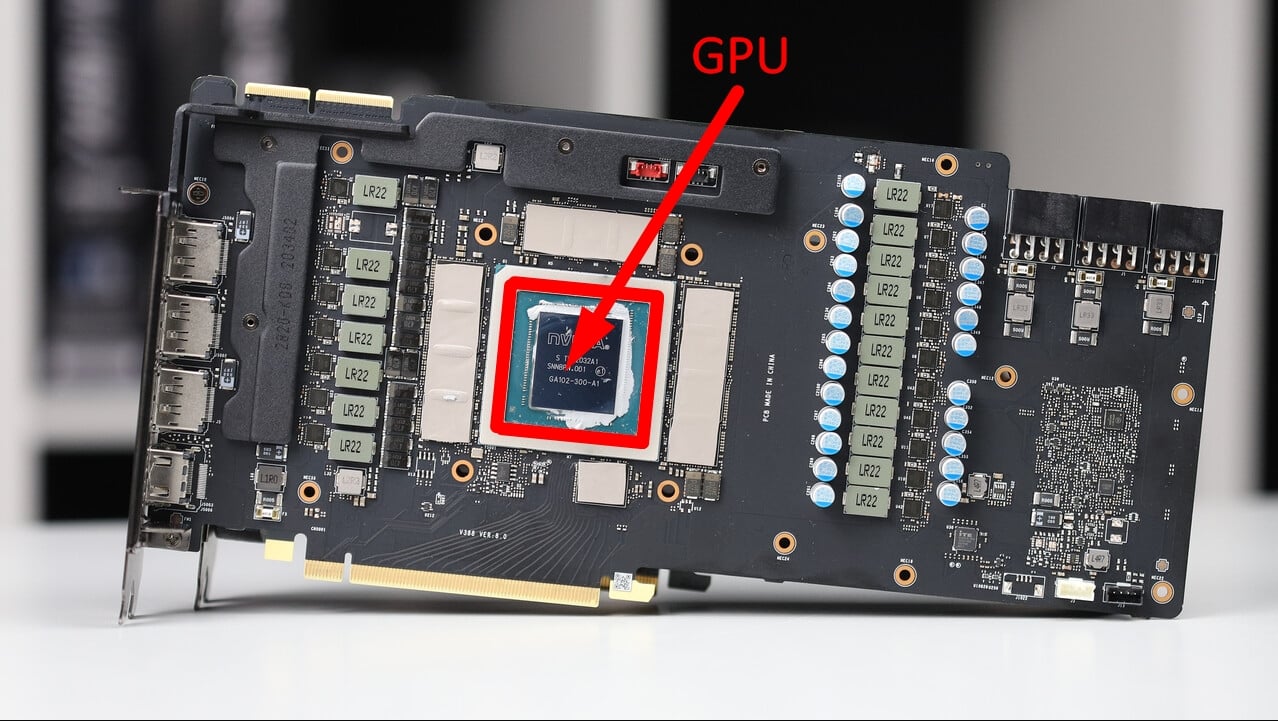
The GPU is a small chip on the video card. It is the brain of the graphics system. The video card has the GPU, memory chips, cooling fans, and a circuit board. These parts work together to keep the GPU running smoothly. Without the full video card, the GPU cannot operate properly in a computer.
Performance Impact
The GPU mainly decides the speed of graphics processing. Better GPUs mean smoother and faster graphics. The video card’s other components also affect performance. Good cooling helps the GPU run faster without overheating. The type and amount of memory on the card also matter. Both GPU and video card quality influence your computer’s graphics power.
Gpu Architecture
GPU architecture defines how the graphics processing unit works inside a video card. It shapes the speed and efficiency of graphics rendering and computing tasks. Understanding this helps to see the difference between a GPU and a video card.
The architecture includes different parts that work together. These parts control how data is processed, stored, and how much power the GPU uses. Each design choice affects the overall performance and capabilities of the GPU.
Processing Units
Processing units in a GPU handle many tasks at once. They work in parallel to speed up graphics and calculations. More units often mean better performance, especially in complex tasks like gaming or 3D rendering.
These units are smaller than a CPU core but much more numerous. This allows the GPU to manage thousands of threads simultaneously. This parallel structure is key to the GPU’s power.
Memory Integration
Memory integration connects the GPU to its own memory, called VRAM. VRAM stores textures, images, and other data needed for rendering. Fast and large VRAM helps the GPU work smoothly without delays.
Some GPUs have memory built directly into the chip. Others connect to memory chips on the video card. This design affects speed and how much data the GPU can handle at once.
Power Consumption
Power consumption shows how much energy the GPU uses. Efficient architecture means better performance with less power. This matters for laptops, desktops, and even gaming consoles.
Higher power use often means more heat and bigger cooling needs. Good design balances power and performance for the best user experience.
Video Card Components
A video card contains several parts that work together to display images on your screen. Each part plays a key role in the card’s performance. Understanding these components helps to see how a video card differs from just the GPU.
The main parts include the GPU chip, cooling system, and output interfaces. These parts make the video card a complete unit ready for use in your computer.
Gpu Chip
The GPU chip is the heart of the video card. It processes all graphics tasks and calculations. This chip handles everything from simple images to complex 3D scenes. The power of the GPU chip often decides how well your video card performs.
Cooling Systems
Video cards generate heat while working. Cooling systems keep the card from overheating. They use fans, heat sinks, or liquid cooling to lower the temperature. Good cooling improves the video card’s lifespan and performance.
Output Interfaces
Output interfaces connect the video card to your monitor. Common types include HDMI, DisplayPort, and DVI. These ports transfer the video signal from the card to your screen. The number and type of ports vary by video card model.
Credit: www.cgdirector.com
Common Misconceptions
Many people confuse video cards and GPUs. This misunderstanding causes wrong buying choices and frustration. Clearing up these common myths helps you know what you need. It also saves money and time.
Terminology Confusion
People often use “video card” and “GPU” as the same thing. A GPU is a chip inside the video card. The video card holds the GPU and other parts. These parts include memory and cooling systems. Saying GPU means only one component, but video card means the whole device.
This mix-up comes from hearing both terms often. Tech talk sometimes uses them interchangeably. This makes beginners unsure about what each term means. Knowing the difference helps in understanding computer parts better.
Marketing Influence
Marketing adds to the confusion. Companies use “GPU” and “video card” in ads to attract buyers. Ads focus on the GPU’s power, ignoring the full video card. This causes people to think they are identical.
Some ads highlight GPU brands like NVIDIA or AMD. They rarely explain the video card’s other features. Buyers might miss important details like cooling or memory size. Clear terms help buyers choose the right product.
Choosing Between Gpu And Video Card
Choosing between a GPU and a video card can be confusing. Many people think they are the same. A GPU is the chip that processes graphics. A video card is the full hardware piece that holds the GPU and other parts. Understanding the difference helps you pick the right option for your needs.
Use Case Scenarios
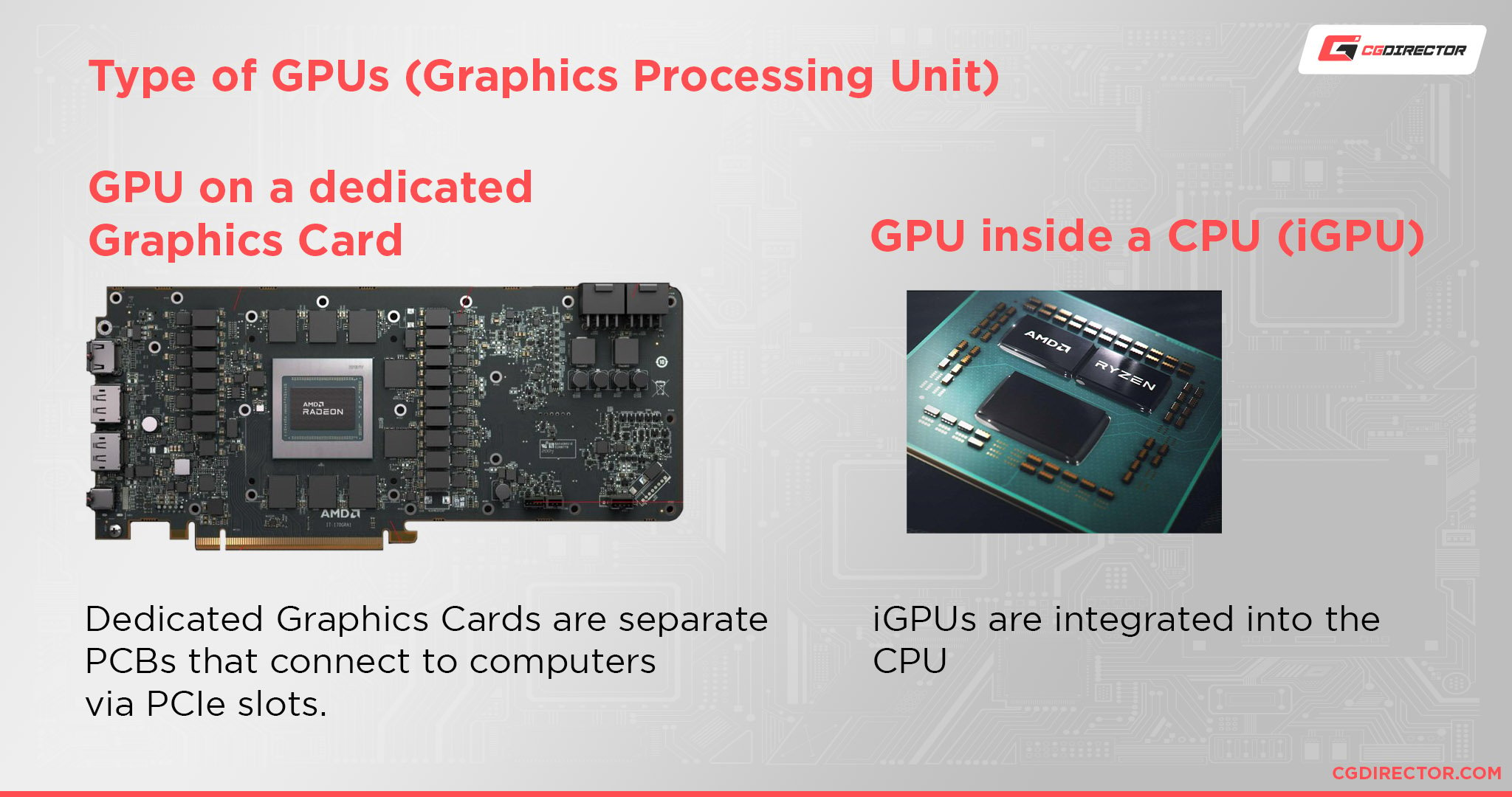
For simple tasks like watching videos or browsing, an integrated GPU works well. It is built into the processor or motherboard. For gaming, 3D modeling, or video editing, a dedicated video card is better. It offers more power and better performance. Choose based on what you want to do.
Compatibility Factors
Check if your computer supports a video card. Some laptops and small PCs do not allow upgrades. Also, verify the power supply can handle a new video card. The motherboard must have the right slot, usually PCIe. These details avoid problems during installation.
Budget Considerations
GPUs inside CPUs are cheaper since no extra parts are needed. Video cards cost more but deliver higher performance. Set a budget before buying. Balance between price and what you need from your graphics setup. Spending wisely saves money and meets your needs.
Credit: www.cgdirector.com
Frequently Asked Questions
What Is The Difference Between A Video Card And Gpu?
A video card is a complete hardware component with GPU, memory, and cooling. The GPU is the chip that processes graphics inside the video card.
Can A Gpu Work Without A Video Card?
No, a GPU needs to be mounted on a video card or motherboard to function. It alone cannot display graphics without supporting hardware.
Are Video Card And Gpu Terms Interchangeable?
They are related but not interchangeable. GPU refers to the processor, while video card includes GPU and other parts for output.
Does Upgrading A Video Card Improve Gpu Performance?
Yes, upgrading a video card usually means a better GPU and improved graphics performance in games and applications.
Conclusion
A video card and a GPU are not exactly the same. The GPU is the chip that does the work. The video card holds the GPU and other parts together. It connects to your computer and sends images to your screen.
Knowing the difference helps when buying or upgrading. Both work closely to show graphics smoothly. Remember, one is a part, and the other is the whole. Understanding this makes choosing easier and clearer. Keep these points in mind for your next tech decision.