How to Vertical Mount Gpu: Ultimate Guide for Stunning PC Builds
Are you looking to give your PC build a sleek, eye-catching upgrade? Vertical mounting your GPU can instantly transform the look of your setup, making your graphics card the star of the show.
But how do you do it without risking damage or poor performance? In this guide, you’ll discover simple, step-by-step tips to mount your GPU vertically with confidence. By the end, you’ll not only improve your system’s style but also ensure it runs smoothly.
Ready to make your rig stand out? Let’s dive in!
Benefits Of Vertical Gpu Mounting
Vertical GPU mounting is a popular choice among PC builders. It offers several clear benefits that improve both the look and function of your computer. This mounting style changes how the graphics card sits inside the case. It can affect airflow, protection, and the overall design.
Enhanced Aesthetics
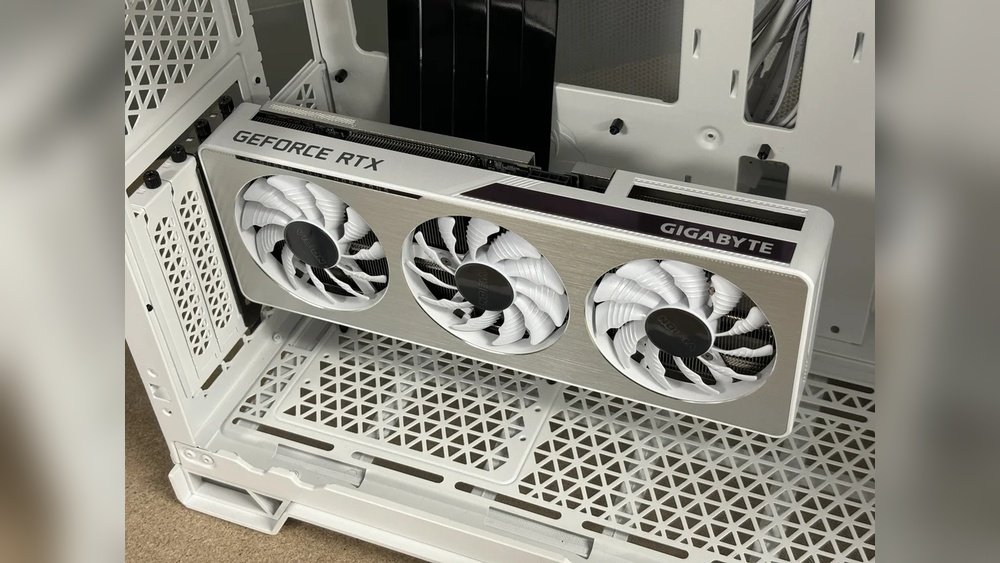
Vertical mounting lets you show off the GPU’s design and lighting. The card faces outwards, making it more visible through the side panel. This setup highlights the GPU’s colors and cooler design. It gives your build a clean and modern look. Many builders prefer this style for its visual appeal.
Improved Airflow
Mounting the GPU vertically can help airflow inside the case. It prevents the card from blocking other components. This allows fresh air to reach the GPU more easily. Better airflow helps keep the GPU cooler under load. Cooler temperatures can improve performance and lifespan.
Better Gpu Protection
Vertical mounting reduces stress on the PCIe slot. The GPU hangs straight down instead of bending sideways. This lowers the risk of damaging the slot or the card itself. It also keeps the GPU stable during transport or movement. This mounting style adds extra safety for your valuable hardware.

Credit: www.darkflash.com
Choosing The Right Case
Choosing the right case is key for a vertical GPU mount. Not every case supports this setup. You need a case designed to hold the graphics card upright. The case must offer proper slots and space. This ensures the GPU fits safely and cools well.
Picking a case that matches your GPU size and style is important. It helps avoid damage and improves airflow. A good case also makes your build look clean and neat. Let’s explore what cases work best and what to check before buying.
Compatible Cases For Vertical Mount
Not all PC cases allow vertical GPU mounts. Look for cases with vertical PCIe slots. These slots let you place the GPU standing up. Some cases include a vertical mount bracket or riser cable. These parts are necessary to connect the GPU properly.
Popular brands like NZXT, Corsair, and Lian Li offer cases with vertical mount options. Check the product details to confirm this feature. Some cases require buying a riser cable separately. Make sure your case supports your GPU’s length and weight too.
Space And Clearance Considerations
Vertical mounting needs extra space inside the case. The GPU will stand tall, so clearance is important. Measure the distance between the PCIe slot and the side panel. This space must fit your GPU’s height comfortably.
Also, consider airflow. A tight space can block air and cause heat build-up. Ensure the case has enough room for fans near the GPU. Good ventilation keeps your graphics card cool and stable. Check for any cables or parts that may block the GPU area.
Required Accessories And Tools
Vertical mounting a GPU requires certain accessories and tools. These parts help secure the graphics card safely and properly inside your PC case. Using the right items makes the process easier and prevents damage to your components. Below are the essential accessories and tools needed for vertical GPU mounting.
Vertical Mount Brackets
Vertical mount brackets hold the GPU upright inside the case. They replace or attach to the existing GPU slots. These brackets come in different sizes to fit various PC cases. Choose one that matches your case and GPU model. Quality brackets keep your card stable and prevent it from bending.
Pcie Riser Cables
A PCIe riser cable connects the GPU to the motherboard while allowing vertical placement. These cables are flexible and come in different lengths. Pick a cable that supports your GPU’s PCIe version for best performance. Good quality riser cables reduce signal loss and maintain speed.
Screwdrivers And Other Tools
A Phillips-head screwdriver is the main tool needed to install the bracket and secure the GPU. Keep extra screws handy, as some cases require special sizes. Anti-static wrist straps protect your parts from static electricity. A flashlight can help see inside tight spaces. Having these tools ready ensures a smooth installation process.
Credit: www.reddit.com
Preparing Your Pc For Vertical Mount
Preparing your PC for a vertical GPU mount is an important step. It ensures a safe and smooth installation. Proper preparation can prevent damage and improve airflow inside your case. Take your time with each step to avoid mistakes.
Removing The Existing Gpu
Turn off your PC and unplug all cables. Open the side panel of your case carefully. Locate your current GPU and unscrew it from the case. Release the PCIe slot latch gently to free the GPU. Pull the GPU out slowly to avoid damaging the slot or card.
Cleaning The Interior
Dust can block airflow and cause overheating. Use a soft brush or compressed air to clean inside your case. Focus on fans, vents, and the GPU slot area. Cleaning helps your PC run cooler and last longer. Avoid using a vacuum as it can create static electricity.
Checking Cable Management
Organize cables for better airflow and easier installation. Use zip ties or Velcro straps to bundle cables neatly. Keep cables away from the GPU area to prevent obstruction. Proper cable management improves cooling and gives a tidy look inside your case.
Step-by-step Vertical Mount Installation
Installing a GPU vertically can improve your PC’s look and airflow. This step-by-step guide helps you mount your GPU safely and correctly. Follow each step carefully for the best results.
Installing The Mount Bracket
First, turn off your PC and unplug all cables. Open the case to access the PCIe slots. Remove the slot covers where the GPU will sit. Attach the vertical mount bracket to the case. Use screws to fix the bracket firmly in place. Make sure the bracket lines up with the PCIe slot.
Connecting The Pcie Riser Cable
Take the PCIe riser cable and connect it to the motherboard’s PCIe slot. Be gentle to avoid bending the pins. Route the cable through the case to the vertical mount bracket. Connect the other end of the riser cable to the GPU. Ensure both connections are secure and tight.
Securing The Gpu Vertically
Align the GPU with the mount bracket and riser cable. Carefully insert the GPU into the riser cable connector. Use screws to secure the GPU to the bracket. Check that the GPU sits firmly without movement. Close your PC case and reconnect all cables.
Credit: www.reddit.com
Optimizing Cooling And Airflow
Optimizing cooling and airflow is essential when you vertical mount a GPU. Proper airflow keeps the GPU temperature low. This helps the GPU run smoothly and last longer.
Vertical mounting changes how air moves inside the case. It can block or improve airflow depending on setup. You need to adjust your cooling system to match this new position.
Positioning Fans
Place intake fans at the front of the case. They bring in cool air to the GPU. Exhaust fans should be at the back or top. They push hot air out of the case. This setup keeps fresh air flowing around the GPU.
Make sure no fan blows directly on the GPU fan. This can cause turbulence and reduce cooling. Aim fans to create a smooth airflow path inside the case.
Monitoring Temperatures
Use software tools to watch GPU temperatures. Check the temperatures during different tasks. Gaming and heavy work produce more heat. Keep temperatures below 85°C for safe operation.
Watch case temperature as well. High inside temperature can hurt all components. Regular monitoring helps you spot cooling problems early.
Adjusting Fan Speeds
Set fan speeds based on temperature readings. Increase speed when the GPU gets hot. Lower speeds when temperatures drop to reduce noise. Many motherboards and software allow custom fan curves.
Balance cooling and noise for the best experience. Proper fan speed keeps the GPU cool and quiet. Adjust gradually to find the right setting.
Troubleshooting Common Issues
Troubleshooting common issues is important when you vertical mount a GPU. Problems can happen even if you follow all steps. Identifying issues early saves time and frustration. This section covers the most frequent problems and how to fix them.
Gpu Not Detected
Your computer may not detect the GPU after vertical mounting. Check if the GPU is firmly seated in the PCIe slot. Loose connections cause detection problems. Make sure the power cables are properly attached to the GPU. Restart your PC after reconnecting cables. Update your motherboard BIOS and GPU drivers to the latest versions. These updates often fix compatibility issues.
Signal Interference
Signal interference can affect GPU performance with vertical mounting. The GPU is closer to other components and cables. This proximity may cause signal noise or instability. Use high-quality riser cables designed for vertical mounting. Keep power cables and data cables separated to reduce interference. Avoid bending or twisting cables sharply. Testing different cable placements can help find the best setup.
Cable Management Challenges
Managing cables is tricky in vertical GPU setups. Tight spaces limit cable routing options. Plan your cable layout before mounting the GPU. Use cable ties and clips to secure cables neatly. Avoid blocking airflow with cables to prevent overheating. Longer riser cables may be needed for better reach. Proper cable management improves the look and function of your build.
Maintaining Your Vertically Mounted Gpu
Maintaining a vertically mounted GPU helps keep your PC running smoothly. It also protects your graphics card from dust and damage. Regular care improves performance and extends the life of your GPU.
Regular Cleaning
Dust builds up faster on vertical GPUs. Use compressed air to blow dust off the card and vents. Clean at least once a month to prevent overheating. Avoid using a vacuum; it can damage sensitive parts.
Checking Connections
Loose cables cause display problems and crashes. Check power cables and PCIe slots often. Gently press the GPU to ensure it is seated well. Tighten screws on the mount to keep the card stable.
Upgrading Components
Upgrading your GPU or case fans improves airflow. Better airflow lowers GPU temperature and noise. Replace old cables with new, high-quality ones for better power delivery. Keep your system balanced for the best performance.
Frequently Asked Questions
What Tools Are Needed To Vertical Mount A Gpu?
You need a vertical GPU bracket, screws, and a PCIe riser cable. A screwdriver is essential to secure the hardware safely.
Can All Gpus Be Mounted Vertically?
No, not all GPUs fit vertical mounts. Check compatibility with your case and bracket before installation.
Does Vertical Mounting Improve Gpu Cooling?
Vertical mounting can improve airflow and cooling by reducing obstruction. However, proper case ventilation is still crucial for optimal performance.
Will Vertical Mounting Affect Gpu Warranty?
Vertical mounting usually does not void warranties. Always check your GPU manufacturer’s terms to avoid warranty issues.
Conclusion
Vertical mounting your GPU can improve your PC’s look and cooling. It takes some care to avoid damage and ensure good airflow. Choose the right bracket and follow clear steps. Double-check all connections for safety. You can enjoy a neat build and better display of your graphics card.
Try it yourself and see the difference in your setup. A well-mounted GPU adds style and function to your computer.