Is 70C Too Hot for Gpu: Safe or Risky Temperature?
Is your GPU running at 70°C, and you’re wondering if that’s too hot? You’re not alone.
Many gamers and PC builders ask the same question because temperature affects how well your graphics card performs and how long it lasts. But what exactly happens to your GPU at 70°C? Is it safe, or should you take action now?
Keep reading to find out what this temperature means for your hardware and how you can keep your system cool and running smoothly.

Credit: www.reddit.com
Gpu Temperature Basics
Understanding your GPU temperature helps keep your computer safe. The GPU works hard to show images and videos. This work creates heat, just like a car engine. Too much heat can harm the GPU and slow down your system.
Keeping an eye on the temperature helps you avoid problems. It also helps your GPU last longer. Knowing what is normal and what is not is very useful.
What Is Normal Gpu Heat
Most GPUs work well between 30°C and 70°C. Idle temperatures are usually low, around 30°C to 40°C. During heavy use, temperatures can rise to 60°C or 70°C. Some GPUs can handle up to 85°C safely.
Temperatures above 90°C may cause the GPU to slow down or shut off. So, 70°C is not too hot for many GPUs. It is a normal working temperature during gaming or heavy tasks.
Factors Affecting Gpu Temperature
Many things change the GPU temperature. The type of GPU matters. Powerful GPUs create more heat. The case airflow also affects heat. Good airflow cools the GPU better.
Room temperature plays a role too. Warmer rooms make GPUs hotter. Dust on fans or heatsinks can block cooling. Running heavy software or games raises the temperature. Knowing these helps keep your GPU cool.
Evaluating 70c For Gpu
Evaluating whether 70°C is too hot for a GPU requires understanding its normal operating range. GPUs generate heat during work, so temperature is a key factor for performance and safety. This section explores what 70°C means for your graphics card.
Manufacturer Temperature Guidelines
Most GPU makers state safe temperature limits in their manuals. Many modern GPUs can safely run up to 85°C or even 90°C. Staying below these limits helps avoid damage and reduces wear. Check your GPU brand’s official guide for exact numbers.
Some manufacturers suggest keeping the GPU under 80°C during heavy use. This ensures longer life and stable performance. Reaching 70°C is common and usually not harmful if it does not rise further. Cooling solutions also affect how hot a GPU gets.
Performance Impact At 70c
At 70°C, most GPUs perform well without throttling speed. The card runs efficiently and does not slow down because of heat. Temperature-induced performance drops tend to occur above 80°C or 85°C.
Consistent heat at 70°C might slightly shorten GPU lifespan over years. But in the short term, it is not a concern. Proper airflow and clean fans keep the GPU stable near this range. Monitoring software helps track if temperatures rise too high.
Risks Of High Gpu Temperature
High GPU temperatures can cause serious problems for your computer. Keeping your GPU cool is important for its health and performance. Temperatures around 70°C might not seem too hot, but they can still pose risks over time. Understanding these risks helps you protect your hardware and enjoy smooth performance.
Hardware Degradation
Heat damages GPU components slowly. Constant high temperatures wear out parts inside the GPU. This leads to shorter lifespan and possible failure. Solder joints can weaken, and chips may crack under stress. Over time, damage reduces your GPU’s reliability and power.
Thermal Throttling Effects
GPUs reduce speed to cool down when hot. This process is called thermal throttling. It stops the GPU from overheating but also lowers performance. Games and apps may lag or freeze. Regular throttling means your GPU is not working at full power.

Credit: www.reddit.com
Keeping Gpu Temperature Safe
Keeping your GPU temperature safe is very important for its performance and life. High temperatures can cause damage or reduce speed. A good temperature means your GPU works well and lasts longer. Taking steps to control heat helps avoid problems and keeps your system stable.
Here are some ways to keep your GPU cool and safe.
Cooling Solutions
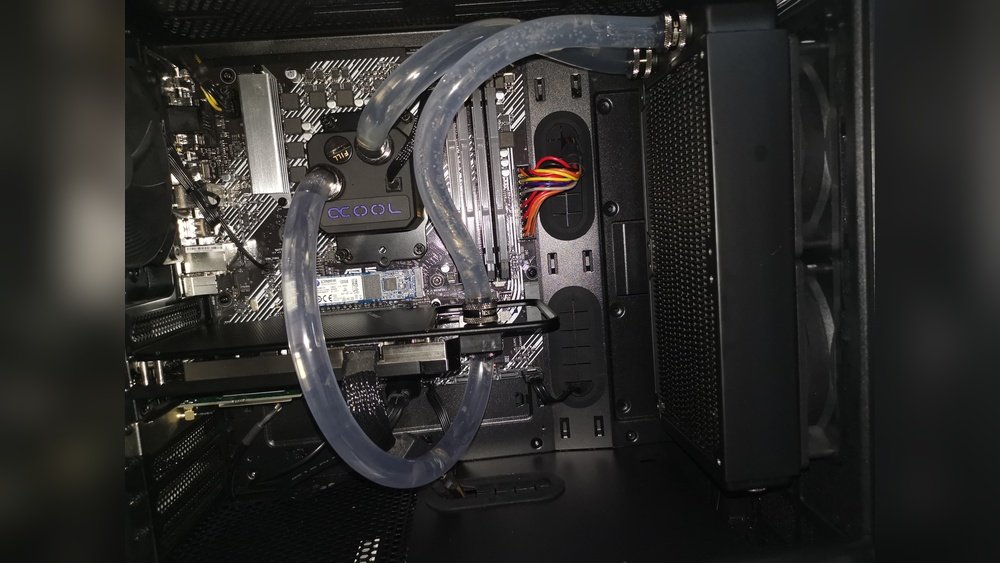
Use good cooling systems to lower GPU heat. Fans are common and help move hot air away. Liquid cooling is another option that works well for high temperatures. Choose a cooler that fits your GPU and case. Regular cleaning of fans and coolers also keeps them effective.
Proper Case Ventilation
Airflow inside your PC case is very important. Make sure there are enough intake and exhaust fans. Keep cables organized to avoid blocking air. A case with good ventilation helps cool all parts, not just the GPU. This reduces heat build-up and keeps the GPU safe.
Thermal Paste Maintenance
Thermal paste helps transfer heat from GPU to cooler. Old or dried paste loses its power to cool well. Replace the thermal paste every 1-2 years or if temperatures rise. Use good quality paste and apply it correctly. This simple step improves cooling and protects your GPU.
Monitoring And Managing Gpu Heat
Keeping your GPU cool is important for its health and performance. High temperatures can slow down your graphics card or cause damage over time. Monitoring and managing GPU heat helps avoid these problems. It also keeps your computer running smoothly during heavy tasks like gaming or video editing.
Several ways exist to track and control GPU temperature. These methods help you maintain safe heat levels. They also extend the life of your GPU and improve stability.
Software Tools For Temperature Tracking
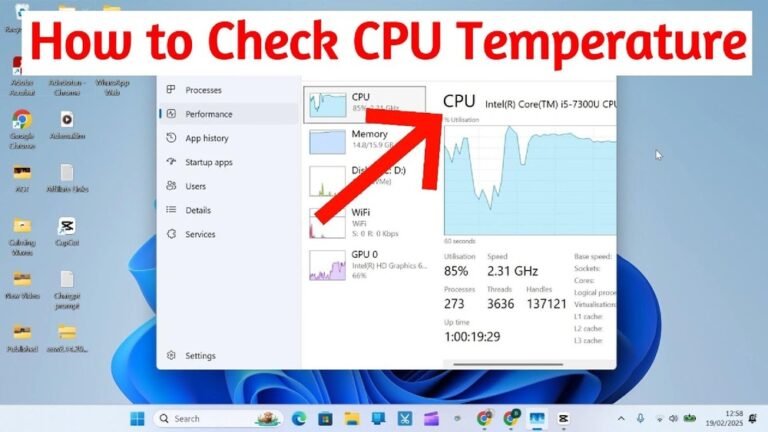
Use software to check your GPU temperature easily. Programs like MSI Afterburner, HWMonitor, and GPU-Z show real-time data. These tools display temperature, fan speed, and usage. They send alerts if your GPU gets too hot. This info helps you act before damage occurs.
Adjusting Fan Speeds
Fans cool your GPU by moving air over hot parts. Adjusting fan speeds can reduce heat effectively. Many GPUs let you set fan curves through software. Increasing fan speed lowers temperature but may increase noise. Find a balance between cooling and quietness that suits you.
Undervolting And Underclocking Tips
Undervolting lowers GPU voltage to reduce heat and power use. It keeps performance stable while generating less heat. Underclocking slows down the GPU clock speed to cut temperature. Both methods need careful testing to avoid crashes. Use trusted guides and software for safe adjustments.
When To Worry About Gpu Temperature
Knowing when to worry about GPU temperature is important for your computer’s health. A GPU running too hot can cause damage and slow down your system. Understanding the signs and taking action early helps keep your GPU safe and working well.
Temperatures around 70°C are usually safe for most GPUs. But if the temperature rises higher or stays hot for long times, it can be a problem. Watch your GPU’s behavior and temperature to avoid issues.
Signs Of Overheating
Overheating GPUs can cause several signs. Your computer may freeze or crash suddenly. You might see strange lines or colors on the screen. The fan noise can get louder as it tries to cool the GPU. Sometimes, the system slows down during games or heavy tasks. These signs mean your GPU could be too hot.
Preventive Actions
Keep your GPU cool by cleaning dust from fans and vents. Make sure your computer case has good airflow. Using extra fans can help lower the temperature. Avoid running too many programs at once. Lowering graphics settings in games reduces GPU load. Monitoring temperature with software helps catch problems early. Acting fast keeps your GPU safe and extends its life.
Credit: www.reddit.com
Frequently Asked Questions
Is 70c Safe For A Gpu During Gaming?
Yes, 70°C is generally safe for a GPU under load. Most GPUs are designed to operate safely up to 85-90°C. Keeping the temperature around 70°C ensures stable performance without overheating or throttling.
What Causes A Gpu To Reach 70c Temperature?
High workload, poor airflow, and ambient room temperature can raise GPU temps. Intensive gaming or rendering tasks push the GPU harder, increasing heat generation.
Does 70c Reduce Gpu Lifespan?
No, 70°C is within safe operating limits and won’t harm your GPU. Consistent temperatures above 85°C over time may reduce lifespan, but 70°C is considered normal.
Should I Worry If My Gpu Hits 70c?
Generally, no. 70°C is typical under heavy use and not a cause for concern. Monitor temps regularly and ensure good case ventilation to maintain safe GPU temperatures.
Conclusion
A GPU temperature of 70°C is usually safe for most cards. It shows your GPU works hard but stays within limits. Keeping your computer clean helps keep temps down. Good airflow inside your case matters a lot. Watch your GPU temps during heavy use.
If temperatures rise much higher, take action. Cooling can protect your GPU and extend its life. Remember, a warm GPU is normal but not too hot. Stay aware, and your system will run smoothly.