

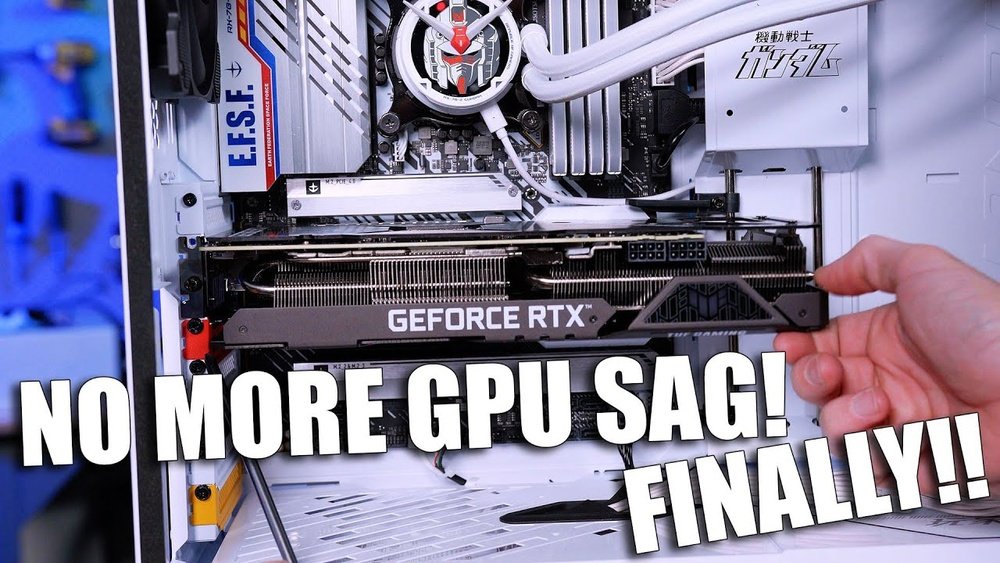
Have you noticed your graphics card slowly drooping inside your PC case? That sinking feeling is called GPU sag, and it can cause serious problems over time.
If you want to keep your computer running smoothly and avoid costly damage, you need to act now. You’ll discover simple and effective ways to stop your GPU from sagging. Keep reading to protect your investment and boost your PC’s performance!
Causes Of Gpu Sag
GPU sag is a common issue that affects many PC builders. It happens when the graphics card bends or droops inside the case. This bending can cause damage to the card or motherboard. Understanding what causes GPU sag helps prevent it and keeps your PC safe.
Weight And Size Factors
Graphics cards have grown larger and heavier over time. Big GPUs put more pressure on the slot that holds them. Heavy cards can slowly bend downward because the support is not strong enough. Long cards also have more leverage, which increases sag risk. Small or light GPUs usually do not sag as much.
Case Design Impact
The design of your PC case affects GPU support. Some cases have weak or no support for heavy graphics cards. Cases with only vertical slots let the card hang freely. Cases with poor airflow can also trap heat, making the GPU sag worse. A well-designed case provides better stability and support.
Thermal Effects
Heat causes metal parts in the GPU to expand. When parts heat up, they become softer and less rigid. This softening can increase the bending of the card over time. Poor cooling makes thermal effects worse. Keeping the GPU cool helps maintain its shape and reduces sagging risks.

Credit: www.reddit.com
Signs Of Gpu Sag
GPU sag happens when the graphics card bends or droops inside the computer case. This can cause problems over time. Knowing the signs of GPU sag helps you spot it early. Catching it soon can protect your hardware and keep your PC running well.
Here are some common signs to watch for.
Visual Indicators
Look closely at your graphics card inside the case. Notice any tilt or bending? The card should sit straight and level. If it leans down or sags on one side, that is a clear sign. Check the PCIe slot area for stress marks or gaps. These may show the card is pulling on the slot.
Performance Issues
GPU sag can affect how the card works. You might see lower frame rates or stuttering in games. The card may run hotter than usual due to poor airflow. Sometimes the screen flickers or shows artifacts. These issues can hint at a loose or stressed card.
Potential Damage
Over time, sag can cause serious harm. The PCB or circuit board may crack. The PCIe slot can get damaged or loosened. This leads to poor connection and hardware failure. Sagging can also stress the GPU cooler, reducing its lifespan. Fixing sag early helps avoid costly repairs.
Basic Prevention Tips
Preventing GPU sag is important to protect your graphics card and keep your PC stable. Simple steps can help avoid damage and improve your system’s look. Follow basic tips to keep your GPU secure and upright.
Proper Installation Techniques
Start by handling the GPU carefully. Align the card straight with the PCIe slot. Push gently but firmly until it clicks. Avoid forcing the card, which can cause bending. Use screws to fix the GPU to the case. This adds support and stops movement.
Optimal Case Orientation
Place your PC case on a flat, stable surface. Keep the case upright to reduce strain on the GPU. Avoid laying the case on its side for long periods. This helps the GPU stay in place and reduces sag risk.
Regular Maintenance
Check your GPU position every few months. Tighten screws if they become loose. Clean dust from the GPU and the slot to keep good contact. Use a support bracket or stand if sag starts. Small checks stop big problems later.

Credit: www.reddit.com
Support Solutions
GPU sag happens when the graphics card bends down inside the case. This can cause damage to the card or the motherboard slot. Support solutions stop this bending. They keep the GPU straight and safe. Here are some popular ways to support your GPU.
Gpu Support Brackets
GPU support brackets are made to hold the graphics card firmly. They attach to the case or the card itself. These brackets stop the card from sagging over time. Many brackets come with adjustable parts. This helps fit different GPU sizes and weights. Installing a bracket is quick and simple. It gives your GPU solid support without extra tools.
Diy Support Options
DIY support options use things you already have at home. Items like Lego blocks, small wood pieces, or thick plastic can work well. These supports sit under the GPU to hold it up. Make sure your DIY support is stable and won’t slip. It should not block fans or airflow. DIY solutions are cheap and easy to customize.
Adjustable Stands
Adjustable stands offer flexible GPU support. They can change height and angle to fit your setup perfectly. These stands often have rubber feet to prevent slipping. Some models include soft padding to protect the card’s surface. Adjustable stands are good for heavy GPUs or unique case layouts. They provide steady support and help keep the GPU level.
Upgrading For Stability
Upgrading your PC can help stop GPU sag. Choosing the right parts improves stability and protects your hardware. You can make smart upgrades to keep your graphics card steady and safe.
Choosing Lightweight Gpus
Lightweight GPUs put less stress on the motherboard. They reduce the chance of sagging over time. Select models with smaller heatsinks and simpler designs. These cards fit well in most cases without extra support.
Case Upgrades
A sturdy case adds strong support for your GPU. Larger cases offer more space for proper mounting. Look for cases with reinforced GPU brackets or additional support points. Good airflow cases help too, keeping components cool and stable.
Enhanced Cooling Systems
Better cooling lowers GPU heat, reducing warping risks. Use fans or liquid coolers designed for your GPU model. Cooler temperatures keep the card rigid and firm. This prevents the card from bending or sagging during use.
Long-term Care Practices
Long-term care practices help keep your GPU stable and safe. Regular attention stops sag from damaging your card or motherboard. Small steps make a big difference over time. Protect your investment and keep your PC running well.
Routine Inspections
Check your GPU often for signs of sag or stress. Look at the card from different angles to spot any bend. Tighten screws if they get loose. Early checks catch problems before they grow.
Cable Management
Arrange cables neatly to avoid extra weight on the GPU. Use ties or clips to keep cables away from the card. This reduces pull on the GPU and lowers sag risk. Clean cables make airflow better too.
Environmental Considerations
Keep your PC in a cool, dry place. Heat and moisture can weaken GPU support over time. Avoid placing your PC where it gets direct sunlight. A stable environment helps your GPU stay strong and lasts longer.
Credit: www.reddit.com
Frequently Asked Questions
What Causes Gpu Sag In Graphics Cards?
GPU sag happens due to the heavy weight of the graphics card. Over time, the card bends downwards inside the PC case. This occurs because of insufficient support or mounting, causing strain on the PCIe slot and potential hardware damage.
How Can I Support My Gpu To Prevent Sag?
Use a GPU support bracket or stand to hold the card upright. These accessories provide extra stability and reduce strain on the slot. Additionally, proper cable management can prevent pulling and help maintain GPU alignment.
Is Gpu Sag Harmful To My Pc Performance?
Yes, GPU sag can lead to connection issues and damage the PCIe slot. It may cause system instability, crashes, or permanent hardware failure. Preventing sag helps maintain optimal GPU performance and prolongs the lifespan of your components.
Can I Fix Gpu Sag Without Replacing Parts?
Yes, you can fix GPU sag by installing a support bracket or using DIY methods like zip ties or small props. These inexpensive solutions help realign the GPU and prevent further bending without needing costly replacements.
Conclusion
Preventing GPU sag keeps your computer safe and working well. Use support brackets or stands to hold your graphics card. Tighten screws and check them often for a secure fit. Avoid heavy cases that put extra weight on the GPU.
Small steps protect your hardware and save repair costs. A strong setup helps your PC run smoothly for years. Take care of your GPU, and enjoy better performance every day. Simple actions make a big difference in the long run.
