Is It Ok If Gpu is at 100%: Risks and Safe Usage Tips
Is your GPU hitting 100% and you’re wondering if that’s a problem? You’re not alone.
Many people worry when their graphics card runs at full capacity. But is it really something to stress about? Understanding what it means when your GPU is maxed out can help you keep your computer safe and running smoothly. Keep reading to find out if your GPU running at 100% is okay and what you should do next.
Gpu Usage Explained
GPU usage shows how much your graphics card is working. It measures the percentage of its power in use. Understanding this helps you know if your computer runs well or faces problems.
High GPU usage can mean different things. Sometimes it is normal, sometimes it signals an issue. Let’s explore what 100% GPU usage means and when high usage is okay.
What 100% Usage Means
100% GPU usage means your graphics card is fully busy. It uses all its power to perform tasks. This usually happens during heavy work like gaming or video editing.
It does not always mean a problem. The GPU is doing its job at full speed. But constant 100% usage without heavy tasks can cause overheating or slowdowns.
When High Usage Is Normal
High GPU usage is normal during demanding tasks. Playing modern games or running 3D software needs full GPU power. This helps deliver smooth graphics and fast processing.
Video rendering and mining also push GPU to 100%. In these cases, full usage is expected and safe if your cooling works well.
Risks Of Constant 100% Usage
Running your GPU at 100% constantly has its risks. It may seem like your computer is working well, but this can cause problems. Understanding these risks helps you protect your hardware and keep your system stable.
Overheating Issues
High GPU usage creates a lot of heat. If the cooling system is not strong, the GPU can overheat. Overheating may cause sudden shutdowns or damage parts inside. Fans and heat sinks need to work well to avoid this.
Reduced Hardware Lifespan
Constant full load wears out the GPU faster. The chips and circuits degrade over time. This means your GPU may stop working sooner than expected. Taking breaks from heavy use can help extend its life.
Potential Performance Drops
At full load, the GPU can slow down to cool off. This is called thermal throttling. It lowers speed and causes lag or stutter in games and apps. Maintaining a balanced workload keeps performance steady.
Monitoring Gpu Health
Monitoring GPU health is important for keeping your computer safe. A GPU running at 100% can work fine for a while. But it can also cause problems if it stays high too long. Checking your GPU’s health helps you avoid damage and slowdowns.
Tracking GPU usage and temperature shows how hard it is working. You can see if it is too hot or stressed. This helps you act early and keep your system stable.
Tools To Track Usage And Temperature
Many free tools show GPU data in real time. Programs like MSI Afterburner and HWMonitor display usage and temperature. They give clear numbers and graphs. You can watch your GPU while gaming or working. This helps you notice changes quickly.
Signs Of Gpu Stress
High temperatures over 85°C mean your GPU is under stress. Frequent crashes, freezing, or slow performance also signal problems. Loud fan noise and graphic glitches are warning signs. Noticing these early can prevent bigger damage.

Credit: www.reddit.com
Safe Practices For Gpu Usage
Using a GPU at 100% can be normal during heavy tasks. Still, keeping it safe is very important. Safe practices help your GPU last longer. They also prevent overheating and crashes. Following simple steps can protect your hardware and improve performance.
Optimizing Cooling Solutions
Good cooling stops your GPU from getting too hot. Use fans or liquid cooling to keep air flowing. Clean dust from vents and fans often. Place your PC where it gets fresh air. Avoid blocking vents with other objects.
Managing Workloads Effectively
Running many tasks at once can push your GPU hard. Close apps you do not need. Lower graphics settings in games to reduce load. Take breaks between heavy use to cool down the GPU. Balance work to avoid long periods at full power.
Keeping Drivers Updated
GPU drivers control how your hardware works. Updated drivers fix bugs and improve efficiency. Check for driver updates regularly. Use official websites or trusted software for updates. Updated drivers keep your GPU stable and safe.
When To Be Concerned
It is normal for a GPU to reach 100% usage during heavy tasks. Still, some signs show when this high usage might be a problem. Watch for these signs to protect your computer and keep it working well.
Unexpected Usage Spikes
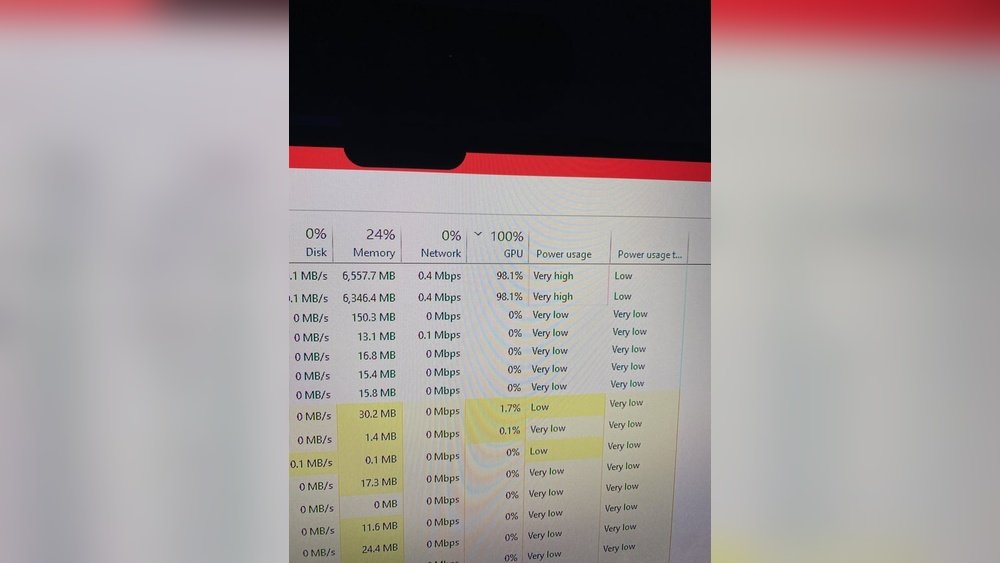
A sudden rise to 100% GPU use without running demanding programs is unusual. Background apps or malware might cause this. Check your task manager to find which process uses the GPU. Continuous spikes can slow your system and harm your hardware.
Unusual Noises Or Artifacts
Strange sounds from your GPU fan or weird screen images are red flags. High GPU usage can cause overheating and damage components. Artifacts like lines or colors on the screen mean the GPU struggles. Stop using the system and cool it down if this happens.
System Instability
Crashes, freezes, or sudden restarts often link to GPU stress. Running at full load for long can cause errors in games or apps. Watch for these problems during intense GPU use. Update drivers and check cooling systems to avoid damage and improve stability.

Credit: www.reddit.com

Credit: www.reddit.com
Frequently Asked Questions
Is It Normal For Gpu To Reach 100% Usage?
Yes, GPU hitting 100% usage is normal during heavy tasks like gaming or rendering. It means your GPU is fully utilized and working efficiently.
Does 100% Gpu Usage Damage The Hardware?
No, 100% GPU usage itself does not damage your GPU if temperatures stay within safe limits. Proper cooling is essential to prevent overheating.
How To Reduce Gpu Usage When It’s At 100%?
To lower GPU usage, close unnecessary background apps, reduce game settings, or update drivers. Improving cooling can also help maintain optimal performance.
Can Gpu Run At 100% Without Overheating?
Yes, modern GPUs are designed to handle 100% usage safely with adequate cooling and proper airflow inside your PC case.
Conclusion
A GPU running at 100% can be normal during heavy tasks. It shows the card is working hard and using full power. Still, constant max usage might cause heat and wear over time. Keep your PC cool and check fan performance.
Lower usage helps the GPU last longer. Watch for crashes or slowdowns as warning signs. Understanding GPU load helps you balance performance and safety. Stay aware, and your system will run smoothly for years.