Is 50 Degrees Celsius Hot for a Gpu: Safe or Risky Temperature?
Are you worried about your GPU running at 50 degrees Celsius? You might be wondering if that’s too hot or perfectly fine.
Understanding your GPU’s temperature is key to keeping your computer safe and performing at its best. You’ll discover why temperature matters, what 50 degrees means for your GPU, and how to keep it cool. Keep reading to learn how to protect your investment and get the most from your graphics card.
Gpu Temperature Basics
Understanding GPU temperature is important for keeping your computer safe. The GPU works hard to show images and videos smoothly. This work creates heat. Too much heat can cause problems.
Knowing what temperature is normal helps you keep your GPU healthy. It also helps you know when your computer needs better cooling or care.
Normal Operating Range
Most GPUs run safely between 30 and 85 degrees Celsius. Idle or light use usually keeps temperatures near 30 to 50 degrees. Heavy tasks like gaming or video editing push temperatures higher, around 70 to 85 degrees.
Some models can handle even more heat but staying below 85 degrees is best. Running at 50 degrees Celsius is quite cool and safe for a GPU.
Factors Affecting Gpu Heat
Several things change how hot a GPU gets. The task your GPU is doing is the biggest factor. Simple tasks create less heat. Games and rendering use more power and heat the GPU more.
Cooling systems also affect temperature. Good fans and clean vents keep the GPU cool. Dust and poor airflow make the GPU hotter. Room temperature matters, too. Hot rooms raise GPU temperature.

Credit: www.reddit.com
Is 50°c Hot For A Gpu?
Is 50°C hot for a GPU? Many users wonder if this temperature signals a problem. Understanding GPU temperatures helps keep your device safe and working well. Let’s explore what 50°C means in the world of graphics cards.
Comparison With Typical Temperatures
Most GPUs run between 30°C and 85°C. Idle temperatures often sit around 30°C to 40°C. During gaming or heavy use, they rise to 70°C or higher. At 50°C, the GPU is relatively cool. It is far from any danger zone. This temperature is normal for light to moderate use.
Impact On Performance
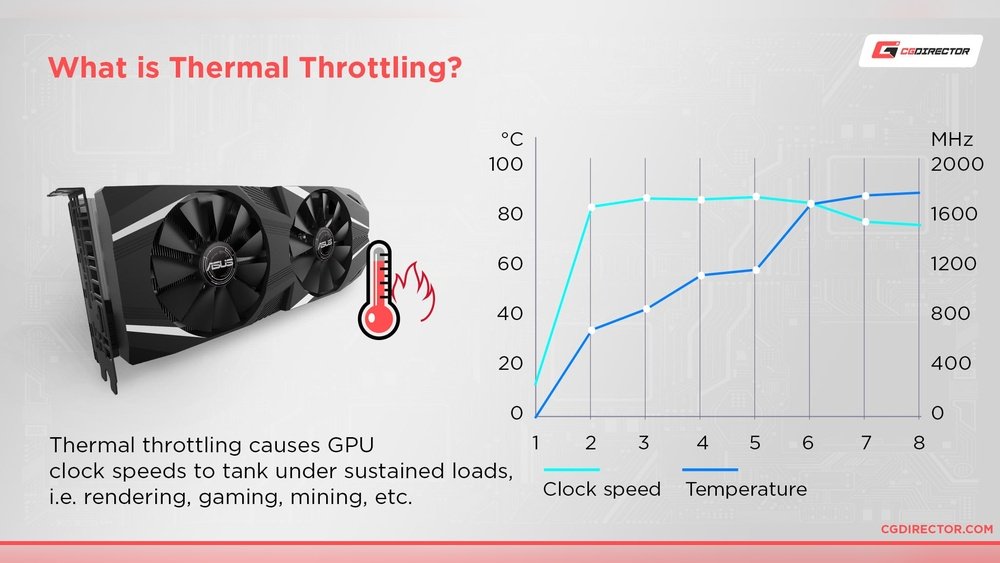
At 50°C, the GPU runs smoothly. There is no risk of thermal throttling. This means the GPU keeps full speed and power. Performance stays steady and reliable. The GPU’s lifespan is also safe at this temperature. No need to worry about damage or overheating here.
Safety Of 50°c For Gpus
Fifty degrees Celsius is a common temperature for many GPUs during light to moderate use. It shows the GPU is working but not under heavy stress. This temperature is usually safe and does not harm the graphics card. Understanding if 50°C is hot depends on the GPU’s design and use.
Manufacturer Guidelines
GPU makers provide temperature ranges for safe use. Most say 50°C is well below their warning level. They design GPUs to handle higher temperatures safely. Users should check the official specs of their GPU model. Following these guidelines helps keep the GPU healthy.
Thermal Thresholds And Limits
GPUs have maximum temperatures they must not exceed. Many modern GPUs can work safely up to 85°C or more. Fifty degrees Celsius is far below these critical limits. Staying under 70°C usually ensures longer GPU life. Proper cooling keeps the temperature in the safe zone.
Credit: www.reddit.com
Risks Of High Gpu Temperatures
High GPU temperatures can cause serious problems for your computer. Keeping your GPU cool is important to avoid damage and keep it working well. When the GPU runs too hot, it can affect how it works and how long it lasts.
Understanding the risks of high GPU temperatures helps you protect your hardware and avoid costly repairs.
Potential Damage
Heat can harm the GPU’s internal parts. Overheating may cause the GPU to crash or freeze during use. It can also lead to permanent damage to the graphics chip. This damage might stop the GPU from working at all. High temperatures can also affect other parts inside your computer case.
Reduced Lifespan
Running a GPU hot for a long time shortens its life. Heat speeds up wear on electronic components. The GPU may fail sooner than expected. Lower lifespan means you will need to replace it more often. Cooling your GPU well helps it last longer and work better.
Cooling Solutions
Cooling solutions keep your GPU safe and running well. They stop it from getting too hot. Good cooling helps your GPU last longer. It also keeps your computer quiet. There are different types of cooling for GPUs. Each has its own way of controlling heat.
Air Cooling
Air cooling uses fans to move air over the GPU. This helps carry heat away. Most GPUs come with built-in air coolers. They are easy to use and cost less. Air cooling works well for most users. It keeps temperatures under control without much noise.
Liquid Cooling
Liquid cooling uses water or special liquid to cool the GPU. The liquid flows through tubes and a radiator. It takes heat away faster than air cooling. Liquid cooling is quieter and cools better. It is good for high-performance or overclocked GPUs. Installation is harder and costs more than air cooling.
Thermal Paste Importance
Thermal paste sits between the GPU and cooler. It fills tiny gaps to help heat move better. Good thermal paste improves cooling efficiency a lot. Old or dry paste can raise GPU temperatures. Reapplying thermal paste every few years helps keep the GPU cool. It is an easy step to improve your cooling system.

Credit: www.reddit.com
Monitoring And Managing Gpu Heat
Monitoring and managing GPU heat is key to keeping your graphics card safe and working well. A GPU running too hot can slow down or stop working. Keeping the temperature in check helps the GPU last longer and perform better. Simple steps and tools make this task easier for everyone.
Software Tools
Many free and paid programs show GPU temperature in real time. These tools alert you if the GPU gets too hot. Popular options include MSI Afterburner and HWMonitor. They also let you control fan speeds to cool the GPU faster. Regular checks help spot heat issues early.
Best Practices
Keep your PC clean inside to help air flow. Dust blocks fans and raises temperature. Use a cool, well-ventilated room for your computer. Avoid placing the PC near heat sources. Set fan curves in software for better cooling. Lowering graphic settings can reduce heat too.
Frequently Asked Questions
Is 50 Degrees Celsius A Safe Gpu Temperature?
Yes, 50°C is generally safe for GPUs during normal use. Most GPUs operate safely between 30°C and 85°C. Maintaining around 50°C indicates good cooling and no overheating risks.
Can 50°c Harm My Gpu Performance?
No, 50°C won’t harm GPU performance. It is a moderate temperature that ensures stable operations. GPUs usually throttle performance only at temperatures above 85°C to prevent damage.
How To Keep Gpu Temperature Around 50°c?
Keep your PC well-ventilated and clean dust regularly. Use quality thermal paste and ensure fans work properly. These steps help maintain GPU temperature near 50°C for optimal performance.
Is 50°c Hot For A Gaming Gpu?
No, 50°C is not hot for a gaming GPU. During gaming, GPUs often reach 60-75°C. 50°C means your GPU runs cool, which is ideal for gaming longevity.
Conclusion
A GPU temperature of 50 degrees Celsius is generally safe and normal. Most graphics cards work well under this heat without damage. Keeping your GPU cool helps it run smoothly and last longer. Regular cleaning and good airflow can prevent higher temperatures.
Watch your GPU’s temperature during heavy use to avoid problems. Remember, 50°C is not too hot for most GPUs. This means your computer is likely running efficiently and safely.