Is Call of Duty Cpu Or Gpu Intensive: Ultimate Performance Guide
Are you curious whether Call of Duty puts more strain on your CPU or GPU? Knowing this can help you get the best gaming experience without wasting money on the wrong upgrades.
Whether you want smoother gameplay, higher frame rates, or better graphics, understanding which part of your computer does the heavy lifting is key. You’ll discover exactly where Call of Duty demands power, so you can make smart choices and enjoy every match to the fullest.
Keep reading to find out what really drives your game’s performance.
Game Performance Factors
Game performance in Call of Duty depends on several key factors. These components work together to provide smooth and fast gameplay. Understanding each part helps players know what hardware upgrades matter most.
The CPU, GPU, memory, and storage all influence how well the game runs. Each has a specific role in processing the game’s data and graphics. Let’s break down these parts to see their impact.
Role Of Cpu In Call Of Duty
The CPU handles game logic, physics, and AI calculations. It processes player inputs and controls the game world’s rules. A strong CPU reduces lag and keeps the gameplay smooth. Call of Duty often requires fast CPU speeds for better performance. Multi-core processors help run multiple tasks at once, improving frame rates. Slow CPUs can cause stutters and delay in actions.
Impact Of Gpu On Gameplay
The GPU renders all the graphics you see on the screen. It creates textures, lighting, and shadows that make the game look real. A powerful GPU produces higher frame rates and better image quality. Call of Duty uses detailed environments that need strong graphics cards. Upgrading the GPU improves visual effects and keeps gameplay fluid. Weak GPUs may cause lower resolutions and choppy images.
Memory And Storage Influence
Memory, or RAM, stores game data for quick access during play. More RAM allows the game to load large maps and textures fast. Insufficient RAM can lead to long load times and freezes. Storage type also matters; SSDs load game files quicker than traditional hard drives. Fast storage reduces wait times and improves overall game responsiveness. Both memory and storage affect how smoothly Call of Duty runs.
Cpu Demands In Call Of Duty
Call of Duty puts significant demands on the CPU. The game processes many tasks that rely on the processor. These include AI behavior, physics calculations, and game logic. Understanding how the CPU handles these tasks helps optimize gameplay and performance.
Processor Core Utilization
Call of Duty uses multiple processor cores. It spreads tasks across cores to improve efficiency. However, it does not use all cores equally. Some cores handle more work, especially for game logic and AI. More cores can help, but strong individual cores are also important.
Clock Speed Importance
Clock speed affects how fast the CPU processes data. Higher clock speeds allow the game to run smoother. Call of Duty benefits from faster clock speeds during intense moments. This helps reduce lag and improves responsiveness. A fast CPU clock boosts overall gameplay experience.
Multithreading Effects
The game supports multithreading to split tasks into smaller parts. This lets the CPU work on many things at once. Multithreading improves frame rates and reduces stutter. Efficient multithreading depends on both the CPU and game optimization. More threads can lead to better performance but only if the game uses them well.
Gpu Requirements
Call of Duty demands a strong graphics card for smooth gameplay. The GPU handles all visual details and effects. A weak GPU can cause lag and poor image quality. Understanding GPU needs helps players choose the right hardware.
The GPU must work hard to display the game’s complex scenes. Different settings and resolutions change how much power the GPU requires. Knowing these factors helps balance performance and visuals.
Graphics Settings And Resolution
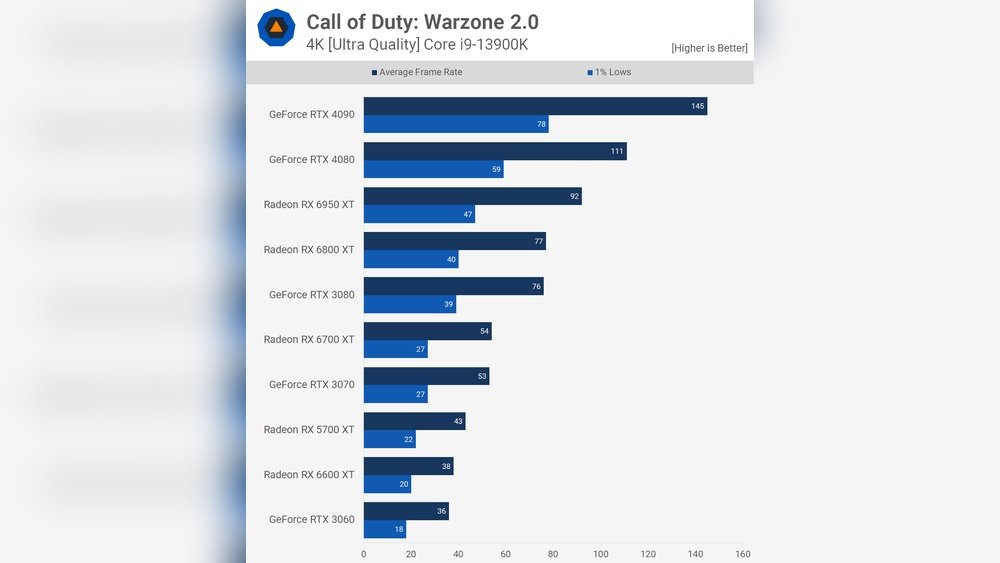
Higher graphics settings increase the load on the GPU. Textures, shadows, and special effects use more GPU power. Playing at 1080p uses less GPU power than 4K resolution. Reducing settings can improve frame rates on weaker GPUs.
Frame Rate Targets
Higher frame rates demand more from the GPU. A target of 60 FPS requires more GPU power than 30 FPS. Competitive players often aim for 120 FPS or more. GPUs with higher performance keep frame rates stable at high settings.
Vram Usage
Call of Duty uses a lot of video memory (VRAM). Higher resolutions and detailed textures need more VRAM. Running out of VRAM causes stuttering and texture issues. At least 6GB of VRAM is recommended for smooth gameplay at 1080p and higher.

Credit: softwareg.com.au
Balancing Cpu And Gpu
Balancing the CPU and GPU is key to a smooth Call of Duty experience. Both parts work together to deliver fast gameplay and sharp graphics. If one part is too weak, the game may lag or stutter. Understanding how to balance these parts helps improve performance and enjoyment.
Identifying Bottlenecks
A bottleneck happens when one part slows down the other. For example, a slow CPU can limit a powerful GPU. Or a weak GPU can stop a strong CPU from showing good graphics. Use tools like Task Manager or third-party apps to check which part is under stress. Watch CPU and GPU usage during gameplay. High usage on one and low on the other shows a bottleneck.
Optimizing System Configuration
Set game settings to match your hardware. Lower CPU-heavy options like shadows or physics. Reduce GPU load by lowering resolution or texture quality. Close background apps to free CPU power. Update drivers to improve compatibility and speed. Adjust power settings for better performance. A balanced setup runs smoother and feels more responsive.
Upgrading Hardware Components
Upgrades help fix bottlenecks and boost performance. Upgrade the CPU if it struggles with game logic or AI. Get a better GPU for sharper visuals and faster frame rates. Add more RAM if the game uses a lot of memory. Balance the parts to avoid new bottlenecks. Choose components that work well together for the best results.
Performance Testing Methods
Testing the performance of Call of Duty helps understand if it relies more on the CPU or GPU. Different methods show how well the game runs on various hardware setups. These tests reveal the impact of each component on gameplay smoothness and graphics quality.
Benchmarking Tools
Benchmarking tools measure game performance under controlled conditions. They provide numbers like frames per second (FPS) and system load. Popular tools include 3DMark and MSI Afterburner. These tools help compare CPU and GPU usage during gameplay. Results guide gamers on hardware upgrades.
In-game Performance Metrics
Call of Duty has built-in performance metrics. Players can view FPS and frame time data while playing. These metrics show real-time stress on the CPU and GPU. They help identify which component limits game speed. Easy to access and useful for quick checks.
Real-world Gameplay Tests
Real-world tests involve playing the game in various scenarios. Different maps and settings test CPU and GPU demands. Recording performance during battles shows the true hardware load. These tests reflect everyday gaming conditions. They provide practical insights beyond synthetic benchmarks.

Credit: www.reddit.com
Tips For Smooth Gameplay
Playing Call of Duty smoothly depends on many factors. Optimizing your system helps avoid lag and stutter. Simple changes can make gameplay better and more fun. Focus on your computer’s parts and settings for the best experience.
Adjusting Graphics Settings
Lowering graphics settings reduces the load on your GPU. Set textures, shadows, and effects to medium or low. This change helps increase frame rates and reduce screen tearing. Turn off extra features like motion blur or depth of field. These tweaks improve smoothness without hurting the game’s look too much.
Background Process Management
Close apps and programs running in the background. These use CPU and memory that your game needs. Check your task manager and stop unnecessary processes. Disable automatic updates or downloads before playing. This frees up resources and keeps the game stable.
Driver And Software Updates
Keep your graphics card drivers up to date. New drivers fix bugs and improve performance. Update your operating system to patch security and system issues. Use the game’s latest version for better compatibility. These steps ensure your hardware and software work well together.
Future Trends In Call Of Duty Performance
Call of Duty continues to evolve with new updates and versions. The game’s performance depends on many factors. Understanding future trends helps players prepare their systems. These trends focus on game engines, hardware, and cloud gaming. Each plays a role in how well Call of Duty runs on PCs.
Performance improvements will shape gaming experiences. Both CPU and GPU demands may change. Here are some key trends to watch.
Upcoming Game Engine Improvements
Game engines are the heart of Call of Duty’s performance. Developers work to make engines more efficient. This means better graphics and smoother gameplay. New engines can reduce CPU load while using GPU power better. Expect better use of multi-core CPUs soon. This helps balance the load between CPU and GPU. Players will see improved frame rates and less lag.
Next-gen Hardware Impact
New CPUs and GPUs arrive every year. Next-gen hardware brings more power and speed. Call of Duty will use these new features to run better. Faster CPUs improve game logic and AI tasks. Advanced GPUs handle high-quality textures and effects. Using new hardware means higher settings and smoother play. Upgrading your system will boost your gaming experience.
Cloud Gaming Prospects
Cloud gaming is growing fast. It lets players stream games without strong hardware. Call of Duty may become easier to play on weak PCs. The game runs on powerful servers in the cloud. Players only need a good internet connection. This reduces the need for a strong CPU or GPU at home. Cloud gaming can change how people play Call of Duty worldwide.

Credit: digitalssync.com
Frequently Asked Questions
Is Call Of Duty More Cpu Or Gpu Intensive?
Call of Duty relies heavily on the GPU for rendering graphics and smooth gameplay. However, the CPU also plays a crucial role in handling game logic and AI. Overall, the game is more GPU intensive, especially at higher resolutions and settings.
How Does Cpu Impact Call Of Duty Performance?
The CPU manages game mechanics, AI, and physics calculations in Call of Duty. A faster CPU improves frame rates and responsiveness. It prevents bottlenecks that can limit GPU performance, especially in multiplayer modes with many players and complex environments.
What Gpu Specifications Are Ideal For Call Of Duty?
A modern GPU with at least 4GB VRAM, good clock speeds, and support for DirectX 12 is ideal for Call of Duty. Higher-end GPUs deliver better frame rates and visual quality at 1080p and 1440p resolutions, enhancing the overall gaming experience.
Can Upgrading Gpu Improve Call Of Duty Gameplay?
Yes, upgrading the GPU significantly boosts graphical performance and frame rates in Call of Duty. It allows higher settings and smoother gameplay. A strong GPU reduces stuttering and improves visual effects, especially in fast-paced action scenes.
Conclusion
Call of Duty demands both CPU and GPU power for smooth play. The CPU handles game logic and player actions quickly. The GPU renders graphics and effects with high detail. A strong balance between these parts gives the best experience.
Low CPU or GPU can cause lag or stutter. Upgrading one without the other might not improve performance. Choose parts that fit your budget and needs. This way, you enjoy better gameplay and visuals. Remember, both CPU and GPU matter in Call of Duty.