How to Remove a Cpu from Motherboard: Easy Steps for Beginners
Removing a CPU from your motherboard might sound tricky, but with the right steps, you can do it safely and easily. Whether you’re upgrading your computer or fixing a problem, knowing how to handle your CPU correctly is key.
In this guide, you’ll discover simple, clear instructions to take your CPU out without causing damage. Keep reading, and you’ll gain the confidence to tackle this task like a pro. Your computer’s heart is about to get some well-deserved attention!

Credit: www.youtube.com
Preparing Your Workspace
Preparing your workspace is the first step to safely remove a CPU from your motherboard. A clean, organized area helps prevent damage. You need enough space to work comfortably and keep all parts within reach.
A good setup reduces mistakes and speeds up the process. Before touching any hardware, make sure you have everything ready. Safety is key to protect both you and your computer parts.
Gathering Necessary Tools
Collect all tools before starting. A small screwdriver is often needed. Some CPUs require a specific tool or a plastic card to lift them out.
Have a clean cloth or anti-static mat to place the CPU on. Avoid using metal tools that can scratch or damage components.
Ensuring Static Safety
Static electricity can harm your CPU or motherboard. Use an anti-static wrist strap if available. Attach it to a grounded metal part.
If no strap is available, touch a metal part of the case to discharge static. Work on a non-carpeted surface to reduce static build-up.
Powering Down And Unplugging
Turn off your computer completely. Shut down the operating system first. Then unplug the power cable from the wall socket or power strip.
Disconnect all cables and peripherals. Double-check that no power is flowing to the motherboard before touching the CPU.
Accessing The Cpu
Accessing the CPU is the first step to remove it safely. You need to open your computer case carefully. This gives you clear space to work inside. It also helps avoid damage to parts. Knowing where the CPU sits is important. It sits on the motherboard, under the cooler. The cooler often looks like a fan or a metal block. Removing it is key to get to the CPU.
Removing The Case Panel
Start by turning off your computer. Unplug all cables for safety. Place the computer on a flat surface. Look for screws at the back of the case. These screws hold the panel in place. Use a screwdriver to remove them. Slide or lift the panel off gently. Set the panel aside where it won’t get lost. Now, you have a clear view inside the case.
Locating The Cpu And Cooler
The CPU sits in the center of the motherboard. It is under the large cooler. The cooler has a fan and metal fins or a heat sink. It keeps the CPU cool during work. The cooler may be fastened with screws or clips. Note how it attaches before removal. This helps when you put it back later. You are now ready to remove the cooler and access the CPU.
Detaching The Cpu Cooler
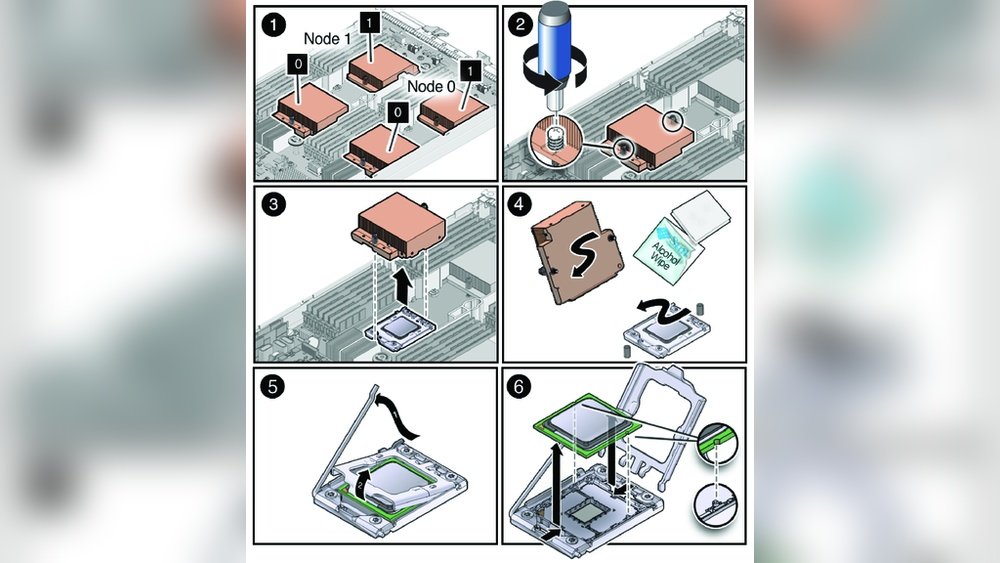
Detaching the CPU cooler is a key step before removing the CPU from the motherboard. The cooler keeps the CPU cool by transferring heat away. It often includes a fan and a heatsink. Removing it carefully protects the CPU and motherboard from damage. Follow simple steps to detach the cooler safely.
Disconnecting The Fan
First, find the fan cable connected to the motherboard. It usually plugs into a small header near the CPU socket. Gently pull the connector straight out. Avoid pulling the wires themselves to prevent damage. Set the fan cable aside once disconnected.
Unscrewing Or Unlocking The Cooler
Check how the cooler is attached to the motherboard. Some coolers use screws; others have clips or a locking lever. Use the right tool to remove screws carefully. For clips or levers, release them slowly without force. Keep all screws or clips safe for reassembly.
Removing The Cooler Gently
After loosening, the cooler may stick due to thermal paste. Twist the cooler gently side to side to break the seal. Lift the cooler straight up without pulling at an angle. Avoid sudden movements to protect the CPU and socket. Place the cooler on a soft surface after removal.

Credit: softwareg.com.au
Releasing The Cpu
Releasing the CPU from the motherboard is a delicate step. It needs care and patience to avoid damage. The CPU is held tightly in place by the socket lever. This lever must be unlocked gently before removing the processor. Following the right steps keeps your hardware safe.
Unlocking The Cpu Socket Lever
Locate the small metal lever next to the CPU socket. This lever locks the CPU in place. Gently push the lever down and away from the socket. Then lift it up carefully until it stands straight. Do not use force or rush this step. Unlocking the lever frees the CPU for removal.
Lifting The Cpu Carefully
After unlocking, the CPU will be loose but not free. Use your fingers to hold the CPU by its edges. Avoid touching the metal pins or contacts on the bottom. Slowly lift the CPU straight up from the socket. Keep the CPU level to prevent bending pins. Place the CPU on an anti-static surface once removed.
Handling And Storing The Cpu
Handling and storing a CPU carefully is very important. The CPU is a delicate part of the computer. Mishandling it can cause damage and stop it from working well. Proper care helps keep it safe and ready for use again.
Avoiding Damage To Pins
CPU pins are very thin and fragile. Touch them only by the edges. Do not press the pins or bend them. Always hold the CPU by its sides. Avoid dropping the CPU on hard surfaces. Bent or broken pins can stop the CPU from working.
Proper Storage Tips
Store the CPU in an anti-static container. This prevents static electricity damage. Keep the CPU in a dry and cool place. Avoid places with high heat or moisture. Place it on a soft, non-metal surface. Label the storage box for easy identification later.

Credit: www.youtube.com
Common Mistakes To Avoid
Removing a CPU from a motherboard requires care and attention. Many people make simple mistakes that cause damage. Avoiding these common errors saves time and money. Keep your CPU and motherboard safe by following the right steps.
Forcing Components
Never force the CPU or socket parts. CPUs fit in one way only. Forcing can bend pins or break the socket. Always check the alignment marks on the CPU and socket before lifting. Use gentle pressure and let the mechanism release naturally.
Ignoring Static Precautions
Static electricity can damage the CPU and motherboard. Always ground yourself before touching components. Use an anti-static wrist strap or touch a metal object. Avoid working on carpets or in dry rooms. Static damage is invisible but deadly to electronics.
Neglecting Thermal Paste Cleanup
Old thermal paste must be cleaned before removing the CPU. Dirty surfaces reduce cooling efficiency. Use isopropyl alcohol and a soft cloth to clean the paste gently. Never use sharp tools or water. A clean surface helps the new paste stick properly.
Frequently Asked Questions
How Do I Safely Remove A Cpu From Motherboard?
First, power off and unplug your PC. Open the case and unlock the CPU socket lever. Gently lift the CPU straight up, avoiding any bending of pins. Handle the CPU by its edges to prevent damage or contamination. Store it safely if needed.
What Tools Are Needed To Remove A Cpu?
Generally, no special tools are required to remove a CPU. You only need a screwdriver to open the PC case. The CPU socket lever is designed for hand operation. Avoid using force or metal tools that may damage the CPU or motherboard.
Can I Remove Cpu Without Damaging The Motherboard?
Yes, you can if you follow proper steps. Power down and unplug your PC first. Unlock the CPU socket lever carefully. Pull the CPU straight up without twisting or bending. Avoid touching the socket pins to prevent damage or static discharge.
How To Handle Cpu After Removal?
Handle the CPU by its edges only. Avoid touching the pins or contacts to prevent damage. Place the CPU on an anti-static surface or its original packaging. Keep it away from moisture, dust, and static electricity for safety.
Conclusion
Removing a CPU from a motherboard is simple with care and the right steps. Always turn off and unplug your computer first. Gently unlock the CPU socket and lift the processor straight up. Avoid touching the pins or the CPU surface.
Take your time to prevent any damage. Cleaning and storing the CPU properly keeps it safe for later use. Following these steps makes the process smooth and safe. Now, you can confidently remove your CPU without worry.