

Are you wondering whether Valorant puts more strain on your CPU or GPU? Knowing this can help you get the best performance and smoother gameplay.
If your game is lagging or stuttering, understanding which part of your computer handles the heavy lifting is key to fixing the problem. You’ll discover exactly how Valorant uses your hardware and what that means for your setup. Keep reading to find out how to boost your game and get the edge over your opponents.

Credit: www.answeroverflow.com
Valorant Performance Basics
Valorant is a popular shooter that many players enjoy. To play smoothly, your computer must handle the game well. Understanding what parts of your PC affect performance helps improve gameplay. Performance depends on both your CPU and GPU, but how much each matters varies.
This section explains the main points about Valorant’s performance. Learn about the game engine and how well the game is optimized. Also, check the system requirements to see what hardware suits Valorant best.
Game Engine And Optimization
Valorant runs on the Unreal Engine 4. This engine is designed to balance graphics and performance. The developers optimized Valorant for competitive play. This means the game can run well on many computers.
The engine uses the CPU to handle game logic and player actions. The GPU works on rendering the graphics and effects. Valorant’s design favors faster CPU speeds for smooth gameplay. The optimization also keeps the game light for mid-range hardware.
System Requirements Overview
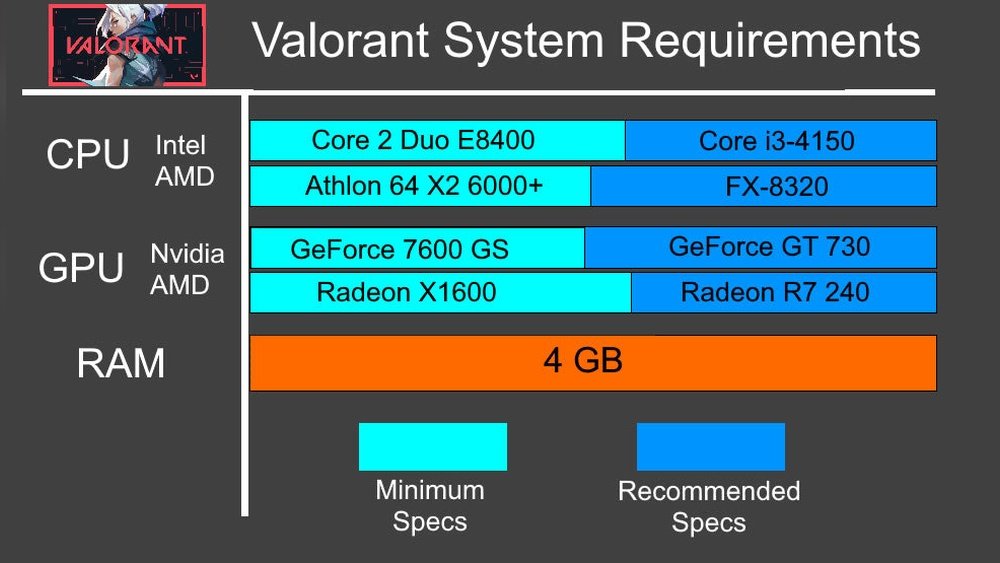
Valorant needs a decent CPU and GPU to run smoothly. The minimum CPU is an Intel Core 2 Duo or AMD Athlon 200GE. The minimum GPU is an Intel HD 3000 or similar. These specs allow the game to run at low settings.
Recommended specs include a faster CPU like Intel i3 or AMD Ryzen 3. The GPU should be at least Nvidia GeForce GT 730 or AMD Radeon R7 240. These help run Valorant at higher settings and better frame rates.
RAM also matters, with 4GB minimum and 8GB recommended. The game is not very demanding but benefits from balanced hardware. Both CPU and GPU influence smooth gameplay in Valorant.
Credit: softwareg.com.au
Cpu Impact On Valorant
The CPU plays a key role in Valorant’s performance. It handles many tasks beyond just running the game. The CPU processes game logic, player movements, and network data. These tasks must be done quickly to keep the game smooth and responsive. A slow or weak CPU can cause lag, stutters, and input delays.
Valorant is designed to run well on mid-range hardware. Still, the CPU’s power affects frame rates and overall gameplay. Understanding how the CPU impacts Valorant helps players make smart hardware choices. This section explains the CPU’s role, what happens with bottlenecks, and the best CPU specs for Valorant.
Role Of Cpu In Gameplay
The CPU processes player inputs and game rules. It calculates where each player moves and shoots. It also handles the game’s physics and enemy AI. This work happens every frame to keep the game real-time and accurate. The CPU also manages communication with the game server. Fast CPU performance means smoother gameplay and quicker reactions.
Cpu Bottlenecks And Their Effects
A CPU bottleneck happens when the processor is too slow. It cannot keep up with the game’s demands. This limits the frame rate, even if the GPU is strong. Players may see stuttering, delays, or low frames per second. Bottlenecks reduce game responsiveness and can affect aiming accuracy. Fixing bottlenecks usually means upgrading to a faster CPU.
Recommended Cpu Specifications
Valorant runs well on most modern CPUs. Aim for a quad-core processor with at least 3.0 GHz speed. Popular choices include Intel Core i5 or AMD Ryzen 5 models. These CPUs balance price and performance well. More cores help with multitasking but are less critical for Valorant. Ensure your CPU supports fast single-thread speeds for the best results.
Gpu Impact On Valorant
The GPU plays a key role in Valorant’s performance. It handles the game’s graphics and visual effects. The better the GPU, the smoother the gameplay feels. Valorant is designed to run on many types of GPUs. Still, some GPUs deliver a clearer and faster experience.
Graphics Rendering Demands
Valorant uses the GPU to draw images on the screen. It processes textures, lighting, and shadows. These elements create the game’s look and feel. The GPU must work fast to keep the game smooth. Higher settings need more GPU power. Lower-end GPUs may struggle with detailed graphics.
Gpu Bottlenecks And Frame Rates
A weak GPU can limit frame rates. This causes stuttering and lag in gameplay. Frame rates drop when the GPU cannot keep up. A balanced system avoids such bottlenecks. The GPU should match the CPU’s power. This balance ensures steady and high frame rates.
Recommended Gpu Specifications
Valorant runs well on mid-range GPUs. A card with 4GB VRAM or more is ideal. Popular choices include NVIDIA GTX 1050 or AMD RX 560. These provide smooth play at 1080p resolution. For higher settings, a stronger GPU is needed. Choose one that supports DirectX 11 or later.

Credit: softwareg.com.au
Balancing Cpu And Gpu For Best Performance
Balancing the CPU and GPU is key for smooth Valorant gameplay. Both parts of your system work together to deliver good frame rates and quick responses. Too much load on one can cause lag or stutter. Knowing how to balance them helps you enjoy the game without interruptions.
Identifying System Bottlenecks
Check which part slows your game the most. Use tools like Task Manager or MSI Afterburner. Watch CPU and GPU usage during gameplay. High CPU use with low GPU use means the CPU is the bottleneck. High GPU use but low CPU use points to the GPU as the problem. Fixing the bottleneck improves overall performance.
Optimizing Settings For Cpu And Gpu
Adjust graphics settings to ease the load on your CPU or GPU. Lower shadows and textures to reduce GPU strain. Turn off extra effects to help the CPU. Set resolution to match your GPU power. Find the balance where the game runs smooth without losing too much quality.
Hardware Upgrade Priorities
Upgrade the part that limits your performance first. If the CPU bottlenecks, get a faster processor or more cores. If the GPU is the weak link, choose a better graphics card. RAM also matters, but focus on CPU and GPU for Valorant. Upgrading the right hardware brings better game performance and higher frame rates.
Performance Testing And Benchmarks
Performance testing and benchmarks help us understand how Valorant runs on different computers. These tests show if the game uses more CPU or GPU power. They also reveal how smooth the gameplay can be with various hardware setups.
By measuring the game’s resource use, players can decide which parts of their computer to upgrade. This section explores the tools used for testing, real gameplay results, and compares CPU and GPU loads.
Popular Benchmarking Tools
Several tools measure Valorant’s performance. MSI Afterburner tracks CPU and GPU usage during gameplay. It also records frame rates and temperatures. Another popular tool is FRAPS, which shows real-time FPS data. UserBenchmark compares your CPU and GPU against others. It highlights which component may limit performance.
Real-world Gameplay Performance
Testing Valorant in real matches provides useful data. The game runs smoothly on mid-range GPUs at 1080p resolution. CPUs with four or more cores handle the game well. Frame rates stay above 60 FPS in most situations. Lower-end hardware may struggle during intense fights. Playing on higher settings demands more from the GPU.
Comparing Cpu Vs Gpu Load
Valorant uses both CPU and GPU, but not equally. The CPU handles game logic, player movement, and hit detection. The GPU renders graphics and effects. Tests show the CPU often runs at 50-70% load. GPU usage varies with settings, reaching 60-80% at high quality. The game favors a strong CPU slightly more than a powerful GPU.
Tips To Boost Valorant Performance
Improving Valorant’s performance can make your gameplay smoother and more enjoyable. Small changes can help your computer run the game better. Focus on settings, background tasks, and software updates. Each area plays a key role in boosting your frame rates and reducing lag.
In-game Settings Adjustments
Lowering graphics settings reduces the load on your CPU and GPU. Turn off shadows and lower texture quality for better frame rates. Set the resolution to a value your system handles well. Disable anti-aliasing to increase performance. These tweaks help your PC focus on gameplay instead of visuals.
Background Processes Management
Close apps running in the background before starting Valorant. Programs like browsers or video players use CPU and memory. Use Task Manager to find and end unnecessary tasks. This frees up resources for Valorant to run smoothly. Avoid downloads or updates during gameplay to prevent slowdowns.
Driver And Software Updates
Keep your graphics card drivers up to date. New drivers improve compatibility and fix bugs. Update your operating system to ensure stability. Check for Valorant patches and install them regularly. Updated software helps your system run the game better and avoids crashes.
Frequently Asked Questions
Is Valorant More Cpu Or Gpu Intensive?
Valorant is generally more CPU intensive as it relies heavily on processing game logic. However, a good GPU is essential for smooth graphics and higher frame rates, especially at higher resolutions.
What Hardware Upgrades Improve Valorant Performance Most?
Upgrading your CPU typically yields the best performance boost in Valorant. A strong CPU ensures better frame rates and responsiveness, while a mid-range GPU can handle the game’s graphics well.
Can A Weak Gpu Bottleneck Valorant Gameplay?
Yes, a weak GPU can limit graphical quality and frame rates. While Valorant is CPU heavy, a decent GPU is crucial for stable performance and smooth visuals.
Does Valorant Benefit From Multi-core Cpus?
Valorant benefits from multi-core CPUs, but it mainly uses 4 cores effectively. Higher core counts help background tasks but don’t drastically improve in-game performance.
Conclusion
Valorant demands more from your CPU than your GPU. The game relies on fast processing for smooth gameplay. A strong CPU helps reduce lag and improve response time. Your graphics card still matters but plays a smaller role. Balancing both components gives the best experience.
Focus on a good CPU if you must choose. This knowledge helps you build or upgrade wisely. Enjoy playing Valorant without worrying about hardware issues. Simple and clear hardware choices make gaming fun.
