How to Apply Thermal Compound to Cpu: Expert Tips for Perfect Cooling
If you want your CPU to run cooler and perform better, applying thermal compound correctly is key. But how do you do it without making a mess or risking damage?
You might think it’s tricky, but with the right steps, you can easily master this skill. You’ll learn exactly how to apply thermal compound to your CPU in a way that ensures maximum heat transfer and keeps your system running smoothly.
Keep reading, and you’ll never worry about overheating again.
Credit: www.reddit.com
Choosing The Right Thermal Compound
Choosing the right thermal compound is key to keeping your CPU cool and running well. A good thermal paste fills tiny gaps between the CPU and the heat sink. This helps move heat away from the processor. Picking the right type can improve performance and prevent overheating.
Types Of Thermal Compounds
There are several types of thermal compounds available. Silicone-based pastes are common and easy to use. They offer decent heat transfer for most users. Metal-based compounds contain tiny metal particles. These provide better heat conductivity but can be slightly conductive electrically. Ceramic-based pastes use ceramic particles. They are safe and non-conductive but may not cool as well as metal types. Liquid metal pastes offer the best heat transfer but need careful application. They can damage some components if applied incorrectly.
Factors To Consider
Check the thermal conductivity rating. Higher numbers mean better heat transfer. Think about ease of application. Some pastes are thick and hard to spread. Others are smooth and easy to work with. Also, consider electrical conductivity. Non-conductive pastes reduce risk of short circuits. Look at durability. Some compounds dry out fast and need reapplying. Others last longer and keep performance steady. Price matters too. More expensive is not always better for everyday use.
Recommended Brands
Arctic MX-4 is popular for its balance of price and performance. No cure time and easy to apply. Thermal Grizzly Kryonaut offers very high thermal conductivity for enthusiasts. It is slightly more expensive but great for overclocking. Cooler Master MasterGel is another reliable choice. It is affordable and performs well in most builds. For liquid metal, Thermal Grizzly Conductonaut is a top pick but needs careful handling. These brands have proven quality and good user reviews.
Preparing The Cpu Surface
Preparing the CPU surface is a key step before applying thermal compound. A clean, smooth surface helps the paste spread evenly. This ensures better heat transfer from the CPU to the cooler. Taking time to prepare the surface improves cooling performance and prevents overheating.
Cleaning Old Thermal Paste
Remove old thermal paste carefully. Use a soft cloth or paper towel. Gently wipe away paste from the CPU and cooler. Avoid scratching the surface. Repeat cleaning until no residue remains. This step helps the new paste stick well.
Tools Needed For Cleaning
Gather the right tools before cleaning. Use isopropyl alcohol with 70% or higher purity. A lint-free cloth or coffee filter works best. Cotton swabs help reach small areas. These tools clean without leaving fibers or dirt.
Ensuring A Dry Surface
Let the CPU surface dry completely after cleaning. Moisture can block thermal paste from spreading properly. Use a dry cloth to remove excess alcohol. Wait a few minutes to be sure no liquid remains. A dry surface keeps the thermal paste effective.
Applying Thermal Compound Techniques
Applying thermal compound to a CPU is a key step in keeping the processor cool. Proper application helps heat move from the CPU to the cooler more efficiently. Several techniques exist to apply the thermal paste evenly. Each method aims to cover the CPU surface without excess or gaps.
Dot Method
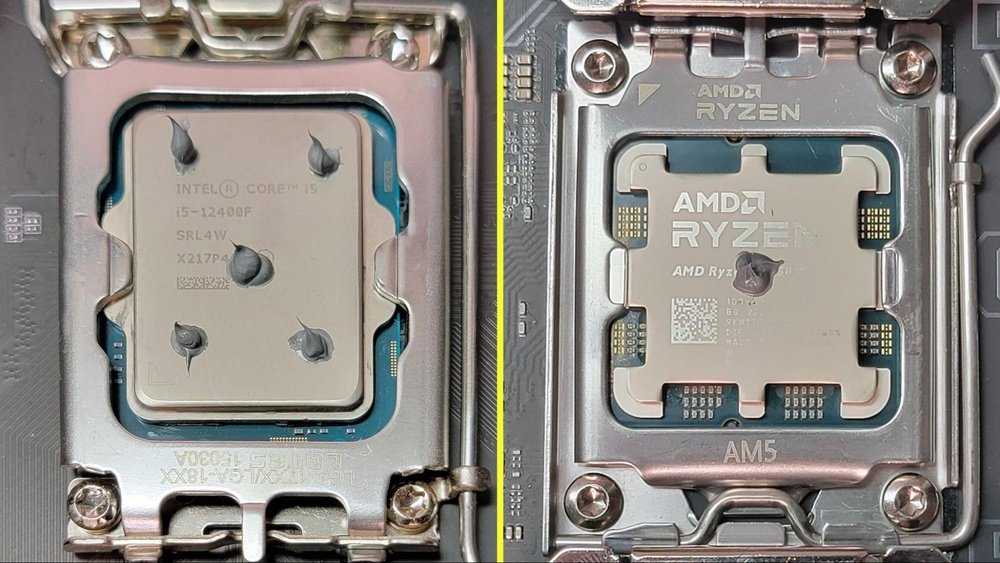
The dot method involves placing a small dot of thermal compound in the center of the CPU. This dot spreads out evenly when the cooler is pressed down. It minimizes air bubbles and covers the surface well. Use a small amount, about the size of a grain of rice.
Line Method
The line method requires putting a thin line of thermal paste across the CPU. This line usually goes through the middle of the chip. When the cooler presses down, it spreads the paste to cover the area. This method works well for rectangular CPUs.
Spread Method
The spread method means manually spreading the thermal compound over the CPU surface. Use a plastic card or a spatula to apply an even layer. This technique gives control over the thickness and coverage. Avoid applying too much paste to prevent spills.
Pea-sized Amount Guidance
Using the right amount of thermal paste is crucial. A pea-sized amount is enough for most CPUs. Too much paste can cause heat buildup and reduce cooling. Too little paste leaves gaps that trap heat. Aim for a thin, even layer for best results.
Mounting The Cooler Properly
Mounting the cooler properly is crucial for good CPU performance. It ensures the heat moves away from the CPU efficiently. A well-mounted cooler keeps the CPU cool and helps your computer run smoothly.
Aligning The Cooler
Place the cooler directly above the CPU. Make sure the mounting holes match the socket on the motherboard. Check that the cooler’s base touches the thermal compound evenly. Avoid shifting the cooler once it touches the CPU.
Applying Even Pressure
Press down gently but firmly on the cooler. Apply the same pressure on all sides. This spreads the thermal compound evenly across the CPU surface. Uneven pressure can cause air pockets and reduce cooling.
Securing The Cooler
Use the screws or clips to fasten the cooler in place. Tighten them slowly and in a cross pattern. This keeps the pressure balanced. Do not over-tighten to avoid damaging the motherboard or CPU.
Testing And Monitoring Temperatures
After applying thermal compound to your CPU, testing and monitoring temperatures is important. This step helps ensure the paste spreads well and cools the processor effectively. Monitoring also alerts you to any cooling problems early.
Software Tools For Temperature Monitoring
Use software tools to check your CPU temperature. Programs like HWMonitor, Core Temp, and SpeedFan show real-time temperature data. These tools are easy to install and free to use. Run them while your computer is idle and under load to see how temperatures change.
Identifying Cooling Issues
High temperatures can mean cooling problems. Look for temperatures above 80°C under heavy use. This may indicate poor thermal paste application or a failing fan. Dust buildup or poor airflow can also cause heat issues. Early detection helps avoid damage.
When To Reapply Thermal Paste
Reapply thermal paste if your CPU temperature stays high. Also, reapply if you remove the CPU cooler for any reason. Thermal paste dries out over time, usually after 2 to 3 years. Fresh paste keeps your CPU running cooler and extends its life.

Credit: www.tglobaltechnology.com
Common Mistakes To Avoid
Applying thermal compound to a CPU looks simple but many make basic mistakes. These errors can reduce cooling efficiency and cause overheating. Avoiding common pitfalls helps keep your CPU cool and stable. Pay close attention to the steps and avoid these frequent errors.
Using Too Much Or Too Little Compound
Applying too much thermal compound creates thick layers. This stops heat from moving well between the CPU and cooler. Too little compound leaves gaps that trap air. Air blocks heat transfer and causes higher temperatures. Use a small pea-sized amount. Spread evenly or let the cooler spread it naturally.
Not Cleaning The Surface Properly
Old thermal compound or dirt blocks good contact. Dust or leftover paste stops heat from passing. Always clean both CPU and cooler base with isopropyl alcohol. Use a soft cloth or coffee filter. Make sure surfaces are dry and spotless before applying new paste.
Improper Cooler Installation
Installing the cooler unevenly causes poor contact with the CPU. This leads to hot spots and higher temperatures. Secure the cooler firmly and evenly. Check mounting screws or clips for tightness. Avoid moving the cooler too much after placing it on the CPU.

Credit: www.youtube.com
Frequently Asked Questions
How Much Thermal Compound Should I Apply On Cpu?
Apply a pea-sized amount of thermal compound at the center of the CPU. This ensures even spreading and optimal heat transfer without excess spillage.
Can I Reuse Thermal Compound On My Cpu?
No, always clean off old thermal compound and apply fresh paste. Reusing old paste reduces thermal conductivity and may cause overheating.
How Do I Clean Old Thermal Compound From Cpu?
Use isopropyl alcohol and a lint-free cloth or coffee filter. Gently wipe the surface until it’s clean and residue-free for best results.
How Long Does Thermal Compound Last On A Cpu?
Thermal compound typically lasts 2 to 5 years before needing replacement. Monitor CPU temperatures; higher temps may indicate it’s time to reapply.
Conclusion
Applying thermal compound to your CPU helps keep it cool and safe. Use only a small amount for the best results. Spread it evenly to avoid air bubbles or gaps. Clean old paste before adding new compound. This simple step improves your computer’s performance and lifespan.
Take your time and be careful. Your CPU will thank you with better cooling and stability.