Is Wow Cpu Or Gpu Intensive: Ultimate Performance Breakdown
Are you wondering whether World of Warcraft (WoW) demands more power from your CPU or GPU? This question is crucial if you want smooth gameplay without wasting money on unnecessary upgrades.
Understanding which part of your computer WoW relies on most can help you make smarter decisions and enjoy the game without frustrating lag or stutter. Keep reading to discover the truth about WoW’s hardware needs and how you can optimize your setup for the best experience.

Credit: www.reddit.com
Wow’s Hardware Demands
World of Warcraft (WoW) has specific hardware needs that affect how well it runs. Understanding these needs helps players decide if their PC is ready. The game’s design and performance rely on both the CPU and GPU. Each part handles different tasks to keep the game smooth.
Core Game Mechanics
WoW’s core mechanics depend mainly on the CPU. The game manages many calculations for player actions and game logic. It processes data for quests, combat, and character movement. The CPU handles multiple players and NPCs at once. A strong CPU reduces lag and improves response time. This ensures smooth gameplay in crowded areas and raids.
Graphics And Visuals
The GPU plays a big role in WoW’s graphics. It renders textures, lighting, and effects seen on screen. Higher settings need a more powerful GPU to keep frame rates steady. The game’s art style is detailed but not overly demanding. Players can adjust settings to balance visuals and performance. Good GPU power enhances immersion without causing slowdowns.
Background Processes
WoW also runs background processes that use CPU power. These include voice chat, addons, and game updates. Addons add features but can increase CPU load. Voice chat apps use resources alongside the game. Background tasks can affect performance if the CPU is weak. Keeping these processes minimal helps maintain smooth gameplay.
Cpu Workload In Wow
World of Warcraft (WoW) relies heavily on the CPU for many tasks. The CPU handles more than just running the game. It processes game logic, controls AI, and manages multiple threads. Understanding the CPU workload helps players optimize their systems.
Game Logic And Ai
The CPU calculates game logic continuously. It tracks player movements, combat interactions, and quest progress. AI controls non-player characters and enemies. These tasks require constant updates to keep the game world active. The CPU must work fast to avoid delays.
Multitasking And Threads
WoW uses multiple threads to split tasks across CPU cores. This helps the game run smoother on modern processors. Threads handle different parts like physics, audio, and input. Efficient multitasking reduces lag and improves responsiveness. CPUs with more cores perform better in WoW.
Impact On Frame Rates
CPU workload directly affects frame rates in WoW. Heavy calculations can lower frames per second (FPS). This happens especially in crowded areas or raids. A strong CPU maintains stable FPS and smoother gameplay. Balancing CPU and GPU power is important for better performance.
Gpu Role In Wow
The GPU plays a key role in World of Warcraft (WoW). It handles the game’s visual parts. This means it makes the game look good and run smoothly. The GPU works hard to show all the images and effects you see on the screen.
Without a strong GPU, the game may look blurry or slow. The better the GPU, the better the graphics and gameplay experience. Let’s explore how the GPU affects WoW in different ways.
Rendering Graphics
The GPU processes all the 3D models in WoW. It creates characters, buildings, and landscapes. Each frame you see is made by the GPU very fast. This makes the world look alive and detailed.
Good rendering helps avoid glitches and screen tearing. The GPU handles large scenes with many players and objects. It keeps the game visually consistent and smooth.
Effects And Textures
WoW uses many effects like shadows, lighting, and spells. The GPU calculates these effects in real time. It also loads textures that cover objects, making them look real.
A powerful GPU can display sharper textures and richer effects. This improves immersion and makes the game more enjoyable. Low GPU power can cause effects to look simple or missing.
Resolution And Frame Rates
The GPU controls the game’s resolution and frame rate. Higher resolution means clearer images but needs more GPU power. Higher frame rates show smoother motion and faster response.
Balancing resolution and frame rate depends on the GPU strength. A strong GPU runs WoW at high settings with steady frames. A weak GPU may struggle and reduce quality or speed.
Credit: rkblog.dev
Performance Factors
Performance in World of Warcraft depends on several key factors. These factors decide if the game stresses your CPU or GPU more. Understanding these helps you get better game speed and smooth visuals.
Settings And Optimization
Game settings play a big role in performance. Lowering graphics settings reduces the load on your GPU. Reducing draw distance and shadow quality helps your CPU work less. Optimizing settings balances the power between CPU and GPU. Well-optimized settings make the game run smoother on most systems.
System Bottlenecks
Bottlenecks happen when one part of your system is slower than others. A slow CPU can limit frame rates even if your GPU is strong. A weak GPU can cause lag despite a powerful CPU. Identifying bottlenecks helps fix performance issues. Avoid bottlenecks to get the best gameplay experience.
Hardware Configurations
Your computer’s hardware affects whether the CPU or GPU is stressed. Older CPUs may struggle with complex game logic. Modern GPUs handle detailed graphics and effects better. Balanced hardware ensures both CPU and GPU share the workload. Upgrading parts can improve World of Warcraft performance significantly.
Balancing Cpu And Gpu
Balancing the CPU and GPU is key for smooth World of Warcraft gameplay. Both parts share the work, but their roles differ. The CPU handles game logic, quests, and NPC actions. The GPU processes graphics, textures, and visual effects. A weak link can cause lag or low frame rates. Finding the right balance avoids wasted power and improves the experience.
Identifying Bottlenecks
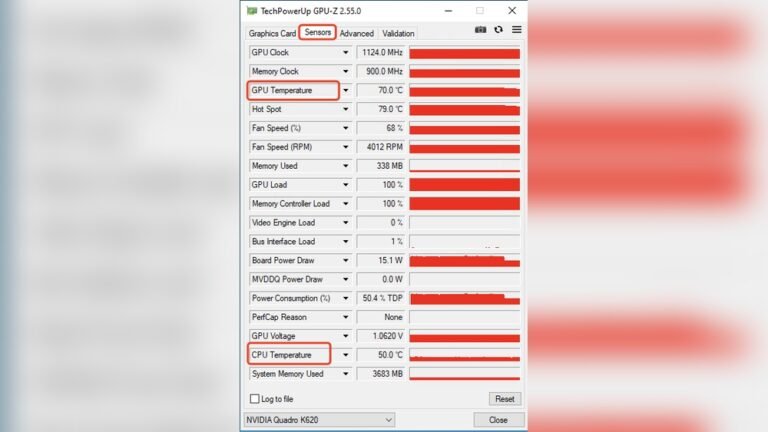
Start by checking which component limits your game’s performance. Use tools like Task Manager or MSI Afterburner. If CPU usage hits 100% but GPU stays low, the CPU is the bottleneck. If GPU runs at full load and the CPU is low, the GPU limits performance. Knowing this helps decide what to upgrade or tweak.
Upgrading Components
Focus upgrades on the bottleneck part. A stronger CPU boosts processing for large raids and complex scenes. A better GPU improves visuals and frame rates in crowded zones. Avoid upgrading one without considering the other. Pairing a high-end GPU with a weak CPU can cause poor results and wasted money.
Optimal Builds For Wow
Choose a balanced build for smooth gameplay. A mid-range CPU with a solid GPU suits most players. For heavy raiding or streaming, invest more in the CPU. Casual players benefit from a decent GPU to enjoy good graphics. Aim for harmony between parts to prevent lag and stutter in World of Warcraft.

Credit: www.reddit.com
Testing And Benchmarking
Testing and benchmarking help us understand whether World of Warcraft (WoW) uses more CPU or GPU power. These tests measure how the game performs on different computer parts. This information helps players know what hardware upgrades to focus on for better gameplay.
Benchmark Methods
We run WoW on different systems with varied CPUs and GPUs. We use software tools that record frame rates, load times, and power use. Tests include both standard settings and higher graphics quality. This way, we see how each part handles the game under stress.
Results Analysis
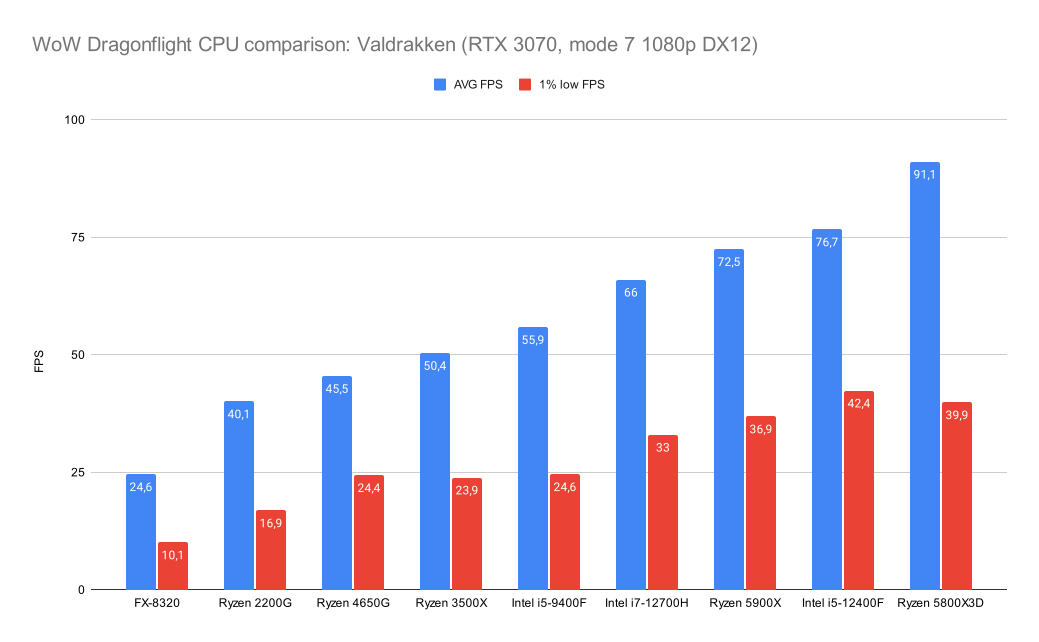
Data shows how CPUs and GPUs affect game speed and smoothness. WoW often relies on CPU for processing game logic and player actions. GPUs handle graphics but are less taxed compared to CPU. We compare frame drops and loading delays to find limits.
Real-world Gameplay Scenarios
Tests include raids, open-world exploration, and PvP battles. Raids stress the CPU with many players and effects. Graphics settings impact GPU load during detailed scenes. Observing actual play helps confirm lab test results and gives practical insight.
Frequently Asked Questions
Is Wow More Cpu Or Gpu Intensive?
WoW primarily relies on CPU power for game logic and world simulation. The GPU handles graphics rendering but is less stressed. A strong CPU improves game performance more noticeably than a high-end GPU in WoW.
Does Wow Benefit From A Multi-core Cpu?
Yes, WoW benefits from multiple CPU cores, especially for background tasks. However, it mainly uses 1-2 cores for core gameplay. Faster cores and higher clock speeds offer better performance than simply increasing core count.
What Gpu Specifications Are Ideal For Wow?
A mid-range GPU with 4GB VRAM is enough for smooth WoW gameplay at 1080p. Higher resolutions and graphic settings require more powerful GPUs but WoW is generally not very GPU demanding.
How Does Cpu Affect Wow Gameplay Experience?
CPU speed directly impacts WoW’s frame rates, loading times, and responsiveness. A faster CPU reduces lag during large raids or crowded areas. Investing in a good CPU enhances overall gameplay fluidity and stability.
Conclusion
World of Warcraft uses both CPU and GPU, but the CPU plays a bigger role. The game needs a strong processor to handle many tasks at once. The GPU helps with graphics, but it is less demanding. For smooth gameplay, focus on a good CPU first.
A decent GPU will improve visuals and performance slightly. Balancing both can give a better experience. Remember, your computer’s overall health also matters. Keep drivers updated and close unnecessary programs. This way, WoW runs better and feels more fun.