How Much Thermal Paste to Use on Cpu: Ultimate Guide for Perfect Cooling
When it comes to building or upgrading your PC, applying thermal paste correctly can make all the difference in keeping your CPU cool and running smoothly. But how much thermal paste should you actually use?
Too little, and your CPU might overheat; too much, and it could cause problems too. You might be wondering what the perfect amount is and how to apply it without making a mess. You’ll discover simple tips and tricks that will help you get it just right—ensuring your computer stays cool and performs at its best.
Keep reading to find out exactly how to handle thermal paste like a pro.

Credit: www.youtube.com
Role Of Thermal Paste
Thermal paste plays a key role in keeping your CPU cool. It fills tiny gaps between the CPU and the cooler. These gaps trap air, which blocks heat transfer. Thermal paste improves contact and helps move heat away from the CPU faster. Without it, your processor can overheat and slow down or get damaged.
Using the right amount of thermal paste is very important. Too little paste leaves gaps that cause poor heat transfer. Too much paste can spill over and cause problems. Understanding how thermal paste works helps you apply the right amount for best cooling.
Heat Transfer Basics
Heat moves from the CPU to the cooler by conduction. Surfaces must touch closely for good conduction. Tiny bumps and gaps prevent this close contact. Air trapped in these gaps blocks heat flow. Thermal paste fills these spaces, creating a smooth bridge. It helps heat pass quickly from the CPU to the cooler.
Why Thermal Paste Matters
Thermal paste improves the efficiency of your cooling system. It stops air pockets that reduce heat transfer. This keeps the CPU temperature lower and stable. Lower temperatures mean better performance and longer CPU life. Using thermal paste correctly avoids overheating and system crashes.

Credit: www.youtube.com
Types Of Thermal Paste
Thermal paste is crucial for keeping your CPU cool. Different types of thermal paste offer various benefits. Knowing the types helps you pick the right one for your needs.
Each type has a unique composition and performance level. Some are better for high heat, while others are easier to apply.
Metal-based Pastes
Metal-based pastes contain tiny metal particles like silver or aluminum. They provide excellent heat transfer between the CPU and cooler. These pastes are very effective but can conduct electricity. Care is needed during application to avoid short circuits.
Ceramic-based Pastes
Ceramic-based pastes use ceramic particles. They do not conduct electricity, making them safer to use. These pastes offer good thermal performance but slightly less than metal types. They are popular for everyday computer use.
Silicone-based Pastes
Silicone-based pastes are easy to apply and affordable. They have lower thermal conductivity compared to metal and ceramic pastes. These are best for light use or older CPUs. Silicone pastes dry out faster and may need replacing more often.
How Much Thermal Paste To Apply
Applying the right amount of thermal paste is key for good CPU cooling. Too much or too little paste can cause heat problems. Knowing the correct amount helps your CPU run cooler and lasts longer. This section explains how much thermal paste to apply for the best results.
Recommended Amounts
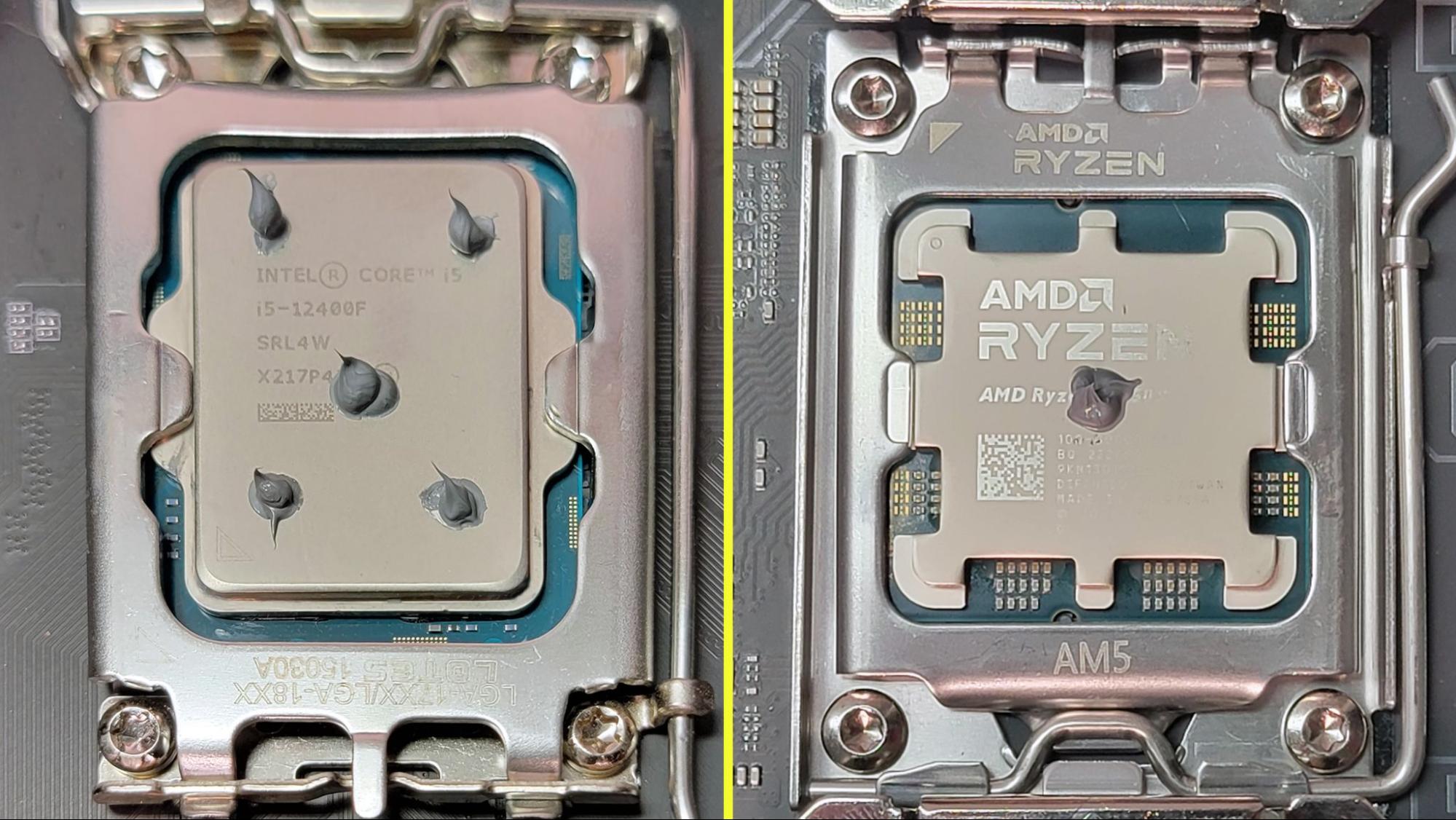
Use a small pea-sized drop in the center of the CPU. This amount spreads evenly when the heatsink is placed. For larger CPUs, a slightly bigger drop is okay. Avoid using large blobs that spill over the edges. Thin, even layers work best to fill gaps.
Common Mistakes
Applying too much paste is a frequent error. Excess paste can trap heat and reduce cooling. Using too little paste leaves air gaps that block heat transfer. Another mistake is spreading the paste by hand. Pressing the heatsink will spread the paste naturally.
Visualizing The Right Size
Imagine a small pea or a grain of rice on the CPU. This size covers the surface after spreading. The paste should not cover the entire CPU top before placing the cooler. Picture a thin layer filling tiny imperfections. This helps the CPU cool efficiently.
Application Techniques
Applying thermal paste correctly is key to good CPU cooling. The right amount and method help spread heat away from the CPU. Too much or too little paste can cause problems. Below are common techniques to apply thermal paste effectively.
Pea-sized Dot Method
Place a small pea-sized dot in the center of the CPU. The pressure from the cooler spreads the paste evenly. This method uses a minimal amount of paste. It prevents air pockets and ensures good contact.
Line Method
Apply a thin line of paste across the middle of the CPU. This method suits rectangular CPUs well. When you mount the cooler, the paste spreads from the center outwards. It covers more area than the dot method.
Spread Method
Use a plastic card or tool to spread the paste evenly. Cover the entire CPU surface with a thin layer. This method needs careful application to avoid too much paste. It offers full coverage but takes more time.
Tools For Application
Applying thermal paste correctly needs the right tools. The tools help spread the paste evenly. This ensures good contact between the CPU and the cooler. Using the right tool makes the job easier and cleaner. Here are some common options for applying thermal paste.
Using Applicators
Many thermal paste tubes come with small applicators. These are plastic or rubber tools made for spreading. They help spread the paste in a thin, even layer. Applicators reduce the risk of using too much paste. They also keep your hands clean. Use gentle pressure to spread the paste smoothly. Avoid scraping hard, which can cause uneven layers.
Alternative Tools
If you don’t have an applicator, other tools work well. A clean plastic card, like an old credit card, can spread paste. A cotton swab or a small piece of paper towel also helps. Some people use their finger, but only if they wear a glove. Always clean the tool before and after use. This prevents dirt or oils from affecting the paste.
Cleaning Old Thermal Paste
Cleaning old thermal paste from your CPU is a crucial step before applying new paste. Old paste can dry out and lose its ability to conduct heat. This can cause your CPU to overheat and slow down. Proper cleaning ensures better contact between the CPU and the cooler. It also helps the new thermal paste to work effectively. Follow safe methods to clean without damaging your CPU or motherboard.
Safe Cleaning Materials
Use isopropyl alcohol with at least 70% purity. It evaporates quickly and leaves no residue. Avoid using water or household cleaners. Soft, lint-free cloths or coffee filters work well. Cotton swabs can help reach small areas. Do not use paper towels or rough fabrics. These may scratch the CPU or leave fibers behind. Always handle the CPU carefully to avoid damage.
Step-by-step Cleaning Process
Start by turning off your computer and unplugging it. Remove the CPU cooler gently from the processor. Use a cloth or coffee filter dipped in alcohol. Wipe the old thermal paste off the CPU surface. Apply gentle pressure and use circular motions. For stubborn paste, let the alcohol sit for a minute. Clean the cooler’s contact surface the same way. Wait a few minutes for the alcohol to dry. Ensure both surfaces are clean and dry before applying new paste.
Signs Of Too Much Or Too Little Paste
Using the right amount of thermal paste on your CPU is key. Too much or too little paste can cause problems. These issues affect your computer’s performance and temperature. Knowing the signs helps you fix the problem quickly. It also protects your CPU from damage.
Overapplication Effects
Too much thermal paste can spill over the sides of the CPU. This may cause short circuits if the paste is conductive. It creates a thicker layer that stops heat from moving well. Temperatures might rise instead of falling. The CPU fan can run louder and longer. Overapplication also wastes paste and makes cleaning harder.
Underapplication Symptoms
Using too little thermal paste leaves gaps between the CPU and cooler. These gaps trap air, which reduces heat transfer. Your CPU may get very hot quickly. You could see sudden shutdowns or crashes from overheating. The fan might spin faster than normal. This means the paste is not doing its job well.
Credit: www.tomshardware.com
Tips For Perfect Cooling
Perfect cooling depends on more than just the amount of thermal paste used. The right technique and quality of the paste play big roles. This section shares simple tips to help your CPU stay cool and work well.
Applying thermal paste correctly helps heat move from the CPU to the cooler. Poor contact or low-quality paste can cause high temperatures. Follow these tips for better results.
Ensuring Proper Contact
Apply a small, pea-sized amount of thermal paste in the center of the CPU. This amount spreads evenly when the cooler is pressed down. Avoid using too much paste as it can block heat flow.
Make sure the cooler sits flat on the CPU surface. Press gently but firmly to spread the paste thinly and evenly. Check for any gaps or uneven spots that could trap air.
Checking Thermal Paste Quality
Choose thermal paste with good heat transfer properties. Look for brands with positive reviews and consistent performance. Avoid old or dried-out paste as it loses effectiveness.
Store paste in a cool, dry place to keep it fresh. Replace the paste every few years or when you remove the cooler. Fresh paste ensures better cooling and longer CPU life.
When To Replace Thermal Paste
Thermal paste is vital for keeping your CPU cool. Over time, it can dry out or lose effectiveness. Knowing when to replace thermal paste helps avoid overheating and damage. This section explains the signs and timing for changing your thermal paste.
Lifespan Of Thermal Paste
Most thermal pastes last between two and five years. The exact lifespan depends on the paste quality and computer use. Heavy use or high temperatures can shorten its life. Some pastes dry faster, while others stay stable longer. Replacing thermal paste after a few years keeps your CPU running cool.
Indicators For Replacement
High CPU temperatures are the first sign to check. If your computer heats up quickly, the paste may be dry or cracked. You might also hear your fans running louder than usual. Another sign is if you remove the heatsink and see dried or crumbly paste. These indicators mean it is time to apply fresh thermal paste.
Frequently Asked Questions
How Much Thermal Paste Is Needed For Cpu?
Use a pea-sized amount of thermal paste on the CPU. This size ensures even coverage without excess spillage. Too much paste can cause overheating, and too little reduces heat transfer efficiency.
Can Too Much Thermal Paste Harm My Cpu?
Yes, excess thermal paste can cause overheating. It may spill over CPU edges and reduce thermal conductivity. Applying the right amount avoids this issue and maintains optimal cooling performance.
How To Apply Thermal Paste Evenly On Cpu?
Apply a pea-sized dot in the center of the CPU. When you install the cooler, it will spread the paste evenly. Avoid spreading manually to prevent air bubbles and uneven coverage.
Should I Clean Old Thermal Paste Before Reapplying?
Always clean off old thermal paste before reapplying. Use isopropyl alcohol and a lint-free cloth for best results. This ensures better thermal contact and prevents buildup that can affect cooling.
Conclusion
Applying the right amount of thermal paste helps your CPU stay cool. Too much paste can cause problems. Too little won’t spread heat well. A small pea-sized dot usually works best. Spread it evenly when placing the cooler. This simple step improves computer performance and lifespan.
Take your time and be careful. Good thermal paste application keeps your system running smoothly.