How to Rma Intel Cpu: Easy Steps for a Smooth Return Process
If your Intel CPU isn’t working as it should, you might be wondering how to get it fixed or replaced without hassle. Knowing how to RMA your Intel CPU can save you time, money, and frustration.
In this guide, you’ll learn the simple steps to handle the process smoothly. Whether you’re a tech newbie or a seasoned user, this article will help you get your CPU back in top shape quickly. Keep reading to discover how to make your RMA experience stress-free and successful.
Check Intel’s Rma Policy
Checking Intel’s RMA policy is the first step in returning a CPU. It explains the rules and steps for returns and repairs. Understanding this policy helps avoid delays or issues.
Intel’s RMA policy covers warranty terms, eligibility, and required documents. Knowing these details ensures a smooth return process.
What Does Intel’s Rma Policy Cover?
The policy covers manufacturing defects and hardware failures. It does not cover damage caused by misuse or accidents. Warranty length depends on the specific CPU model.
How To Determine Warranty Eligibility
Check the purchase date and product serial number. These details confirm if the CPU is still under warranty. Intel’s website offers tools to verify this information.
Required Documents For Rma Request
Keep the original purchase receipt. A detailed description of the issue is necessary. Intel may also ask for proof of purchase or photos.
Steps To Submit An Rma Request
Register or log in to Intel’s support portal. Fill out the RMA form with accurate product and contact information. Follow any instructions given by Intel support.
Gather Required Information
Before starting the RMA process for your Intel CPU, gather all necessary information. This step saves time and helps avoid delays. Having the right details ready makes the process smooth and quick.
Locate Purchase Details
Find your purchase receipt or invoice. This document proves where and when you bought the CPU. Keep the store name, purchase date, and price handy. Online orders usually have a confirmation email. Print or save it for easy access.
Note Cpu Serial Number
The serial number is unique to your Intel CPU. It helps Intel identify your product and warranty status. Check the CPU box or the processor itself for this number. Write it down carefully to avoid mistakes. This step is crucial for a successful RMA request.
Prepare The Cpu For Return
Preparing your Intel CPU for return is a key step in the RMA process. Proper preparation keeps the CPU safe during shipping. It also helps avoid delays or rejection of your return. Follow these steps carefully to protect your CPU and speed up your RMA.
Remove Cpu Safely
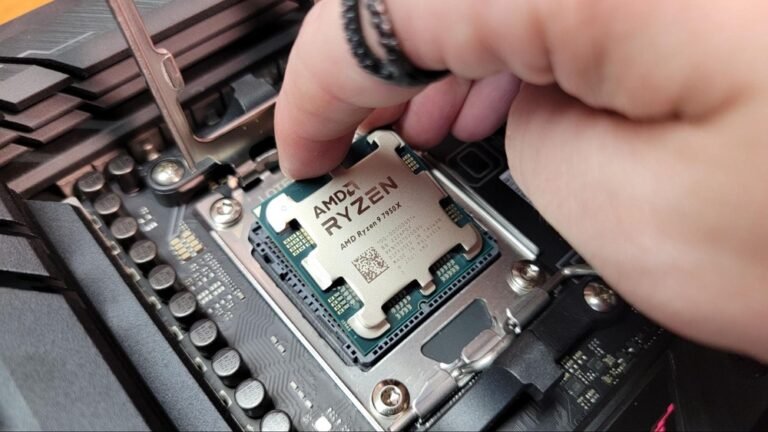
Turn off your computer and unplug it from power. Ground yourself by touching a metal object. This stops static electricity from damaging the CPU. Open your computer case carefully. Release the CPU socket lever slowly to lift the CPU out. Handle the CPU by its edges only. Avoid touching the pins or contacts. Place the CPU on a clean, flat surface.
Package With Anti-static Protection
Wrap the CPU in an anti-static bag. This stops static damage during shipping. Use bubble wrap or foam to cushion the CPU. Place the wrapped CPU in a sturdy box. Fill empty spaces with packing material. Seal the box securely with tape. Label the package clearly with your return address. Follow Intel’s packaging instructions exactly.
Submit Rma Request Online
Submitting an RMA request online for your Intel CPU is simple and fast. This process helps you get support or replacement for your product. You can do it from home without calling customer service. Follow clear steps to complete your request smoothly.
Make sure you have your CPU details and purchase information ready. The online system guides you through each step. This method saves time and keeps your request organized.
Create Or Log Into Intel Account
First, visit the Intel support website. You need an account to submit an RMA request. If you don’t have one, create a new account. Fill out your name, email, and password.
Existing users just need to log in. Use your email and password to access your account. This step keeps your request linked to your profile for easy tracking.
Fill Out Rma Form
Once logged in, find the RMA request form. Enter your CPU details exactly as on the product. Include the serial number, model, and purchase date.
Describe the problem clearly and briefly. Upload any proof of purchase if required. Review all information carefully before submitting. A correct form speeds up the approval process.
Print And Attach Rma Label
Printing and attaching the RMA label is a key step in returning your Intel CPU. This label helps Intel identify your package quickly. It ensures your CPU reaches the right department without delay. Properly handling this step speeds up the whole process.
Make sure the label is clear and readable. A clean, flat surface on the package helps the label stick well. Cover the label with clear tape to protect it from dirt or moisture during shipping.
How To Print The Rma Label
Download the label from Intel’s RMA portal. Use a laser or inkjet printer. Print the label on regular white paper. Avoid using photo paper or colored sheets. Check that the print is dark and sharp.
Where To Attach The Rma Label
Place the label on the top of the box. Avoid sealing over the label. Leave the barcode and text fully visible. Remove old shipping labels or stickers. This prevents confusion during shipping.
Tips For Securing The Rma Label
Use clear packing tape over the label. Cover all edges to keep it from peeling. Do not cover the barcode with tape. Make sure the label stays flat without wrinkles. This ensures smooth scanning by carriers.

Credit: wccftech.com
Ship The Cpu To Intel
Shipping your Intel CPU for an RMA is an important step. You must send it safely to avoid damage. Proper packaging and choosing the right shipping method protects your CPU during transit. Following Intel’s instructions carefully helps ensure a smooth process.
Choose Reliable Shipping Method
Pick a trusted courier service with good delivery records. Avoid cheap shipping options that do not offer tracking. Use a method that provides insurance for your package. This protects your CPU in case of loss or damage.
Keep Tracking Information
Save the tracking number after shipping your CPU. This helps you monitor the package until Intel receives it. Tracking ensures you know the delivery status at all times. Keep the number safe for future reference and updates.
Track Rma Status
Tracking the RMA status for your Intel CPU is important. It helps you know where your repair or replacement process stands. You avoid unnecessary calls or worries about your CPU.
This guide shows how to check your RMA status clearly and simply. Follow the steps below to stay updated on your Intel CPU RMA progress.
Access The Intel Rma Portal
Go to the official Intel RMA website. Use a computer or mobile device with internet access. The portal is the main place to check your RMA status.
Enter Your Rma Number
Find the RMA number you received after submitting your request. Enter this number exactly in the portal’s search field. This unique code tracks your specific case.
View Detailed Status Updates
After entering your RMA number, the system shows current details. See if the CPU is being tested, repaired, or shipped. Updates help you understand each step of the process.
Contact Intel Support For Questions
If the status is unclear, contact Intel support. Use the phone number or email provided on the portal. Support staff can explain your RMA status and next steps.

Credit: www.digitaltrends.com
Receive Replacement Or Refund
Receiving a replacement or refund for your Intel CPU is a key part of the RMA process. Intel aims to ensure customer satisfaction by offering clear options after your claim is approved. Understanding these options helps you decide the best step forward.
The choice between a replacement and a refund depends on your preference and the situation. Both options have specific steps and requirements. Knowing these details makes the process smoother and faster.
Replacement Process
Intel often offers a replacement CPU if your original one is defective. Once your RMA request is approved, Intel ships a new CPU to your address. The replacement usually matches the model and specifications of your original CPU.
You must send back the faulty CPU before receiving the replacement. Intel provides a prepaid shipping label for the return. Keep the package safe until the replacement arrives.
Refund Process
Choosing a refund means Intel returns the purchase amount to you. This option is available when a replacement is not suitable. The refund usually goes back to the original payment method.
After Intel receives the defective CPU, they process the refund. The time frame for the refund may vary. Check your payment account for confirmation.
Important Tips
Keep all original packaging and documents until the RMA completes. Follow Intel’s instructions carefully for a smooth process. Contact Intel support if you face delays or issues. Clear communication speeds up your replacement or refund.

Credit: www.overclockers.com
Frequently Asked Questions
What Is The Intel Cpu Rma Process?
The Intel CPU RMA process involves returning a defective processor to Intel for repair or replacement. First, register your product on Intel’s website. Then, contact Intel Support for troubleshooting. If unresolved, you receive an RMA number and shipping instructions to send your CPU back.
How Long Does Intel Cpu Rma Take?
Intel CPU RMA typically takes 1 to 3 weeks. This includes shipping, inspection, and repair or replacement. Processing times may vary based on location and issue complexity. Intel provides updates during the process for transparency and to keep you informed.
What Items Are Needed For Intel Cpu Rma?
You need your original CPU packaging, proof of purchase, and a valid RMA number from Intel. Properly pack the CPU to avoid damage during shipping. Include all required documentation to ensure smooth processing and quicker resolution of your RMA request.
Can I Rma An Intel Cpu Without A Receipt?
Intel usually requires a proof of purchase for RMA claims. If you lack a receipt, contact Intel Support to discuss alternatives. Sometimes, warranty status can be verified via serial number or product registration, but having the receipt speeds up the process.
Conclusion
Following these steps makes your Intel CPU RMA process smooth. Keep your purchase details and product info ready. Contact Intel support through their official website. Pack your CPU carefully before sending it. Stay patient while waiting for their response. This approach saves time and avoids confusion.
Your CPU replacement or repair will be easier. Simple preparation helps you handle the RMA with confidence. Now you know how to RMA an Intel CPU.