How to Read Amd Cpu Names: Decode Specs Like a Pro
Are you confused by those long AMD CPU names? You’re not alone.
Understanding what each part means can help you pick the right processor without getting overwhelmed. Imagine knowing exactly what you’re buying and how it fits your needs. You’ll learn simple tricks to decode AMD CPU names quickly and easily. Stick with me, and you’ll never feel lost when shopping for a new processor again.
Let’s dive in!
Amd Cpu Name Structure
AMD CPU names follow a clear structure that helps identify their features. Each part of the name gives clues about the processor’s power, generation, and model. Understanding this structure makes choosing the right CPU easier. Below, we break down the main parts of an AMD CPU name.
Segmenting The Model Number
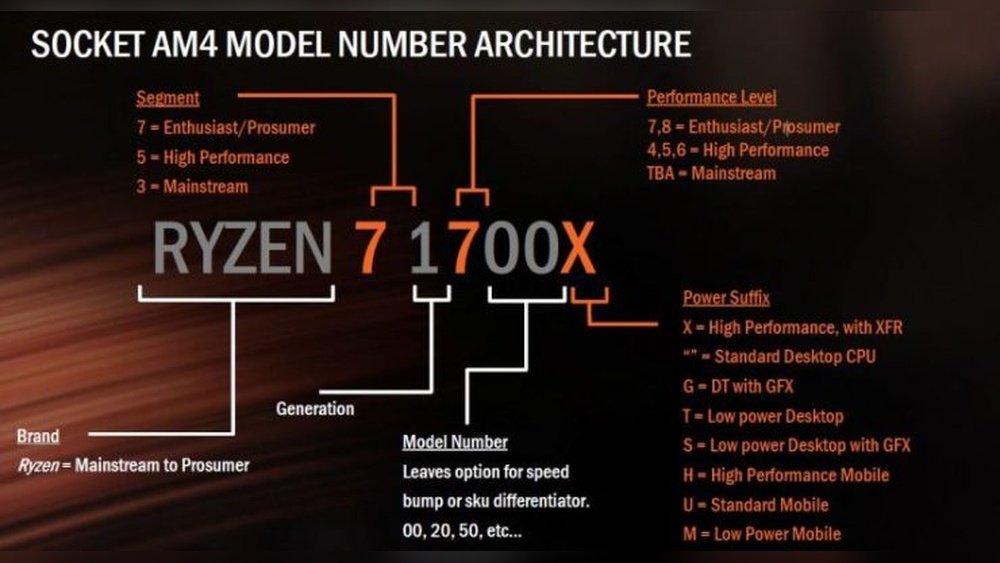
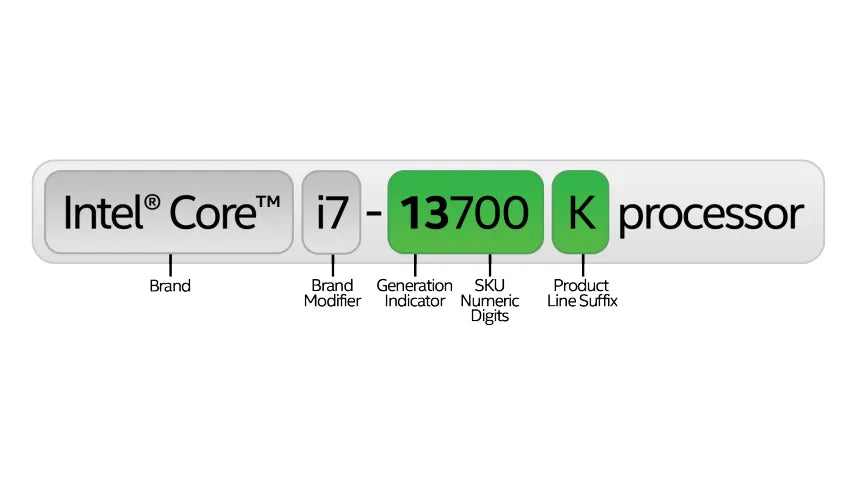
The model number is the core of an AMD CPU name. It usually contains a few digits that show the series and performance level. For example, in “Ryzen 5 3600,” the “3600” is the model number. The first digit often indicates the generation. The next digits tell you the specific model in that generation. Higher numbers usually mean better performance.
Decoding The Series And Generation
AMD uses series numbers to group CPUs by power and use. Ryzen 3, 5, 7, and 9 show different performance levels. Ryzen 3 is entry-level, while Ryzen 9 is high-end. The generation number shows the CPU’s age and technology. For example, “Ryzen 7 5800X” is from the 5th generation, which means newer tech than the 3rd generation.
Understanding The Sku Numbers
SKU numbers give extra details about the CPU. Letters at the end of the name show special features. For example, “X” means higher performance or overclocking ability. “G” means the CPU has integrated graphics. Some CPUs have no letter, which means they are standard models. Knowing these letters helps pick the right CPU for your needs.

Credit: softwareg.com.au
Key Amd Cpu Features In Names
AMD CPU names carry important details about their features. Understanding these details helps in picking the right processor. Key features like core count, clock speeds, and cache sizes are hidden in the name. Knowing how to read these makes shopping easier and clearer.
Identifying Core Count And Threads
The core count shows how many processing units the CPU has. AMD usually includes this number in the model name. For example, a Ryzen 5 3600 has six cores. Threads are virtual cores that help with multitasking. They are often double the core count in AMD CPUs.
Spotting Clock Speeds And Boosts
Clock speed tells how fast a CPU runs. It is measured in gigahertz (GHz). The base clock speed is the normal speed of the CPU. Boost speed is a higher speed the CPU can reach for short tasks. AMD sometimes lists these speeds in the CPU name or specs.
Recognizing Cache Sizes
Cache is fast memory inside the CPU. It helps the processor work quickly. Larger cache sizes improve performance. AMD names often hint at cache levels, like L2 and L3 cache. Knowing cache size helps compare CPUs better.
Amd Cpu Suffixes And Their Meaning
AMD CPUs use suffixes to show their features and performance levels. These letters help you understand what to expect from each processor. They tell about power use, graphics, and speed.
Knowing these suffixes makes it easier to pick the right CPU. It saves time and avoids confusion. Let’s explore the most common AMD suffixes and what they mean.
Difference Between X, G, And U
The letter “X” means high performance. CPUs with “X” run faster and can handle more tasks. They are good for gamers and creators.
“G” stands for graphics. These CPUs have built-in Radeon graphics. You don’t need a separate graphics card with a “G” CPU.
“U” means ultra-low power. These CPUs use less energy. They are great for laptops and small devices.
Significance Of Xt, X3, And Other Variants
“XT” is an enhanced version of the “X” model. It offers a small boost in speed and efficiency.
“X3” is less common. It usually means a special edition or a unique feature set.
Other suffixes may show newer technology or specific uses. Check the exact model for details.
Credit: www.reddit.com
Comparing Ryzen And Athlon Naming
AMD offers two main CPU lines: Ryzen and Athlon. Each has a unique naming style. Understanding these names helps you pick the right processor for your needs. Ryzen and Athlon names show details like performance, generation, and features. This guide breaks down their naming patterns simply.
Ryzen Series Breakdown
Ryzen CPUs use a clear naming system. The name starts with “Ryzen,” followed by a number like 3, 5, 7, or 9. This number shows the CPU’s power level. Ryzen 3 is for basic tasks, Ryzen 5 for mid-range use. Ryzen 7 and 9 are for higher performance.
Next, a four-digit number shows the generation and model. For example, Ryzen 5 5600X: “5” is mid-range, “6” means 6th generation, and “000” is the model. The letter at the end shows special features. “X” means higher speed, “G” means it has graphics built-in.
Athlon Series Naming Patterns
Athlon names are simpler than Ryzen. They start with “Athlon” and usually a number like 3000 or 200GE. The first digit shows the generation. For example, 3000 means third generation.
Letters at the end describe features. “GE” means the CPU has graphics and uses less power. Athlon CPUs focus on basic tasks and energy saving. Their naming is easy to understand for simple use cases.
Practical Tips For Choosing Amd Cpus
Choosing the right AMD CPU can feel confusing. Many models and numbers make it hard to decide. Understanding the CPU name helps pick the best one for your needs. This guide shares practical tips to read AMD CPU names and select wisely.
By knowing what each part of the name means, you save time and money. You avoid buying a CPU that does not fit your tasks. Keep reading to learn simple ways to match CPU names with your use.
Matching Cpu Names To Use Cases
AMD CPU names show their power and use. The first part often tells the series and generation. For example, Ryzen 5 means a mid-level CPU. Ryzen 7 is stronger, good for more work.
The numbers after Ryzen show the generation and model. Higher numbers usually mean newer and faster CPUs. For simple tasks like browsing, a Ryzen 3 or 5 works well. For gaming or video editing, choose Ryzen 7 or 9.
Look for letters at the end. “X” means extra performance and better speed. “G” means the CPU has built-in graphics, good if you have no separate GPU. This helps match the CPU to what you want to do.
Avoiding Common Naming Confusions
AMD naming can confuse buyers. Some letters and numbers look similar but mean different things. For example, Ryzen 5 5600X is not the same as Ryzen 5 5600G. The “X” version focuses on speed, the “G” has graphics.
Do not trust only the number. Check the full name and letters. Some CPUs share numbers but differ in power or features. Read the specs before buying to avoid surprises.
Remember, newer generations often perform better. A Ryzen 5 from a newer generation can beat an older Ryzen 7. Look at the generation number carefully to get the best value for your money.
Credit: primetechsupport.com
Frequently Asked Questions
What Do Amd Cpu Model Numbers Mean?
AMD CPU model numbers reveal generation, performance level, and features. The first digit shows the generation. The following numbers represent the series and model. Letters indicate specific capabilities or power levels, helping users identify the CPU’s target use and performance.
How To Identify Amd Cpu Generation?
The first digit after the brand name in AMD CPUs shows the generation. For example, in Ryzen 7 5800X, ‘5’ indicates the 5th generation. This helps users know the CPU’s release cycle and technological improvements over previous models.
What Do Letters In Amd Cpu Names Indicate?
Letters in AMD CPU names denote specific features or performance tiers. For example, ‘X’ means higher clock speeds, ‘G’ indicates integrated graphics, and ‘E’ stands for energy-efficient models. These suffixes help buyers choose CPUs based on their needs.
How To Differentiate Ryzen And Athlon Cpus?
Ryzen CPUs offer higher performance and features like multi-core designs and better graphics. Athlon CPUs are budget-friendly with fewer cores and basic performance. Model names and numbers reflect this, guiding users to the right choice for their tasks.
Conclusion
Reading AMD CPU names is easier than it seems. Each part tells a story about speed, power, and generation. Knowing these details helps you choose the right processor for your needs. It also saves time and avoids confusion. Keep practicing by checking different CPU names.
Soon, you will understand them without effort. This simple skill makes buying or upgrading a computer much clearer. Stay curious, and keep learning.