How to Measure Cpu Fan Size: Quick & Easy Guide for Accuracy
Are you unsure about the right size for your CPU fan? Picking the correct fan size is more important than you might think.
It affects how well your computer stays cool and runs smoothly. If you get it wrong, you could face overheating or noise problems. But don’t worry—measuring your CPU fan size is simple once you know what to look for. In this guide, you’ll learn easy steps to measure your fan accurately, so you can make the best choice for your system.
Keep reading to avoid costly mistakes and keep your computer running at its best.
Why Cpu Fan Size Matters
Choosing the right CPU fan size is crucial for your computer’s health. The fan controls the temperature of your CPU. If the fan size is wrong, the CPU may overheat. This can cause your computer to slow down or even break. Understanding why fan size matters helps you pick the best one for your needs.
Impact On Cooling Efficiency
Larger fans move more air. This helps cool the CPU better. Small fans spin faster but may not cool as well. A fan that fits correctly keeps your CPU at a safe temperature. Good cooling stops damage and keeps your PC running smoothly.
Compatibility With Cpu Sockets
Not all fans fit all CPUs. Different CPUs have different socket types. Each socket has size limits for fans. Using a fan that does not fit can cause installation problems. Always check your CPU socket before buying a fan.
Noise Levels And Performance
Bigger fans usually run quieter. They spin slower but cool better. Small fans can be noisy because they spin fast. A quiet fan improves your computer experience. Balance fan size with noise and cooling needs for best results.

Credit: voltcave.com
Tools Needed For Measuring
Measuring a CPU fan size requires the right tools. These tools help get accurate dimensions. Using the proper equipment makes the process easier and precise.
Measuring Tape Or Ruler
A measuring tape or ruler is the most basic tool. It helps measure the fan’s width and height. Use a rigid ruler for better accuracy. Hold the ruler straight across the fan blades. This tool works well for rough estimates.
Calipers For Precision
Calipers provide detailed and precise measurements. They can measure small parts like the fan’s frame or mounting holes. Digital calipers offer easy-to-read results. Use calipers to measure thickness and diameter accurately. This tool is ideal for exact fitting needs.
Additional Equipment Tips
Use a flashlight to see small markings on the fan. A notepad helps record measurements quickly. Clean the fan before measuring to avoid errors. Double-check your measurements for accuracy. These small steps improve the overall process.
Measuring Cpu Fan Dimensions
Measuring CPU fan dimensions is important for choosing the right replacement or upgrade. Accurate measurements ensure the fan fits well inside your computer case. It also helps maintain good airflow and cooling performance. Follow these steps to measure your CPU fan correctly.
Measuring Fan Diameter
Fan diameter is the distance across the fan blades. Use a ruler or tape measure for this. Measure straight across the circle from one blade tip to the opposite tip. Do not include the fan frame in this measurement. Note the size in millimeters for best accuracy.
Checking Thickness And Height
Thickness is how deep the fan is from front to back. Use a ruler to measure the fan’s side profile. The height is the same as thickness in most fans. This helps confirm the fan fits inside the case without blocking other parts.
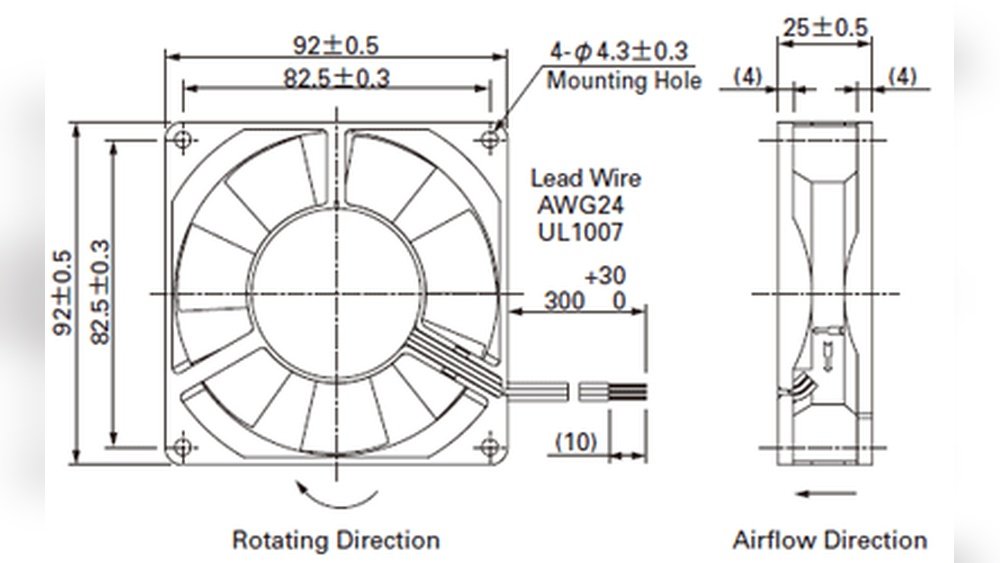
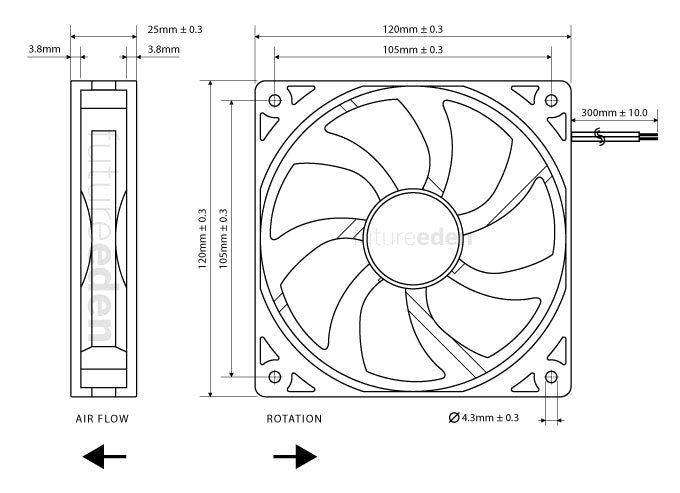
Measuring Mounting Hole Distance
Mounting holes secure the fan to the heatsink or case. Measure the distance between two opposite holes. Use the center of each hole for accuracy. This distance is usually in millimeters and must match your fan bracket.
Credit: www.reddit.com
Common Cpu Fan Sizes
Cpu fans come in different sizes to fit various computers. Knowing common Cpu fan sizes helps in choosing the right one. It ensures proper cooling and avoids noise or damage.
Cpu fans are usually measured in millimeters, showing the length of one side of the square fan. This size affects airflow and compatibility with your system.
Standard Fan Sizes Explained
The most common Cpu fan sizes are 80mm, 92mm, 120mm, and 140mm. Each size has a different airflow capacity and noise level. Smaller fans are quieter but move less air. Larger fans move more air but might be louder.
80mm and 92mm fans are often found in older or smaller cases. 120mm fans are the most popular for modern Cpu coolers. 140mm fans are used in high-performance setups that need better airflow.
Choosing The Right Size For Your Setup
Check your Cpu cooler or case manual for recommended fan sizes. Size must fit the mounting points and space available. Too large fans may not fit inside your case.
Consider airflow needs and noise preferences. Larger fans at lower speeds can be quieter and cool better. Smaller fans may work well in compact systems with limited space.
Measure the space around your Cpu cooler carefully. Use a ruler or tape measure to confirm size before buying a fan.
Tips For Accurate Measurement
Measuring your CPU fan size correctly helps ensure you buy the right replacement or upgrade. Accurate measurements avoid fitting problems and keep your computer cool. Follow simple tips to get precise results every time.
Avoiding Common Mistakes
Use a ruler or tape measure with clear markings. Measure the fan from edge to edge, across the center. Do not include the fan frame when measuring the blades only. Avoid measuring the fan hole or the mounting bracket by mistake.
Measuring Multiple Times
Measure the fan size at least two or three times. Check both width and height to confirm consistency. Take measurements from different angles if possible. This reduces errors and ensures you have the exact size.
Documenting Measurements Properly
Write down the measurements immediately. Note the units used, usually millimeters or inches. Keep a photo of the fan with a ruler beside it for reference. Proper records help when buying or comparing parts later.
Replacing And Upgrading Cpu Fans
Replacing and upgrading CPU fans is a key step to keep your computer cool and running well. Over time, fans can wear out or may not cool enough. Choosing the right fan size and type helps avoid overheating and noise problems. It also improves your PC’s lifespan and performance.
Matching Size With Cooling Needs
Measure your current CPU fan carefully before buying a new one. Fans come in different sizes like 80mm, 120mm, or 140mm. Bigger fans usually move more air and cool better. But check your CPU cooler space first. A fan too big will not fit. Pick a fan size that fits your case and matches your CPU’s heat output.
Considering Fan Speed And Noise
Fan speed is shown in RPM (revolutions per minute). Higher RPM means more airflow but louder noise. Lower RPM fans are quieter but might cool less. Choose a fan speed that balances noise and cooling. Some fans offer PWM control to adjust speed based on temperature. This keeps noise low when the CPU is cool and speeds up when needed.
Installation Best Practices
Turn off and unplug your PC before starting. Remove the old fan carefully without forcing parts. Use the right screws and mounting brackets for the new fan. Connect the fan cable to the correct motherboard header. Check the fan spins freely after installation. Clean dust regularly to maintain airflow and fan life.

Credit: www.ubuy.mq
Frequently Asked Questions
How Do I Measure Cpu Fan Size Accurately?
Measure the fan’s length and width from edge to edge in millimeters. Use a ruler or caliper. Measure only the fan blades, excluding the frame.
Why Is Cpu Fan Size Important For Cooling?
Fan size affects airflow and cooling efficiency. Larger fans move more air quietly. Proper size ensures optimal CPU temperature and system stability.
Can I Replace My Cpu Fan With A Different Size?
Yes, but ensure the new fan fits the mounting points. Check compatibility with your CPU cooler and case dimensions before replacement.
What Tools Do I Need To Measure A Cpu Fan?
A simple ruler or digital caliper works best. These tools provide precise measurements needed for accurate CPU fan sizing.
Conclusion
Measuring your CPU fan size is simple and important. Knowing the right size helps keep your computer cool. Use a ruler or tape to check the fan’s width and height. Remember to measure the fan’s frame, not just the blades.
This ensures you buy the correct replacement or upgrade. With the right fan size, your CPU runs smoothly and lasts longer. Keep these steps in mind for easy, accurate measurement every time.